CHAPTER 3 MECHANICAL SYSTEM
3-20
COPYRIGHT © 1999 CANON INC. CANON DADF-B1 REV.0 APR. 1999 PRINTED IN JAPAN (IMPRIME AU JAPON)
2. Mounting the Original Width
Detecting Volume
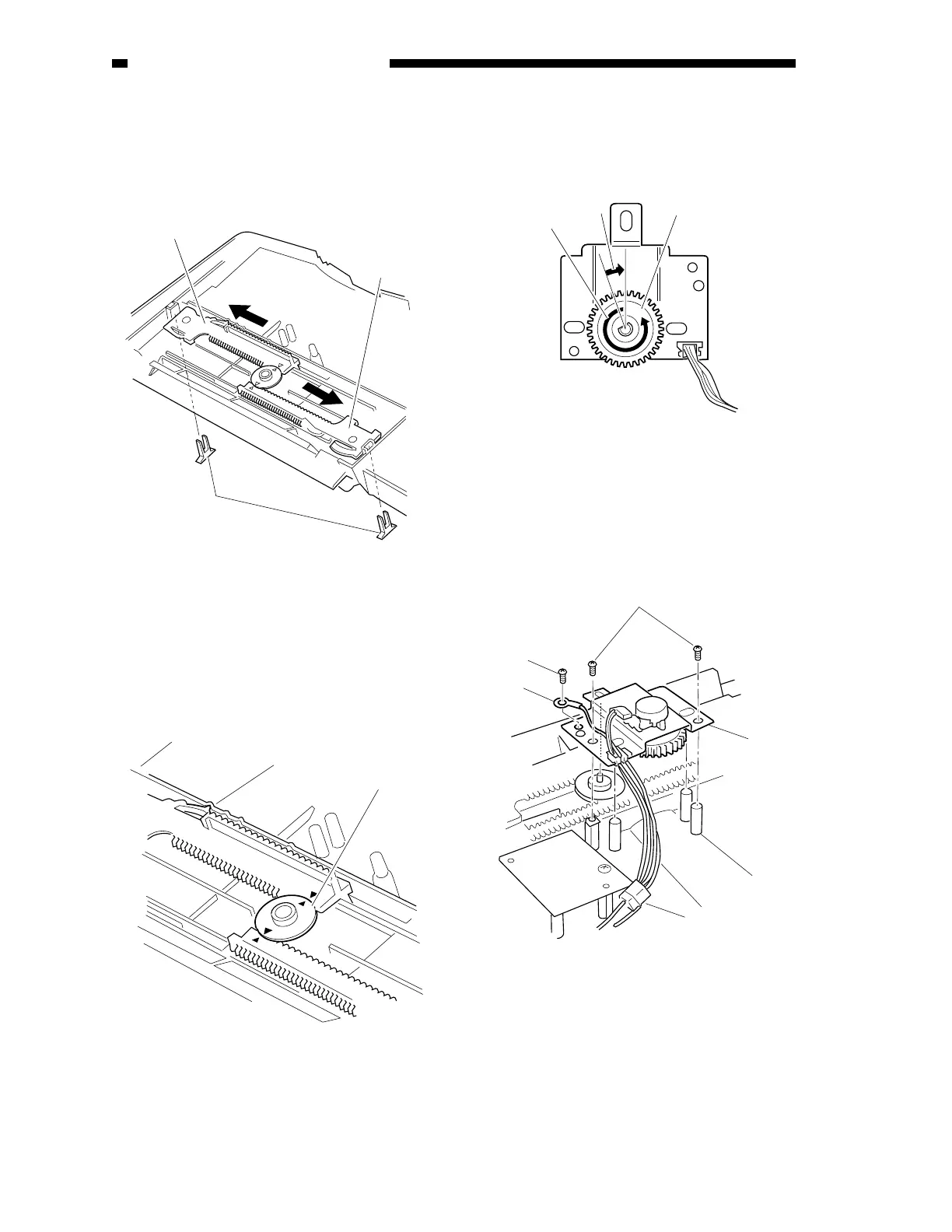
1) Remove the width guide roll.
2) Move the side guides to both ends.
Figure 3-406
3) Mount the volume idler gear against the
arrow marking.
4) Check to make sure that the click claw of
the side guide gear is as shown.
Figure 3-407
5) Turn the volume fully in the direction of
the arrow [A], and turn it back an
equivalent of two teeth [B].
Figure 3-408
6) Mount the original width detecting volume
with two screws.
7) Mount the grounding wire, and connect
the connector.
Figure 3-409
8) Mount the covers and the width guide roll;
then, mount the original pickup tray to the
feeder.
9) Perform original tray width adjustment
discussed in B. “Electrical System” under
I. “Standard and Adjustments” in Chapter 5.
[2]
[2]
[1]
[4]
[3]
[A]
[B]
[5]
[9]
[10]
[8]
[7]
[6]











 To Next Page