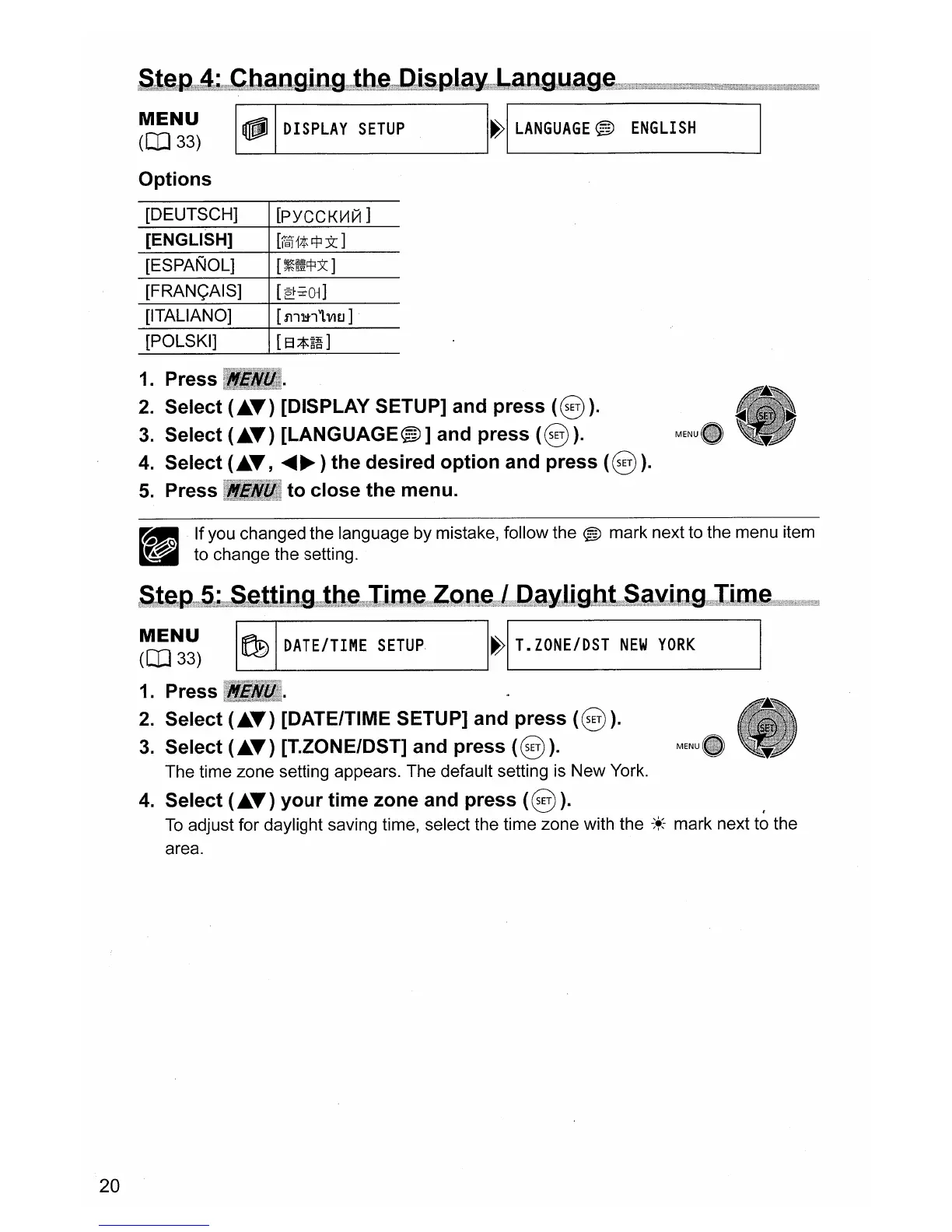
;S~t~tg9;;:4(,;:tCtb!aD;gjlD1g;;;;;t;b!et'M.Cti;:&i!g,;I;i1~mgLa;Q{g;Y,a~g,enn).;.y.;;
'
1inYU@HWMJlh
~~~)
~
DISPLAY
SETUP
H
LANGUAGE
®
ENGLISH
Options
[DEUTSCH]
[PYCCKV1111
]
[ENGLISH]
[r§'j1t$3t]
[ESPANOL]
[~~~)(]
[FRAN<;AIS]
[ei::i;-Ol]
[ITALIANO]
[511~1'1.VI£J]
[POLSKI]
[B*~~]
1.
Press
2.
Select (
••
) [DISPLAY SETUP] and
press
(@)).
3.
Select (
••
) [LANGUAGE@)] and
press
(@)).
4.
Select (
••
,
~~)
the desired
option
and
press
(@)).
5.
Press
to
close
the
menu.
20
~
If you changed the language by mistake, follow the ® mark next to the menu item
_ to change the setting.
(S;t~g!n~!;;.l.S!~lti!l1gw!t(b~~;mIi!W!'~rZ:Q
..
I1!er!l;;Ca.~.lii;.glbft@lS!a~!il1gHiIi1m!em
"
~~~)
~
DATE/TIME
SETUP
I~I
T.
ZONE/DST
NEW
YORK
I
1.
Press
2.
Select (
••
) [DATE/TIME SETUP] and press
(@)).
3.
Select (
••
) [T.ZONE/DST] and
press
(@)
).
The time zone setting appears. The default setting is
New
York.
4.
Select (
••
)
your
time
zone and
press
(@)).
t
To
adjust for daylight saving time, select the time zone with the
-:~-
mark next to the
area.



 To Next Page