~
If the optimal exposure cannot
be
obtained, try the following actions.
~
0 Manually adjust the exposure
(CO
43).
o Change the metering method
(CO
43).
,I~n;U,;&;i,lJgtn,l,b;~;.;;.S·;b;u;tt~;;t;.et;i;gt;i.iM;{AJ;@,I\D{g;"~
,·····'·;;li}1;;@;S·,
You
can select a shutter speed, and the camcorder automatically sets the aperture setting
most appropriate for the subject. Select
a high shutter speed for recording fast moving
subjects, and a slow shutter speed to add a motion blur to moving objects, enhancing the
feel
of
movement
of
the image.
I
To
change the operating mode, refer to About the Operating Modes
(CO
11).
Mode switch: P
P
flmID
seN
L..
•••
--l
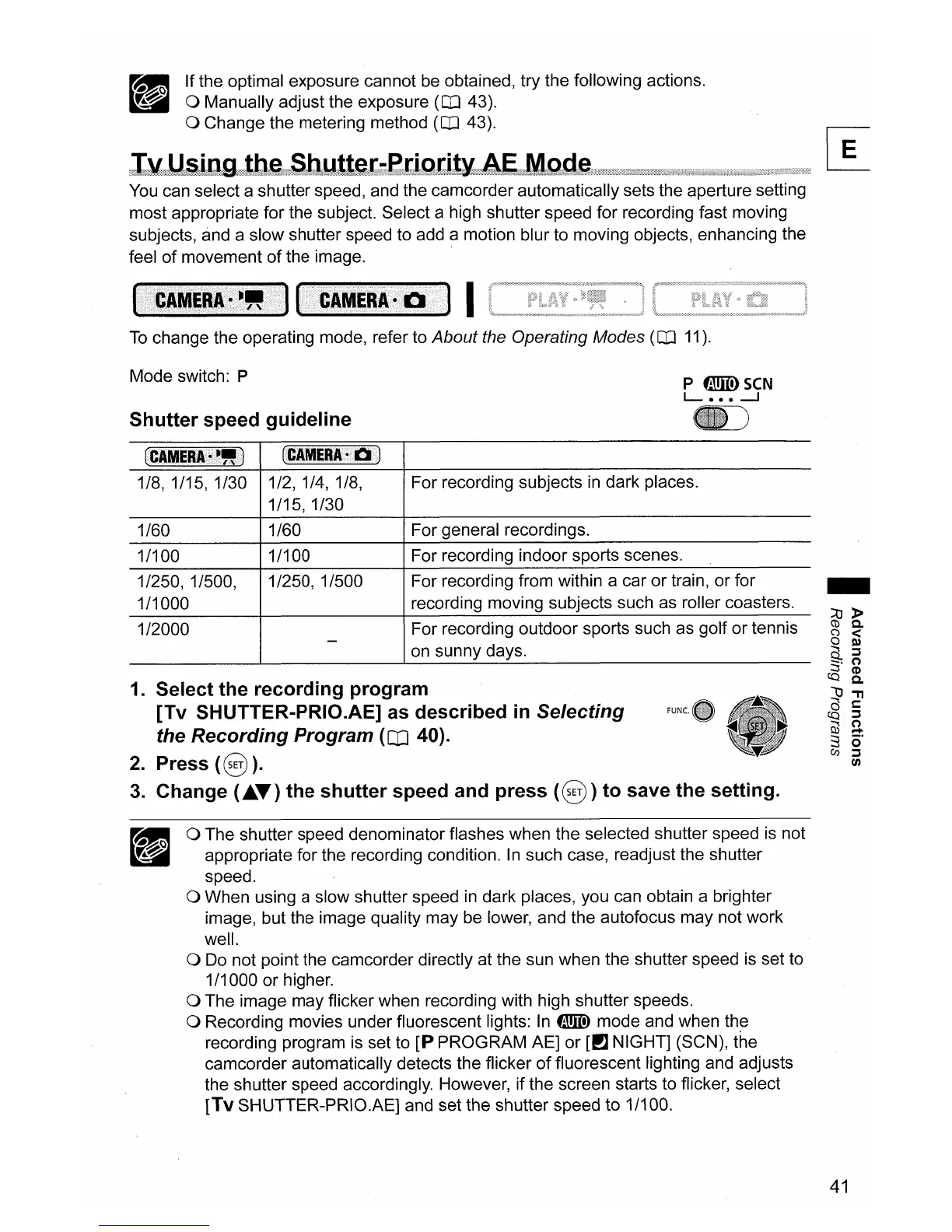
Shutter
speed
guideline
(CAMERA
.-"
)
(CAMERA'
Q )
1/8,1/15,1/30
1/2,1/4,1/8,
1/15,1/30
For recording subjects
in
dark places.
1/60 1/60 For general recordings.
1/100 1/100 For recording indoor sports scenes.
For recording from within a car or train, or for
recording moving subjects such as roller coasters.
For recording outdoor sports such as golf or tennis
on
sunny days.
1/250, 1/500
1/2000
1/250, 1/500,
1/1000
1.
Select
the
recording
program
[Tv
SHUTTER-PRIO.AE] as described in
Selecting
the
Recording
Program
(CD
40).
2.
Press (@
).
3. Change
(AT)
the
shutter
speed and
press
(@)
to
save
the
setting.
o The shutter speed denominator flashes when the selected shutter speed
is
not
appropriate for the recording condition.
In
such case, readjust the shutter
speed.
o When using a slow shutter speed
in
dark places, you can obtain a brighter
image, but the image quality may be lower, and the autofocus may not work
well.
o
Do
not point the camcorder directly at the sun when the shutter speed
is
set to
1/1000 or higher.
o The image may flicker when recording with high shutter speeds.
o Recording movies under fluorescent lights:
In
fillIID
mode and when the
recording program is set to
[P
PROGRAM AE] or [PJ NIGHT] (SCN), the
camcorder automatically detects the flicker
of
fluorescent lighting and adjusts
the shutter speed accordingly. However, if the screen starts to flicker, select
[Tv SHUTTER-PRIO.AE] and set the shutter speed to 1/100.
41



 To Next Page