70
Message Explanation
CD
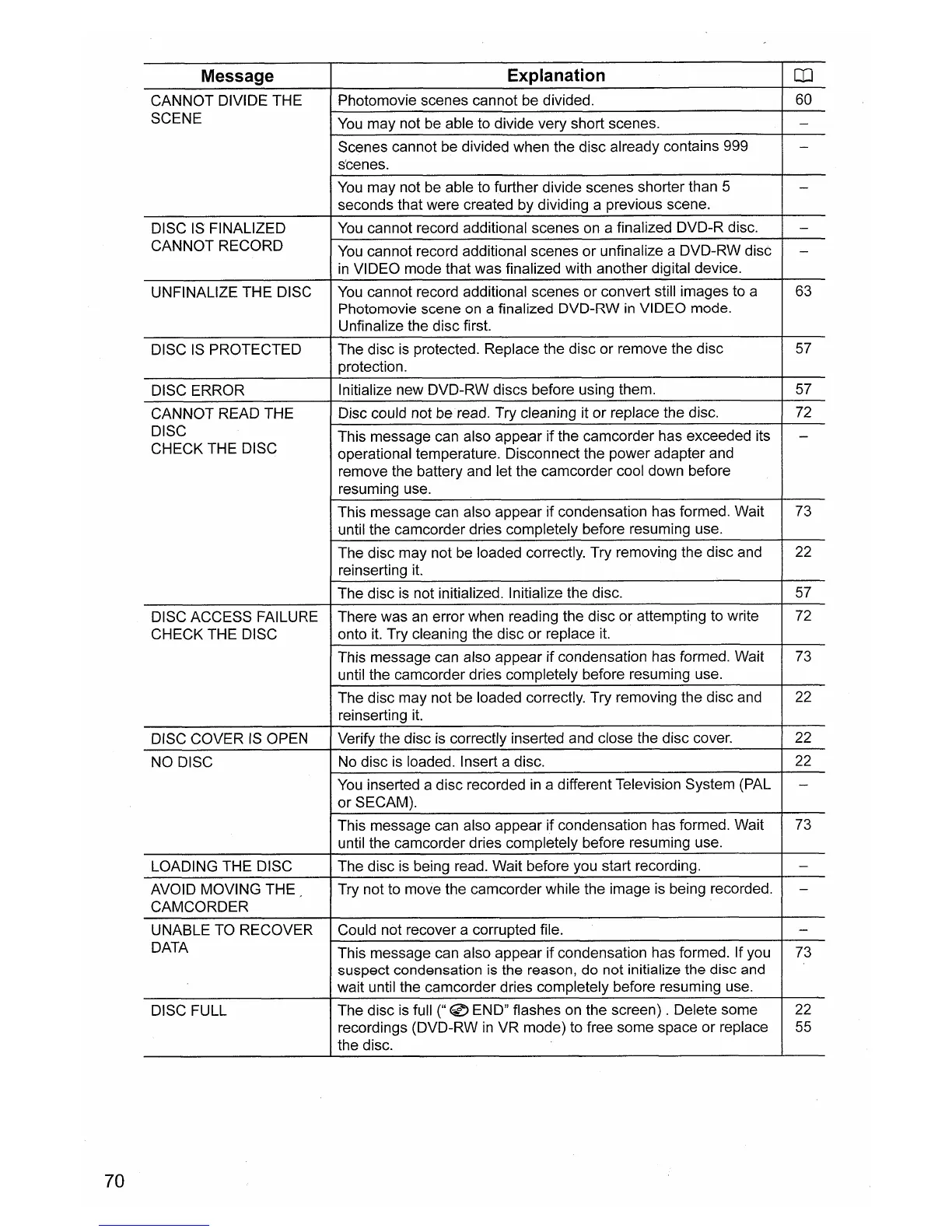
CANNOT DIVIDE THE
Photomovie scenes cannot be divided. 60
SCENE
You
may not be able to divide very short scenes.
-
Scenes cannot be divided when the disc already contains 999
-
s'cenes.
You
may not be able to further divide scenes shorter than 5
-
seconds that were created by dividing a previous scene.
DISC IS FINALIZED
You
cannot record additional scenes on a finalized DVD-R disc.
-
CANNOT RECORD
You
cannot record additional scenes or unfinalize a DVD-RW disc
-
in
VIDEO mode that was finalized with another digital device.
UNFINALIZE THE DISC
You
cannot record additional scenes or convert still images to a
63
Photomovie scene
on
a finalized DVD-RW
in
VIDEO mode.
Unfinalize the disc first.
DISC
IS
PROTECTED The disc
is
protected. Replace the disc or remove the disc
57
protection.
DISC ERROR
Initialize new DVD-RW discs before using them. 57
CANNOT READ THE
Disc could not beread. Try cleaning it or replace the disc.
72
DISC
This message can also appear if the camcorder has exceeded its
-
CHECK THE DISC
operational temperature. Disconnect the power adapter and
remove the battery and let the camcorder cool down before
resuming use.
This message can also appear if condensation has formed. Wait
73
until the camcorder dries completely before resuming use.
The disc may not be loaded correctly. Try removing the disc and 22
reinserting
it.
The disc
is
not initialized. Initialize the disc.
57
DISC ACCESS FAILURE There was
an
error when reading the disc or attempting to write 72
CHECK THE DISC onto
it.
Try cleaning the disc or replace
it.
This message can also appear if condensation has formed. Wait
73
until the camcorder dries completely before resuming use.
The disc may not be loaded correctly. Try removing the disc and 22
reinserting
it.
DISC COVER
IS
OPEN Verify the disc
is
correctly inserted and close the disc cover. 22
NO DISC
No disc
is
loaded. Insert a disc. 22
You
inserted a disc recorded
in
a different Television System (PAL
-
orSECAM).
This message can also appear if condensation has formed. Wait 73
until the camcorder dries completely before resuming use.
LOADING THE DISC
The disc is being read. Wait before you start recording.
-
AVOID MOVING THE Try not to move the camcorder while the image is being recorded.
-
CAMCORDER
UNABLE TO RECOVER Could not recover a corrupted file.
-
DATA
This message can also appear if condensation has formed. If you 73
suspect condensation is the reason, do not initialize the disc and
wait until the camcorder dries completely before resuming use.
DISC FULL
The disc is full
("
0 END" flashes on the screen) . Delete some 22
recordings (DVD-RW
in
VR mode) to free some space or replace
55
the disc.


 To Next Page