4-47
Loading and Outputting Paper
4
Printing from the Manual Feed Slot
NOTE
The names of the following paper sizes are indicated by an abbreviation.
Legal: LG, Letter: LT, Executive: EX, Statement: ST, Index Card: IC, Envelope DL: DL,
Envelope COM10: CO, Envelope C5: EC5, Envelope Monarch: MO, Envelope B5: EB5,
Custom Size: 80 to 99, Custom SizeR: 80R to 99R, Free/Mixed Sizes: FR
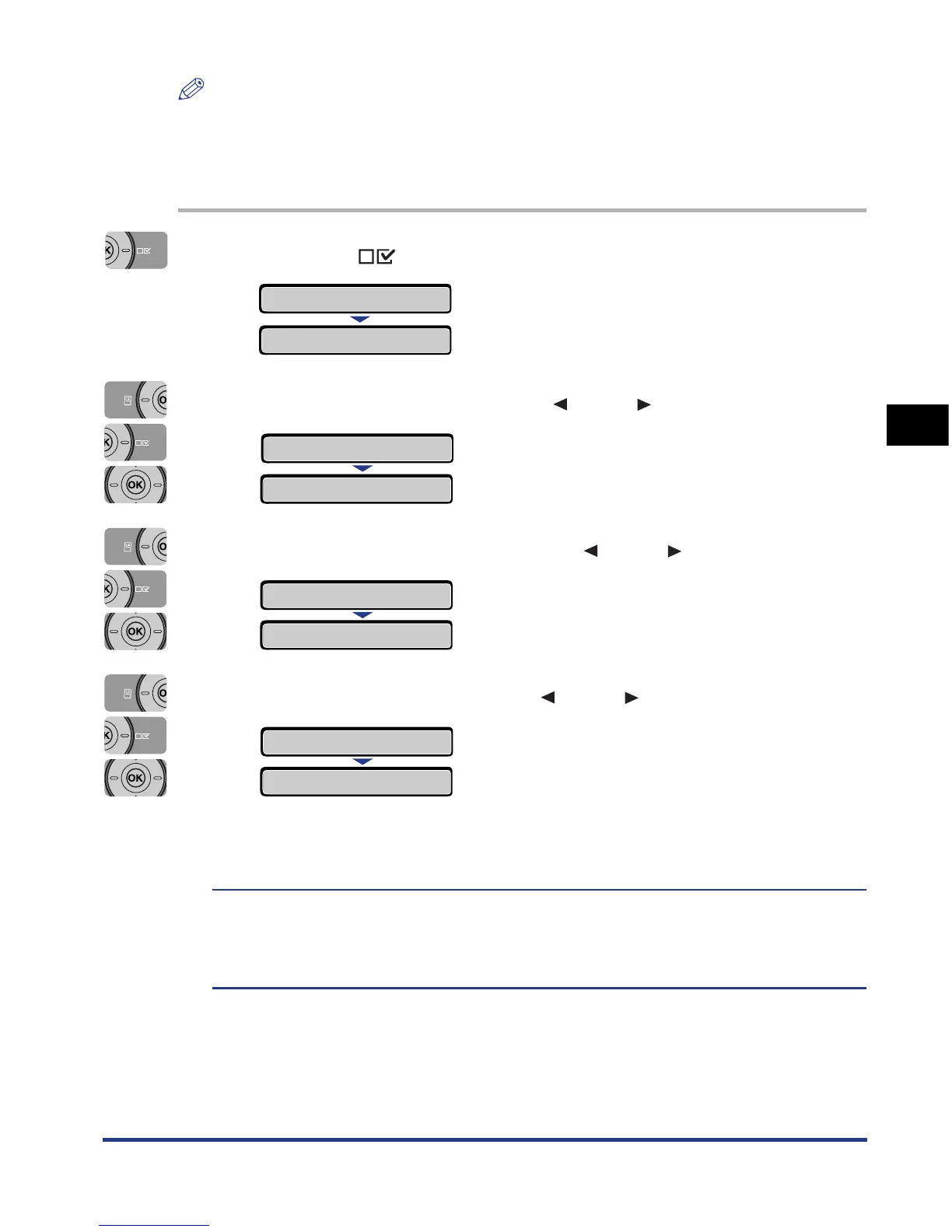
1
Press the (Settings) key.
2
Select FEEDER MENU using [ ] and [ ], then press [OK].
3
Select SLOT PAPER SIZE using [ ] and [ ], then press [OK].
4
Select the paper size using [ ] and [ ], then press [OK].
"=" is displayed on the left of the paper size, and the paper size for the manual
feed slot is specified.
When printing from the printer driver on Windows or Macintosh, configure the printer
driver. (See Driver Guide)
When printing from DOS or UNIX, specify the settings for STD PAPER SIZE (See p.
6-15) and STD PAPER TYPE (See p. 6-17) using the control panel.
SETUP
CONTROL MENU
→
FEEDER MENU
→
SLOT PAPER SIZE
→
SLOT PAPER SIZE
→
=A4
→
=B5
→
B5
→













 To Next Page