5-3
The Printing Environment
5
Menu Functions
Setting Priority
When the setting values for the same item are different between an application or
the printer driver and the menu functions, the setting specified in the application or
printer driver is effective. When specifying an item only in the menu functions using
the control panel or the Remote UI, the most recently specified setting is effective.
The printer driver and Remote UI are supplied with this printer. For details on using
the printer driver or Remote UI, see "Driver Guide", Help of the printer driver, and
"Remote UI Guide".
Depending on the items, they become effective after cycling the power of the printer
or performing a hard reset.
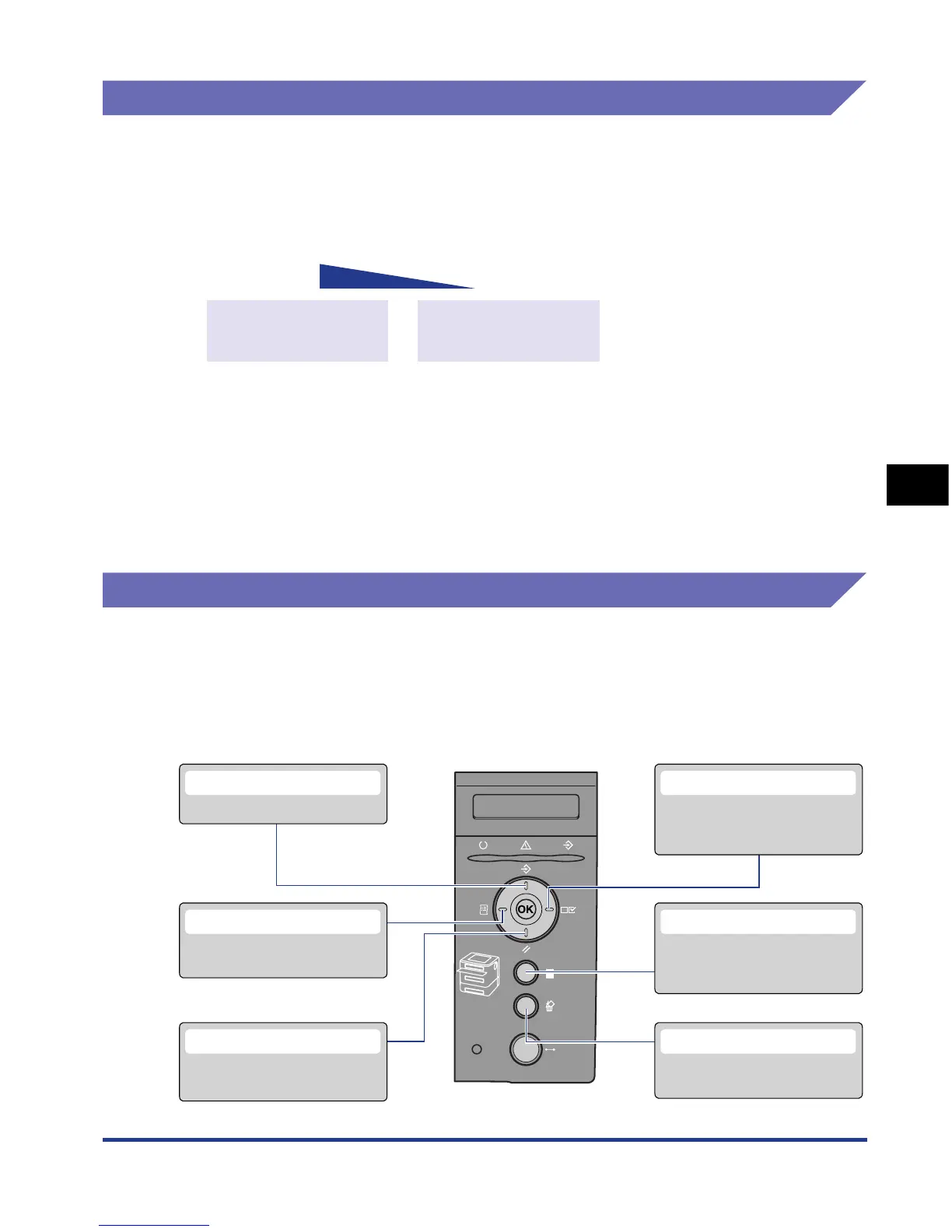
Menu Categories
There are the following six categories of the menu.
For the functions and operation procedures, see "Menu Functions and Menu
Operation," on p. 5-9.
For details on each menu, see "Chapter 6 Printing Environment Settings".
Application soft
Printer driver
Priority
High
Low
Control panel
Remote UI
The most resent
setting is effective
CANCEL JOB Menu
Cancels the job currently being
received or processed.
JOB Menu
Prints the job logs.
UTILITY Menu
Prints information about the
current printer settings.
SETUP Menu
Specifies the printing environment
such as layout adjustment and
print quality setting.
RESET Menu
Resets the printer or outputs
print data.
SELECT FEEDER Menu
Specifies whether to feed paper
from the paper cassette or manual
feed slot and the paper size













 To Next Page