2-5
Using the Printer
2
Turning the Printer ON/OFF
NOTE
•
You can release Power Save Mode by setting TIMER SETTINGS to WAKE UP TIME
(See p. 5-14).
•
To configure the printer so that it does not enter Power Save Mode, set POWER SAVE
MODE (See p. 5-10) to OFF.
•
To specify whether the printer should enter Power Save Mode when an error is occurring
in the printer (when the Message indicator is on, or the number in the message blinks),
set PWR SAVE IN ERR (See p. 5-11) to OFF.
■ Power Save Mode 1 (Panel Off Mode) ... Power-saving effect: Small
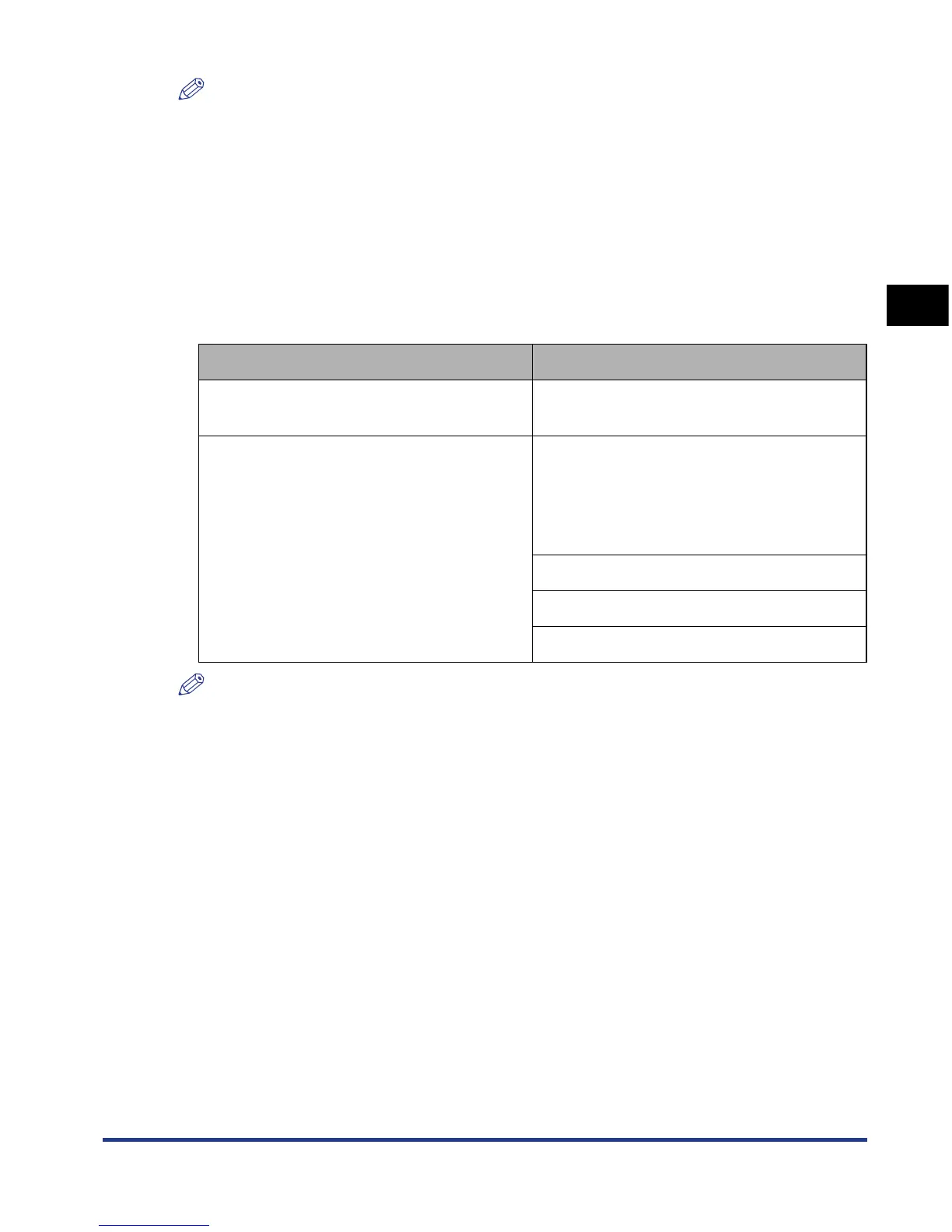
The printer enters Power Save Mode 1 when it is in any of the following conditions.
NOTE
•
When the printer enters Power Save Mode 1, only the Ready indicator comes on.
However, when the printer is offline, only the Message indicator comes on.
•
Power Save Mode 1 can be released when the printer is in any of the following status:
- When any key on the control panel is pressed
- When an error is occurring
- When the printer receives data from the computer (Only when the printer is online)
- When WAKE UP TIMER (See p. 5-15) in TIMER SETTINGS is set to ON, and the time
specified WAKE UP TIME (See p. 5-14) has elapsed
- When the settings for [Utility Menu] are specified in the Remote UI
- When the settings for [Device Control] are specified in the Remote UI (Except for [Deep
Sleep])
Condition 1 Condition 2
POWER SAVE MODE is set to DEEP
SLEEP or PANEL OFF.
POWER SAVE MODE is set to DEEP
SLEEP or PANEL OFF.
The panel operation has not been
performed and no data has been sent from
the computer for the time specified in
POWER SAVE TIME (See p. 5-11).
(You can select 5 minutes, 15 minutes, 30
minutes, 60 minutes, or 180 minutes for
POWER SAVE TIME, and the default value
is 15 minutes.)
POW. SAVE TIMER (See p. 5-15) in
TIMER SETTINGS is set to ON, and the
time specified in POWER SAVE TIME
(TIMER SETTINGS) (See p. 5-15) has
elapsed.
Panel operation has not been performed.
No data has been sent from the computer.
The printer is not starting up.











 To Next Page