Turning the Printer ON/OFF
2-6
Using the Printer
2
■
Power Save Mode 2 (Deep Sleep Mode) ... Power-saving effect: Large
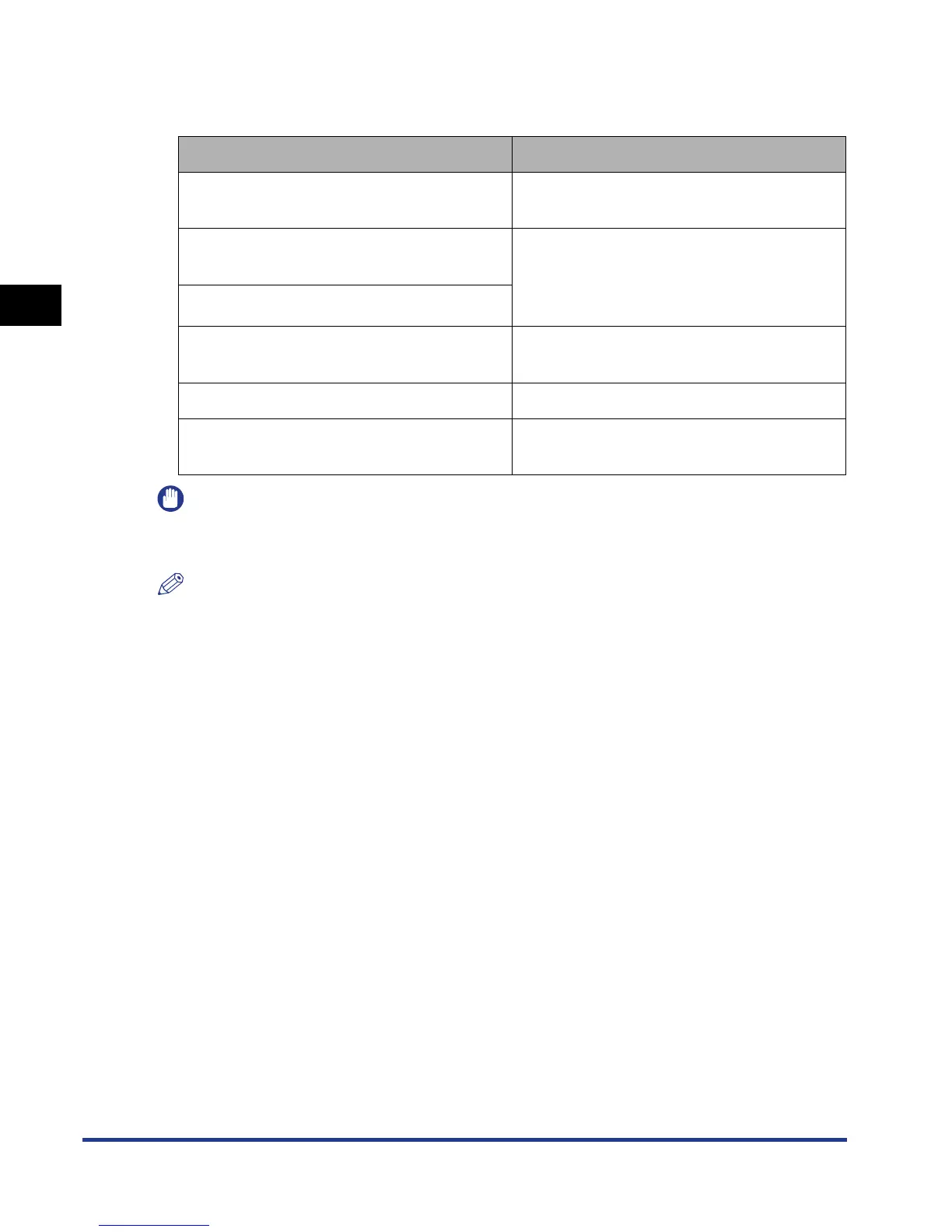
The printer enters Power Save Mode 2 when it is in any of the following conditions.
IMPORTANT
Even if POWER SAVE MODE is set to OFF, the printer enters Power Save Mode 2 when
[Deep Sleep] is executed in [Device Control] in the Remote UI.
NOTE
•
When the printer enters Power Save Mode 2, only the Power indicator comes on.
•
Power Save Mode 2 can be released when the printer is in any of the following status:
- When [Online] on the control panel is pressed
- When the printer receives data from the computer (Only when the printer is online)
- When WAKE UP TIMER (See p. 5-15) in TIMER SETTINGS is set to ON, and the time
specified WAKE UP TIME (See p. 5-14) has elapsed
- The settings for [Utility Menu] are specified in the Remote UI
- When the settings for [Device Control] are specified in the Remote UI (Except for [Deep
Sleep])
Condition 1
Condition 2
POWER SAVE MODE is set to DEEP
SLEEP.
POWER SAVE MODE is set to DEEP
SLEEP or PANEL OFF.
The printer has already entered Power
Save Mode 1.
DEEPSLEEP TIMER (See p. 5-16) in
TIMER SETTINGS is set to ON, and the
time specified in DEEP SLEEP TIME (See
p. 5-16) in TIMER SETTINGS has elapsed.
USB in I/F CONNECTION is set to OFF.
APPLETALK in NETWORK MENU is set to
OFF.
APPLETALK in NETWORK MENU is set to
OFF.
There is no job on the print queue. There is no job on the print queue.
The printer has not communicated on the
network for more than 15 seconds.
The printer has not communicated on the
network for more than 15 seconds.











 To Next Page