CHAPTER 7 EXTERNALS/AUXILIARY MECHANISMS
COPYRIGHT
©
1999 CANON INC. CANON NP6512/6612/7120/7130/7130F REV.0 AUG. 1999 PRINTED IN JAPAN (IMPRIME AU JAPON)
7-16
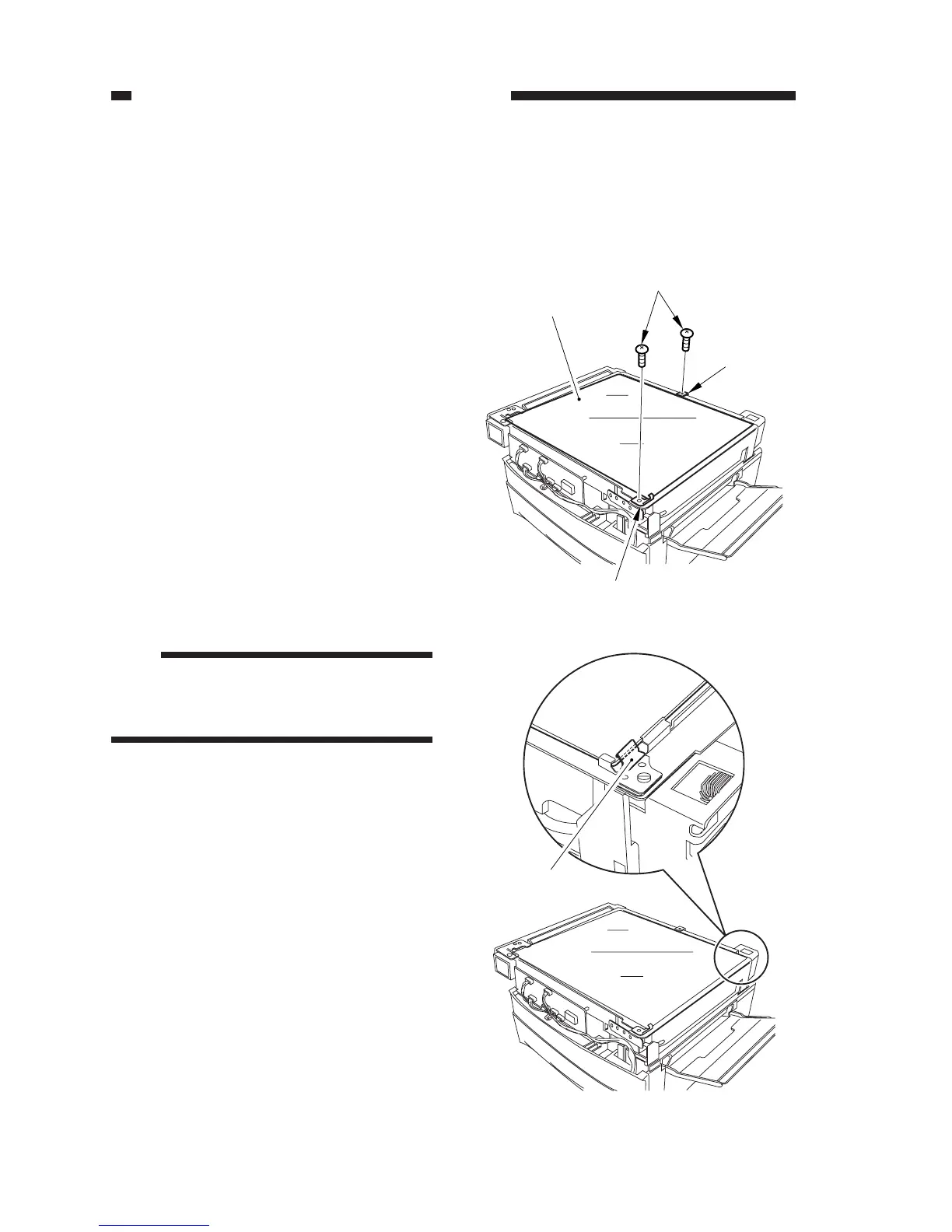
Figure 7-316
Figure 7-317
[1]
[2]
[2]
[3]
Grounding plate
Copyboard glass
C. Copyboard Glass
1. Removing the Copyboard Glass
1) Remove the top cover.
(See A.1. “Removing the Top Cover.”)
2) Close the machine’s top unit.
3) Remove the two screws [1], and detach
the two support plates [2]; then, detach the
copyboard glass [3].
Note:
When mounting the copyboard glass, be
sure that the grounding plate is on the
side of its top edge. (ADF type only)








 To Next Page