CHAPTER 5 PICK-UP/FEEDING SYSTEM
COPYRIGHT
©
1999 CANON INC. CANON NP6512/6612/7120/7130/7130F REV.0 AUG. 1999 PRINTED IN JAPAN (IMPRIME AU JAPON)
5-23
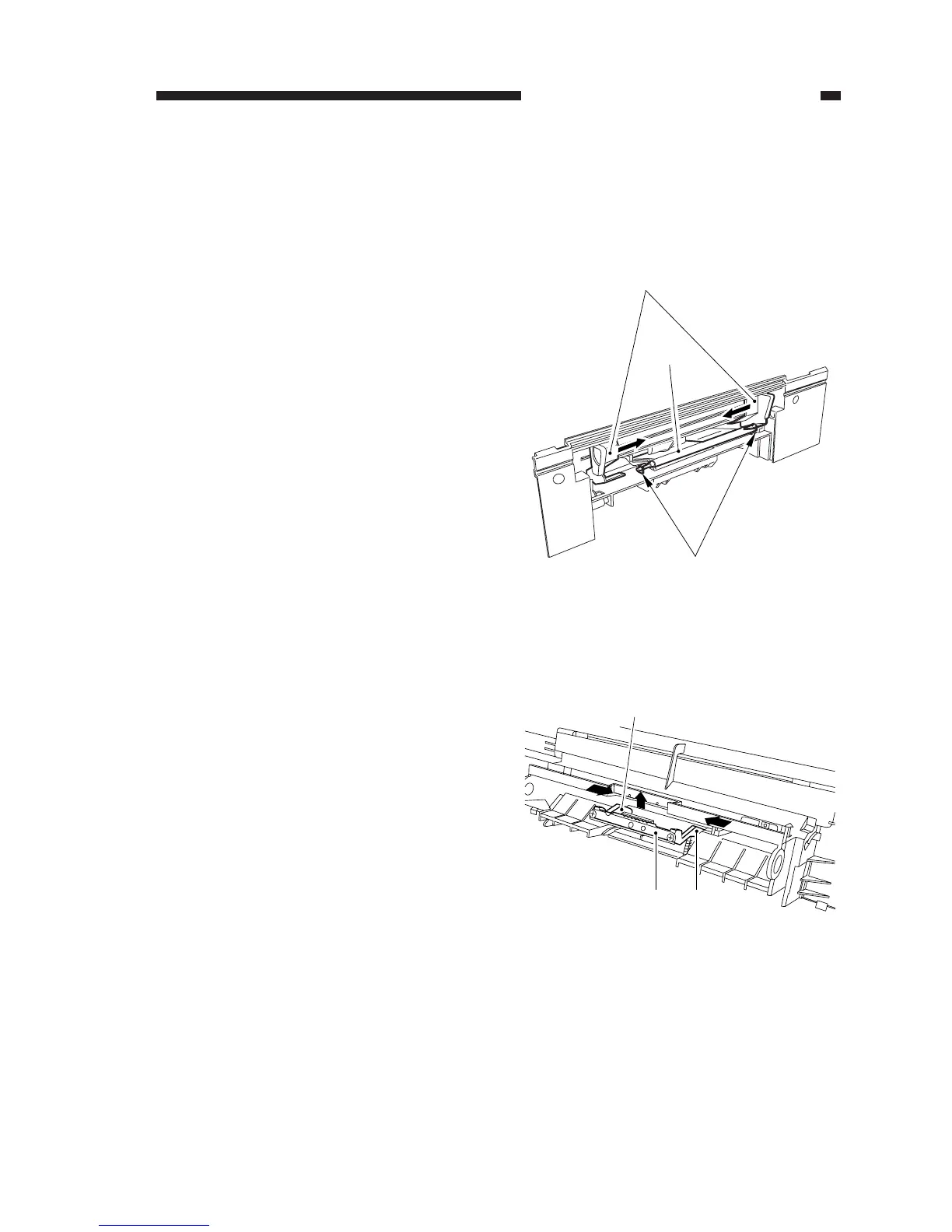
Figure 5-219
Figure 5-220
[1]
[2]
[3]
[4] [5]
[5]
3. Removing the Separation Pad
1) Remove the multifeeder pickup roller to-
gether with its shaft.
(See 2. “Removing the Multifeeder
Pickup Roller.”)
2) Remove the multifeeder tray.
3) Slide the side guide [1] to the inside about
3 cm, and free the two claws [2]; then, de-
tach the holding plate [3].
4) Push up the separation pad [4], and pull it
out by pushing the shaft [5] toward the in-
side.




 To Next Page