CHAPTER 9 INSTALLATION
COPYRIGHT
©
1999 CANON INC. CANON NP6512/6612/7120/7130/7130F REV.0 AUG. 1999 PRINTED IN JAPAN (IMPRIME AU JAPON)
9-13
Work Checks and remarksStep
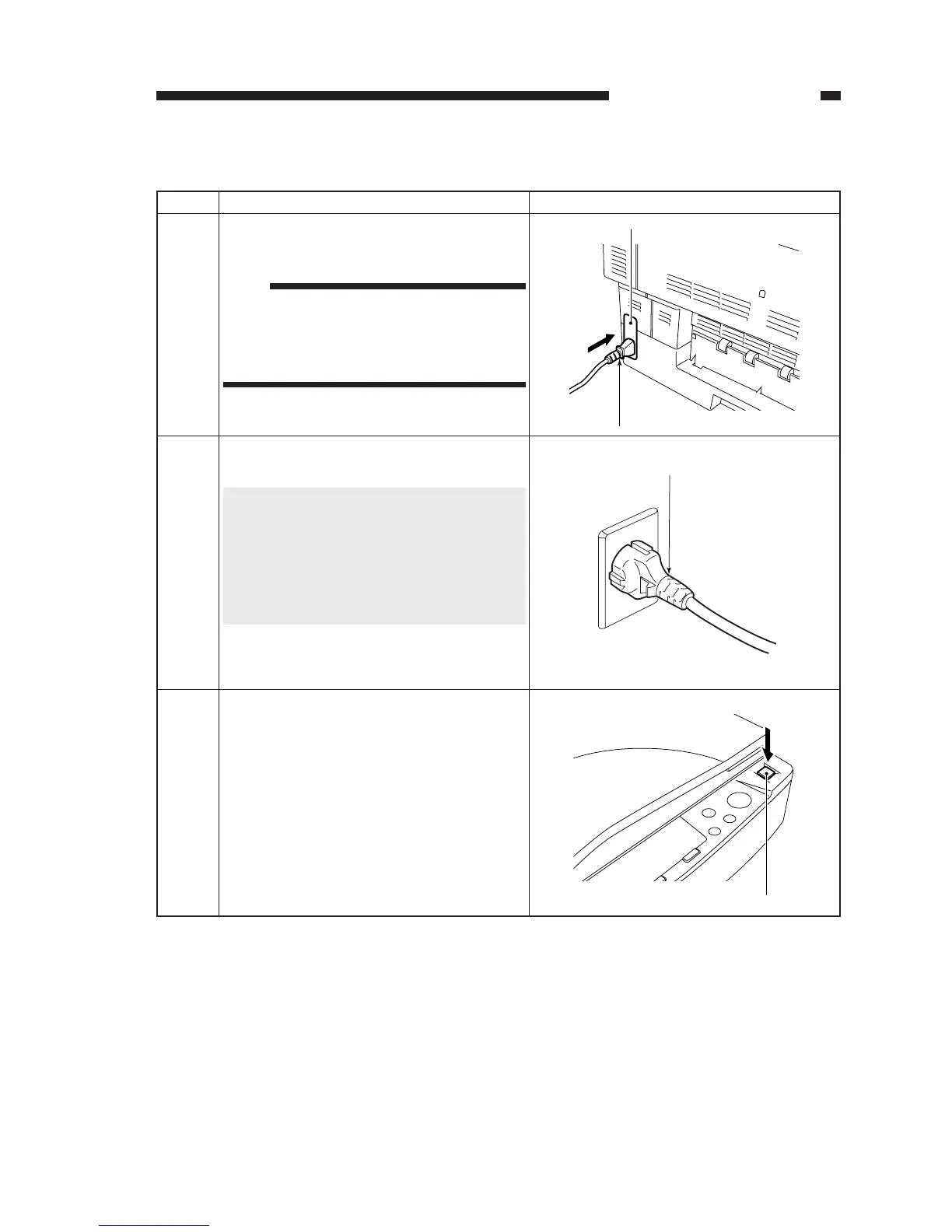
Insert one end of the power cord to the
machine’s power supply unit.
1
Connect the power plug to the power outlet.
2
5. Connecting the Power Cord
Turn on the power switch.
• The display will indicate '1'.
3
Power supply unit
Power cord
Power switch
Note:
Do not connect the power plug and turn on the
power before completing "Setting Up the Ma-
chine" and "Installing the Drum Unit" to
avoid damage to the machine.
Caution:
This machine is designed for use with a power
source matching the power requirements
shown on the marking label at the back of the
machine. If you are unsure of the power
source, check with your local power com-
pany.








 To Next Page