CHAPTER 9 INSTALLATION
COPYRIGHT
©
1999 CANON INC. CANON NP6512/6612/7120/7130/7130F REV.0 AUG. 1999 PRINTED IN JAPAN (IMPRIME AU JAPON)
9-7
Work Checks and remarksStep
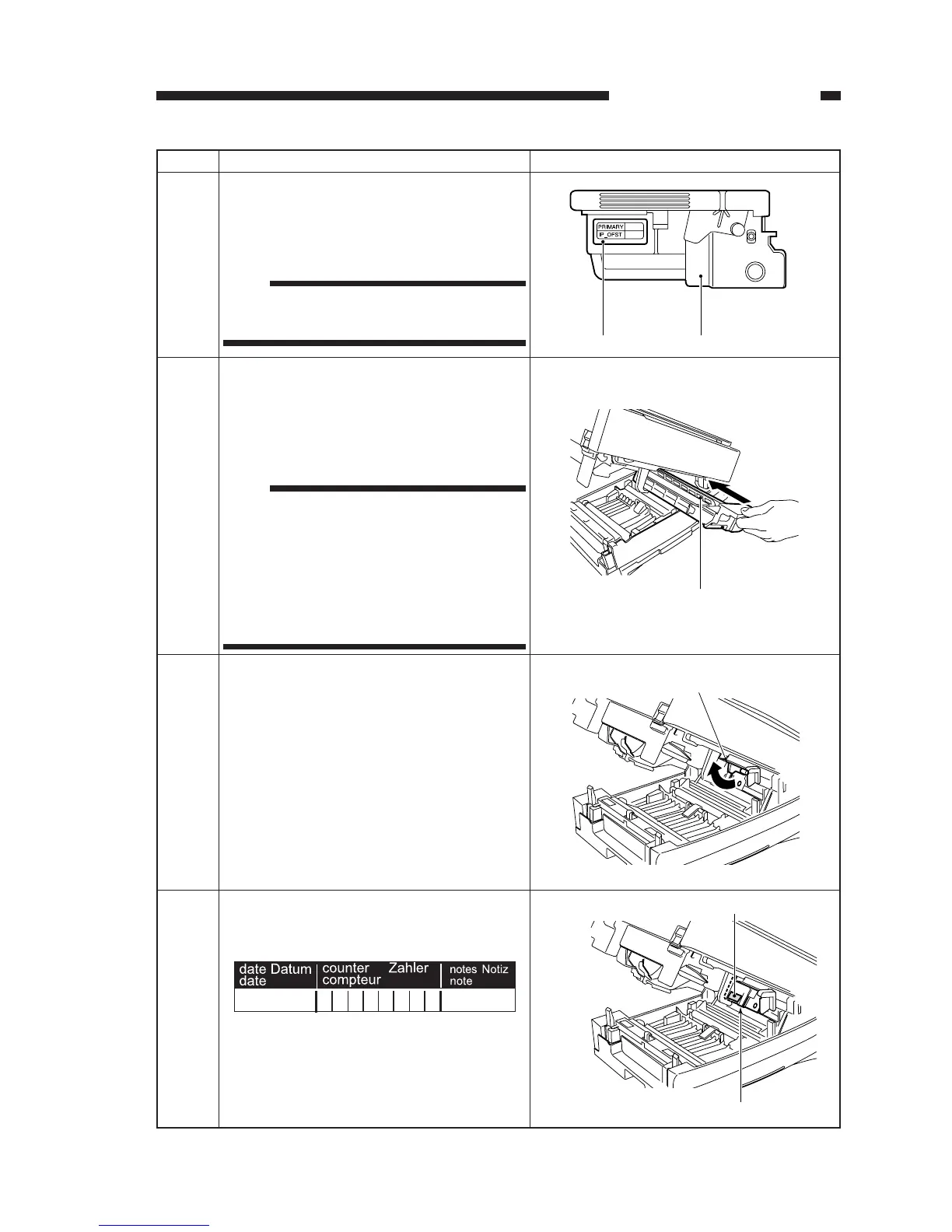
Record the settings of 'PRIMARY' and
'IP_OFST' indicated on the label attached to
the front of the drum unit on an appropriate
piece of paper.
5
Insert the drum unit into the machine.
When doing so, hold the drum unit horizontal
in relation to the top unit, and act with care.
• Be sure to slide in the drum unit until it
butts against the rear end.
6
Label Drum unit
Drum unit
Turn the drum unit releasing lever clockwise
to secure the drum unit in place.
7
Drum unit releasing lever
Enter the date of installation of the drum unit
and the counter reading on the label attached
to the drum unit.
8
Label
Drum unit
Note:
You will need these settings in steps 4 and 6 of
"Adjusting the Machine".
Note:
• When mounting the drum unit, check to
make sure that the drum unit releasing lever
has been turned counterclockwise. (Other-
wise, you would not be able to insert the
drum unit into the machine.)
• Take care not to touch the surface of the
drum. Contact can affect copy images.


 To Next Page
 Loading...