CHAPTER 11 TROUBLESHOOTING
COPYRIGHT
©
1999 CANON INC. CANON NP6512/6612/7120/7130/7130F REV.0 AUG. 1999 PRINTED IN JAPAN (IMPRIME AU JAPON)
11-90
Figure 11-704
30
31
32
33
34
35
36
37
38
REGIST
LE_BLANK
PRIMARY
IP_OFST
PW_OFST
IP_ADJ
LENS_ADJ
PREX_LP
LAMP_ADJ
FB5-2777
4. Clearing the Error Code from Memory
If 'E000', 'E001', 'E002', or 'E003' is indicated, remove the cause of the error, and clear the
memory.
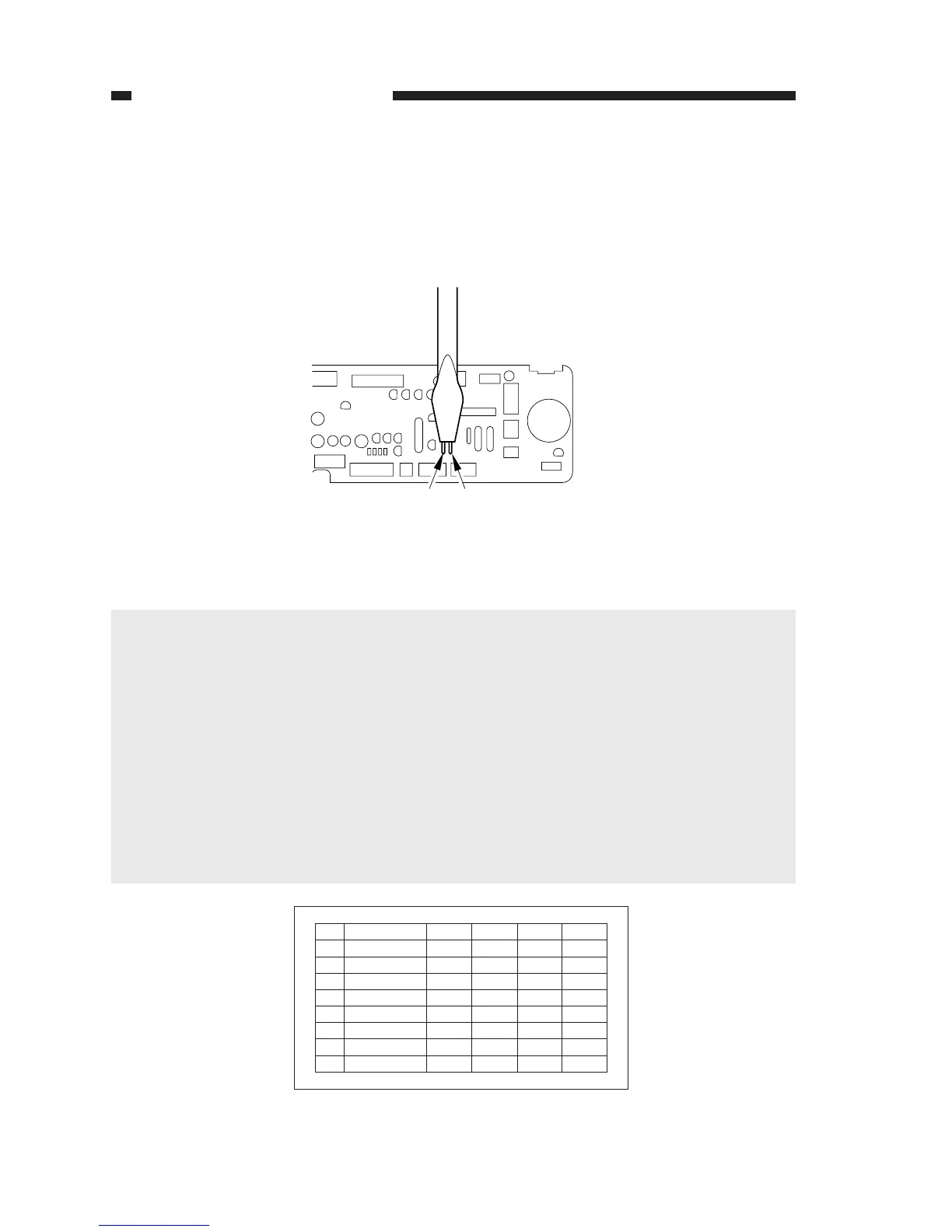
1) Turn on the power while shorting JP103 and JP104 on the DC controller PCB with a screw-
driver.
• The display will indicate 'F'.
Figure 11-703
2) Turn off and then on the power switch to check the copying operation.
SERVICE
JP104
JP104
JP103
Caution:
When a fault associated with 'E000', 'E001', 'E002', or 'E003' is detected, the power will auto-
matically turn off. It will still turn off even when turned on without removing the fault.
To find out which code turned off the power, disconnect J207 from the composite power
supply PCB, and turn on the power.
Figure 11-704 shows the label attached behind the front upper cover. At the factory, each
individual machine is adjusted, and its adjustment values are recorded on the label.
If you have entered any new value in the field, be sure to record it on the label. If you have
replaced the DC controller PCB, be sure to enter the values recorded on the label in service
mode.
If you have replaced the drum unit, composite power supply PCB, or pre-exposure PCB, on
the other hand, be sure to enter the values recorded on the label of the appropriate part. Then,
record these values on the service label.



 To Next Page