12
Settings
Settings
Combine Settings
Properly setting the combine is essential to having responsive header control. You should
become very familiar with the steps in this section.
Always perform the combine ground calibration before adjusting settings. Set each sensitivity
setting by increasing till header bouncing occurs then decreasing till header becomes stable.
• Set the automatic drop rate to 6-8 seconds from full up to full down in auto mode
• Set the automatic raise rate to 5-7 seconds from full down to full up in auto mode
• Open hydraulic accumulator
• Set height sensitivity
• Set tilt sensitivity
“Pro 600/700” Monitors - x130 with Common Cab, x010, x120, x230, xx40, xx50
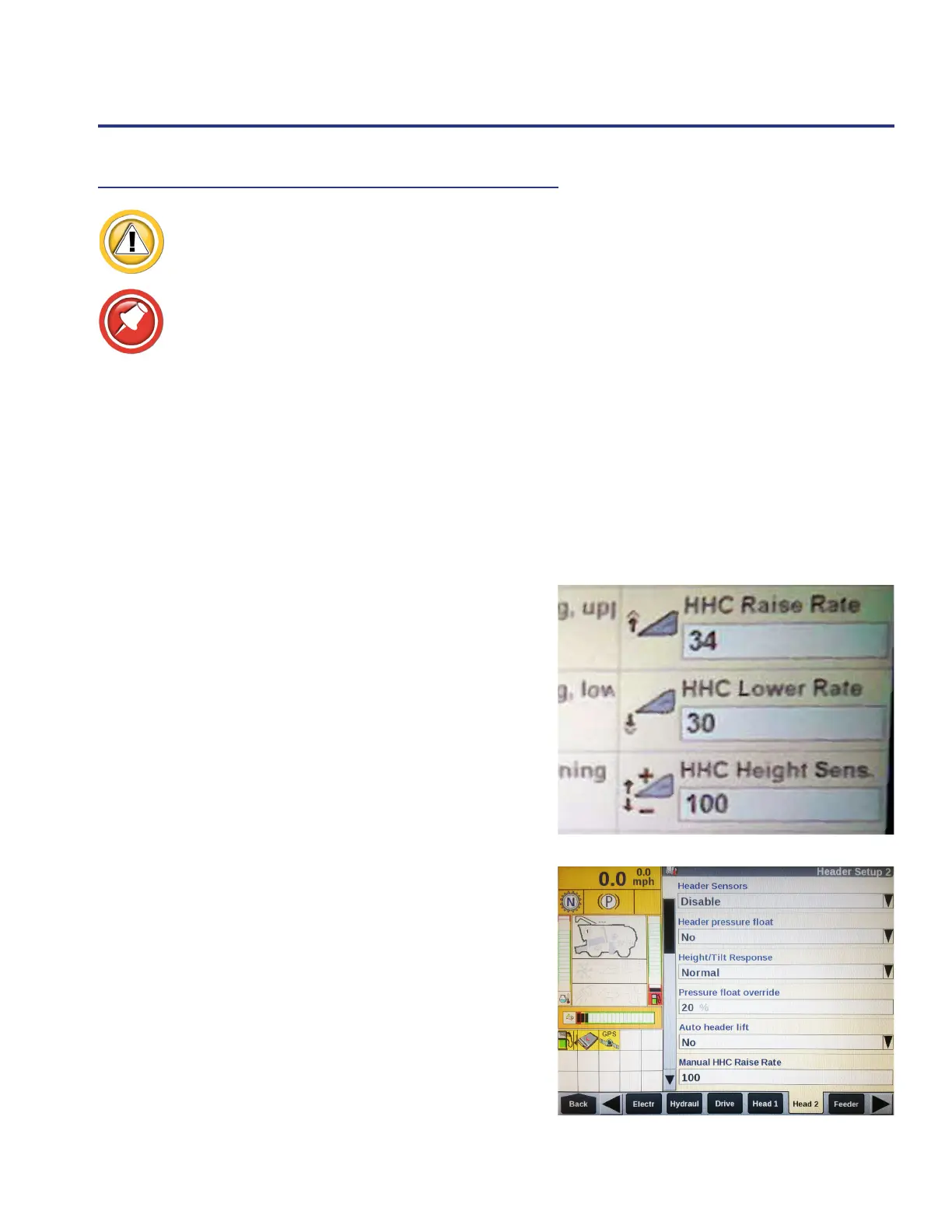
1. Find the HHC settings on one of the run screen tabs or
Back>>Toolbox>>(right arrow) Head2.
2. Touch the setting you want to adjust.
3. Verify all settings are correct: Back>>Toolbox>>(right
arrow) Head2.
• Header Sensors are “Enabled”
• Header Lateral Tilt “Yes”
• Reel end Dividers (header reel or end augers
installed) “Yes” or “No”
• Pressure oat override - increase if header drops
slowly or does not go into (Wavy Line mode)
Automatic Height Control








 To Next Page