3
Installation
Insight
®
Power Wire Installation
No Power Wire is needed for the following models. Skip to the next section.
• CIH Midrange combines (x088/x130,x140)
• CIH Flagship Model x250 s/n YKG239890 & newer
For all CIH Flagship 8010-x240
1. Remove plastic shield from left side of feederhouse.
2. Connect 3 pin triangular plug in-line at feeder
speed sensor (Y313 and Y314) on upper left side of
feederhouse.
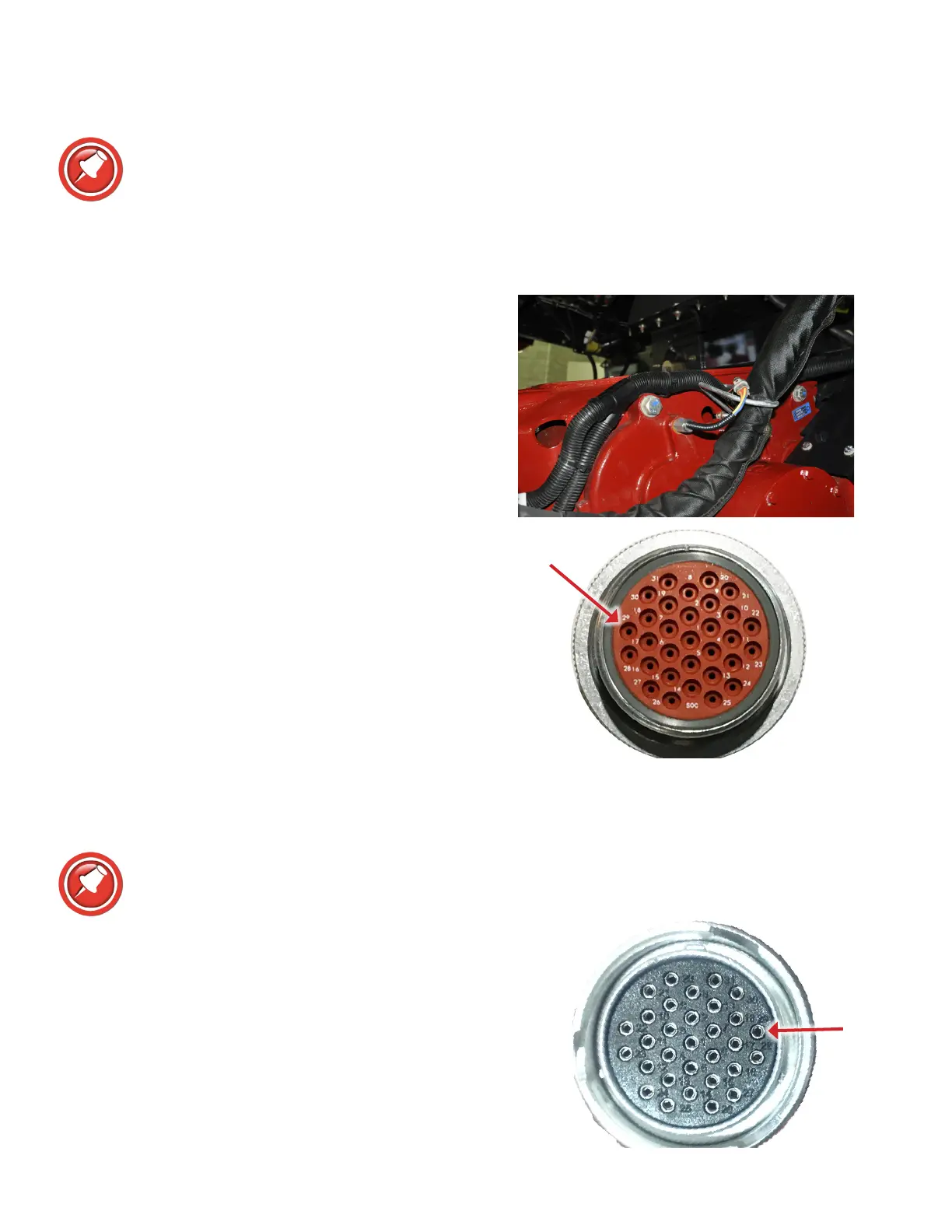
3. Route power wire along existing wiring to main header
connector.
4. Unscrew rear of header connector on combine.
5. Remove white plug from rear of power wire pin 29 of
header connector. Insert single Deutsch pin on power
wire till it snaps into place.
For CIH Flagship x250 before s/n YKG239890
This step is only needed for 1st year production x250 combines before s/n YKG239890. All
combines prior to s/n YKG239854 are know to be Battery, proceed with x250 power wire
install.
1. Test pin 29 in header connection to chassis ground.
2. If 12V with key off,
• Follow the steps in “For x250 w/Battery Power on pin
29” to switch the power from battery to key switched.
3. If pin 29 is 12V only with the key on,
• No change is needed.
• Skip to the next section.








 To Next Page