33
REF NAME FUNCTION
1 Horn Press button on end of light stalk to sound horn.
2
Turn signal lever/
indicators
Move lever down for left turn and up for right turn. The control is self-canceling when the
turn is completed.
3
High/low
beam switch
The centered lever position is low beam.
Move the lever forward for momentary high beam to ash lights.
Move the lever rearward for high beam – the high beam indicator lamp on the instrument panel
illuminates when active. Return the lever to the center position for low beam.
4 Indicator bar icon
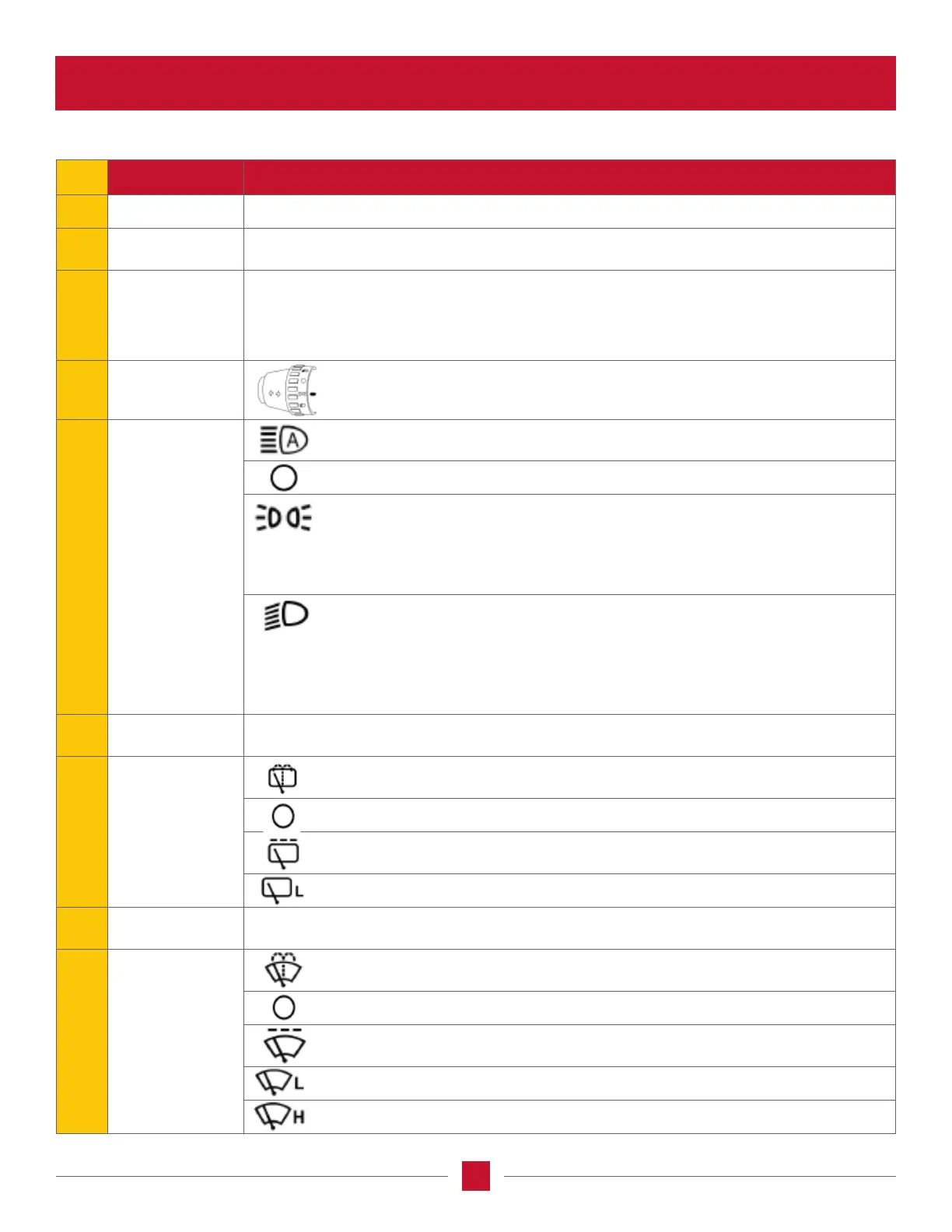
The lighting control is located on the left-hand control stalk.
Rotate the control to align one of the four lighting positions (shown in 5)
with the indicator bar icon.
5
Work and
roading lights
Auto lights – the auto lights are automatically off or on with work lights and
night roading settings.
Master lights off.
Work lights and daytime roading:
a) Rear stop/tail lights and cab control backlighting are on and the front head light
ashing enabled.
b) Work lights enabled, but are controlled by the overhead work light switches and
zone control settings on the tractor lights screen on the Pro 1200 display.
Work lights and nighttime roading:
a) the front road head lights, rear stop/tail lights and cab control backlighting are on.
NOTE: Hood or high mount head lights are selected with the Pro 1200 display.
b) High or low beam for the head lights can be selected with the display.
c) Work lights enabled, but are controlled by the overhead work light switches and
zone control settings on the tractor lights screen on the Pro 1200 display.
6 Indicator bar icon
The right-hand control stalk contains all of the windshield wiper and washer controls for the
tractor. Rotate the control to align the wiper or washer icon to the indicator bar icon.
7
Rear wiper
control
Rear wiper/washer – hold the outer ring in the wash position to clean the rear window
with the wiper action.
Turns off the rear wiper.
Rear wiper intermittent – operate the rear wiper at intermittent intervals. Length of
delay is set using the middle ring (8).
Rear wiper low speed – operate the rear wiper in low speed.
8
Intermittent wiper
settings
Rotate knob and align with indicator bar icon to set variable delay to one of ve settings
available. The front and the rear wipers share the selected setting.
9
Front wiper
control
Front wiper/washer – hold the outer ring in the wash position to clean the front
windshield with the wiper action.
Turns off the front wiper.
Front wiper intermittent operation – operate the front wiper at intermittent intervals.
Length of delay is set using the middle ring (8).
Front wiper low speed – is selected to operate the front wiper in low speed.
Rear wiper low speed – is selected to operate the rear wiper in low speed.








 To Next Page