CASE IH PRO VISION OPERATING SYSTEM GUIDE
54
AFS Pro 1200
™
Display
AUTO GUIDANCE CONFIGURATION
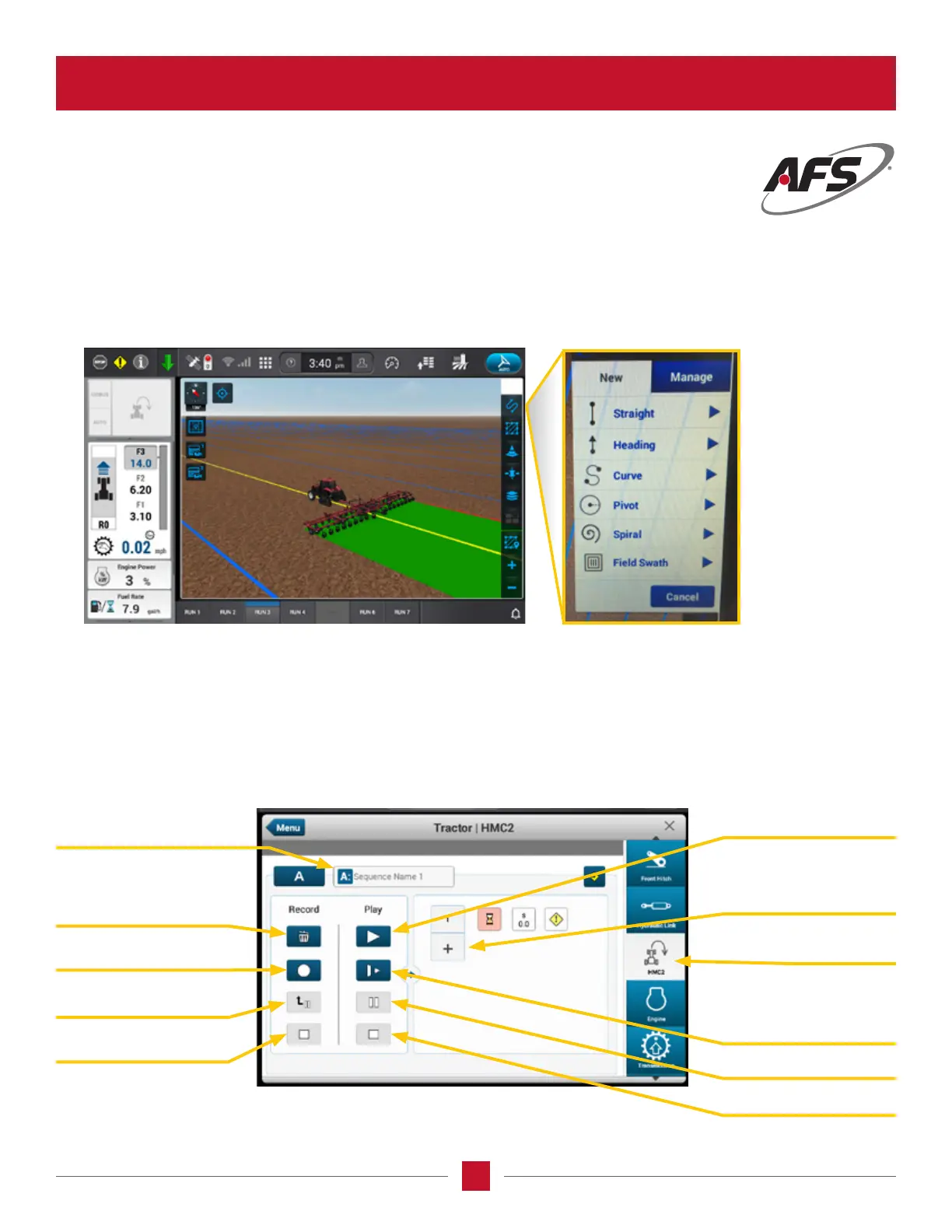
Located in the Run 3 screen is the setting for the auto guidance A/B lines. The operator will click on the Swath
Management “gure S” symbol. This will bring up two choices, New or Manage. The lines will be congured in the
“NEW” tab. The type of line conguration available will appear and the operator will select from the list.
The recording and editing of a sequence is completed through the AFS Pro 1200 display by pressing the HMC wizard on
the right side of the display and the screen shown below will show. The activation or play back of the sequence can be
done on the MultiFunction handle by pressing the Headland engage/step switch. The activation can also be done on the
AFS Pro 1200 display. The editing of a sequence or deletion of a sequence is completed in the AFS Pro 1200 display.
HEADLAND MANAGEMENT CONTROL (HMC)
Sequence Name
Trash
Auto Play
Add Symbol
Record
Manual Play
Pause Sequence
Pause
HMC Wizard
Save
Stop Sequence
NOTE: Manage
choice will allow
the user to
switch between
Auto Guidance
lines within the
same eld.








 To Next Page