39
AFS Pro 1200
™
Display
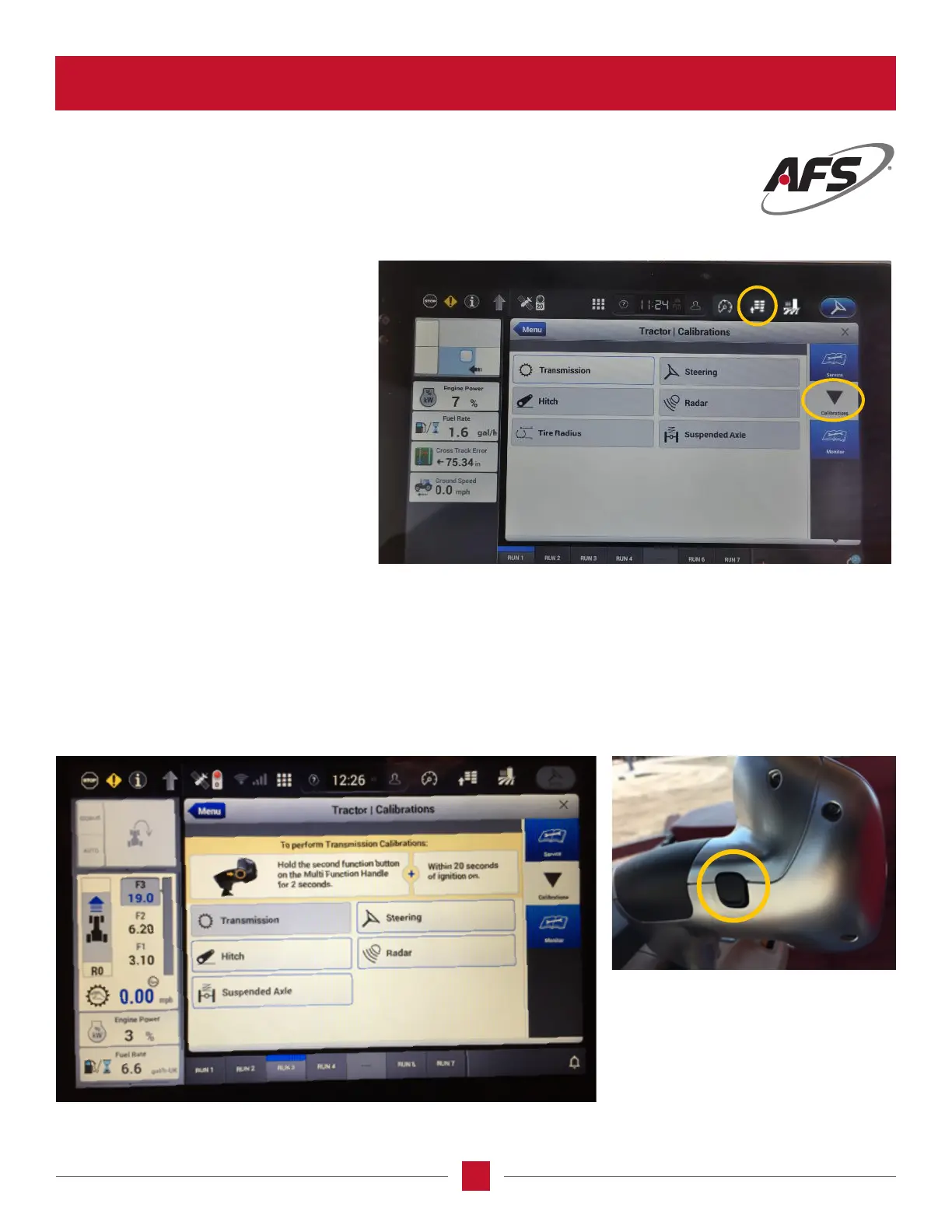
TRANSMISSION CALIBRATION SCREEN
Let’s follow through with an example:
Transmission Start of Calibration
This is the transmission calibration page and follow the instructions at the top of the page. The instructions state
to push the Second Function button with in 20 seconds of starting the tractor. The Second Function button is the
BLACK BUTTON on the front of the MultiFunction handle. This button is also used to start the calibration of the
transmission if pushed within the 20 seconds of start up. Even though the button is pushed within the time frame,
the tractor will still go through the boot up process. The operator will then be sent to the calibration menus, and it
will show the calibration items and should show ready.
To get to the calibration screen, select
Vehicle Settings icon in the toolbar, click
on the Menu Diagnostics and then Vehicle
Diagnostics. Now select the Calibration
Wizard on the right side of the display and
this screen will pop up. Notice it has all
the tractor components which should be
calibrated.








 To Next Page