CASE IH PRO VISION OPERATING SYSTEM GUIDE
8
AFS® Pro 1200
Precision Farming & Guidance
Quick Reference Card
© 2018 CNH Industrial America LLC
12345678-1A
EN
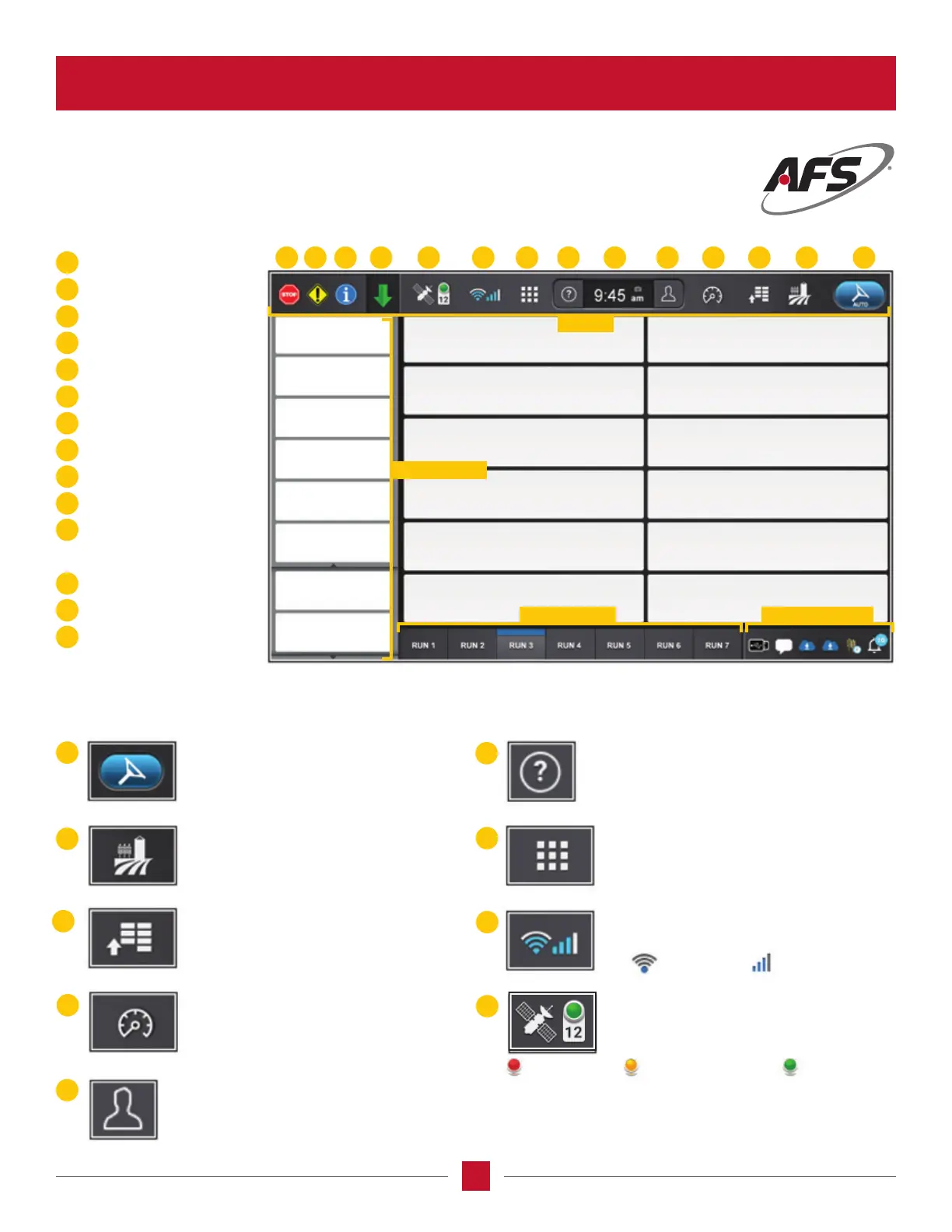
No Position
Guidance Engage
Operations Screen
Vehicle Settings
Vehicle Parameters
User Proles
Clock
Help and Manuals
Application Manager
Connectivity Status
GNSS Status
Work Condition
Faults and Warnings
Information
Yellow Warning
Stop Sign
10
9
8
7
5
4
3
2
1
Introduction to the AFS Pro 1200
™
Display
1
5
3
7
10
12
2
6
9
4
8
11
14
13
The GNSS Status indicator displays
position accuracy and the number of
satellites being tracked.
The Connectivity Status displays current signal
strength of Wi-Fi and cellular connection.
The Application Manager Screen allows access
to individual applications on the display like:
Update Manager, Remote Assistance Service,
Gallery, Radio and Phone.
Help and Manuals Screen provides access to
manuals and videos on the display.
Create or modify user proles.
The Vehicle Parameters Screen
screen displays input and output
values for sensors on your machine.
The Vehicle and Implement Settings Screen
provides setup and diagnostics for your
vehicle, implement, guidance, ISOBUS,
connectivity, and work condition.
The Operations Screen allows you to view
eld information, as well as select your
vehicle and product conguration.
The Guidance Engage function acts as a
guidance status indicator and a button
to engage and disengage autoguidance.
Wi-Fi
Degraded Position
Cellular
Good Position
GETTING TO KNOW THE ICONS
WHAT THE ICONS MEAN
13 12 11 10 9 8 7 6 5 123414
Left-Hand Area
Top Bar
Run Screens Status Area








 To Next Page