35
AFS Pro 1200
™
Display
USING THE AFS PRO 1200 (continued)
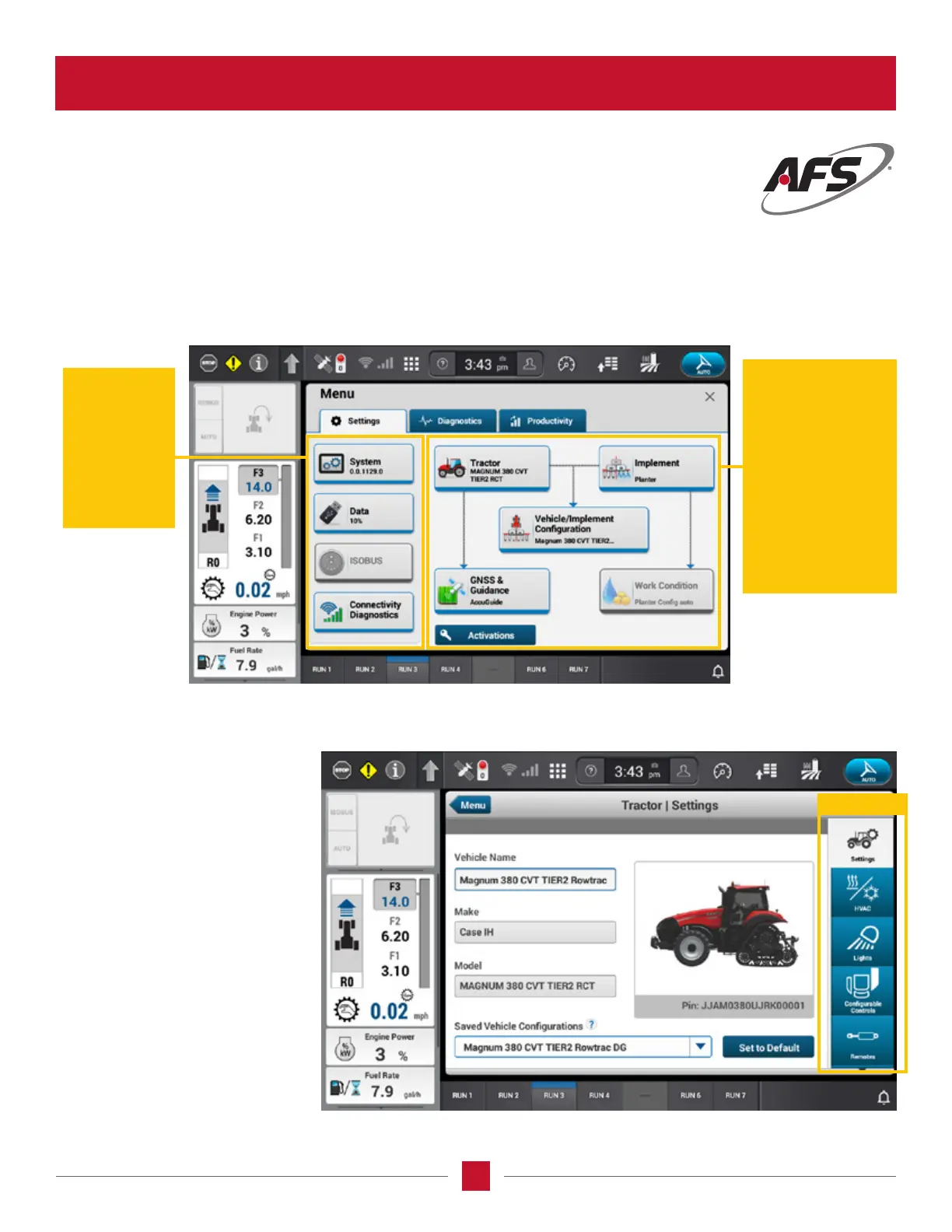
The Settings Menu provides setup and diagnostics for the vehicle systems. When you select any one of these settings on the
left side, there will be a list of Cards on the right side that will lead to each subject.This is the main tractor operating page
and probably the one which the operator will use the most.
Right Side
• Tractor
• Implement
• Vehicle/Implement
• GNSS and
Guidance
• Work Conditions
• Activation
• Help
Left Side
• System
• Data
• ISOBUS
• Connectivity
Diagnosis
In this example selecting the
Settings Menu and then clicking
on the Tractor Card, these are the
Wizards which will show up.
Additional cards can be called
up to be able to adjust tractor
settings and adjustments on
the tractor by clicking on the
wizards to the right side of the
screen. The operator can scroll
through the wizards, select one
by touching the screen, and
make additional adjustments
to the unit.
Wizards








 To Next Page