3-CONTROLSANDINSTRUMENTS
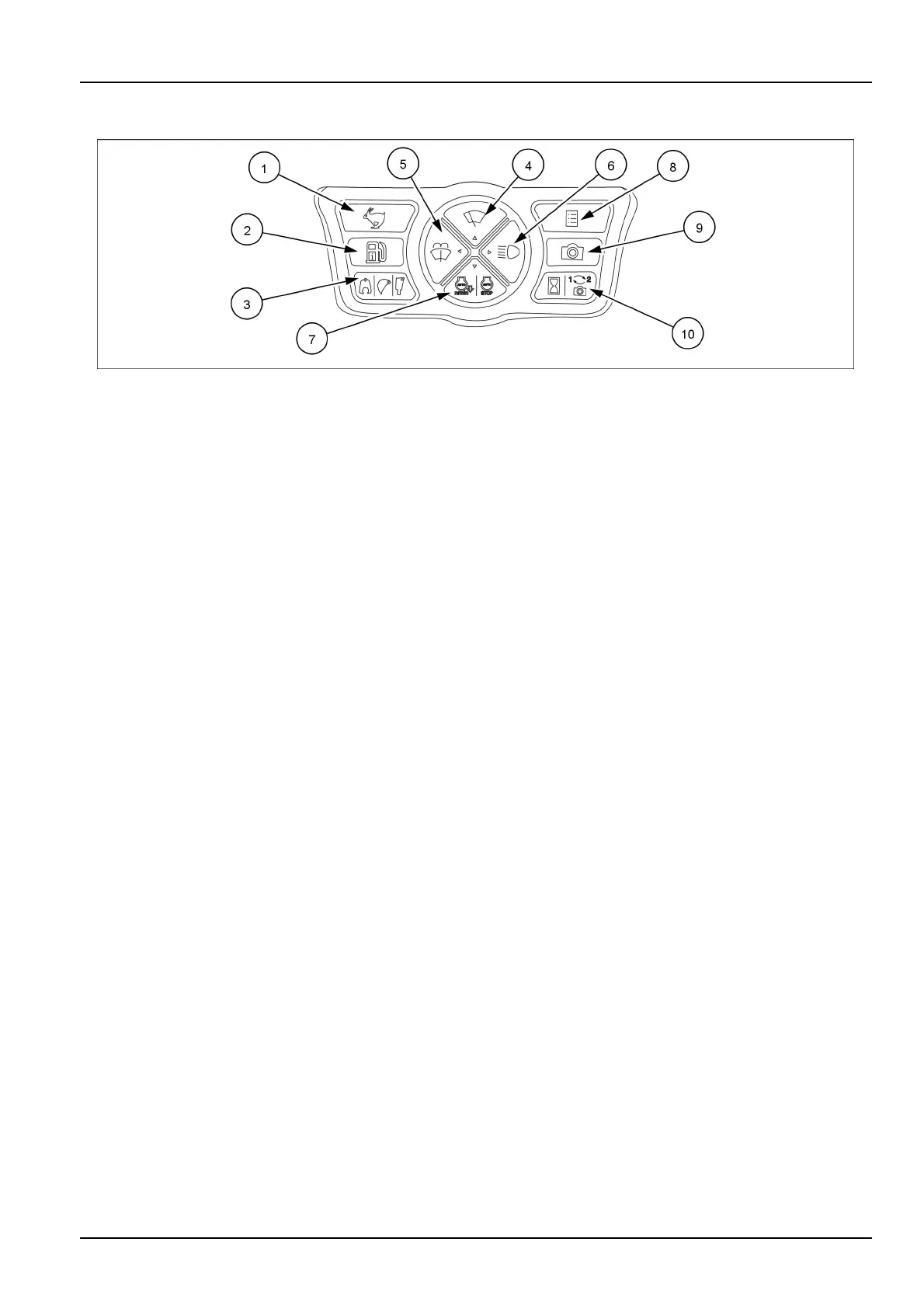
Controlbuttons
SMIL18CEX0535EB6
1.Travelmodeselectbutton
Theselectiontogglesbetweenslowspeedmode
(“Turtle”)andfastspeedmode(“Rabbit”)everytime
thetravelmodeselectorswitchispressed.
NOTICE:performallchangestothetravelmodewhile
themachineisstopped.
Usethe"Turtle"modetotravelonslope,off-roadorsoft
ground.
Usethe“Rabbit”modetotravelonahard,at,maintained
road.
NOTE:theslowspeedmodeisautomaticallyselected
whentheengineisstarted.
NOTE:ifthefastspeedmodeisselectedonthemachine,
itautomaticallyswitchestoslowspeedmodewhenthe
loadincreasesonuphillroad,andautomaticallyreturns
tofastspeedmodeastheloaddecreases.
2.Fuelconsumptionindicatorbutton
Pushtoshowalternatelyonthedisplaythecumula-
tiveaveragefuelconsumptionorthecumulativefuel
consumptionamount.
-Cumulativeaveragefuelconsumption:displayedin
L/hr.
-Cumulativefuelconsumption:displayedinL.
Pushthefuelconsumptionindicatorbuttonfor3sec-
ondstoresetthecumulativeaveragefuelconsump-
tionandcumulativefuelconsumptionamount.
3.Attachmentselectionbutton
Whenusingahydraulicattachment,pressthebutton
tosettheauxiliaryhydrauliccircuittothepatternthat
properlymatchesthetypeofattachmentused.
Setthebreakermodeforusingasingleactinghy-
draulicattachmentsuchashydraulicbreaker.The
breakericonappearsonthedisplay.
Setthecrushermodeforusingadoubleactinghy-
draulicattachmentsuchashydrauliccrusher.The
crushericonappearsonthedisplay.
NOTICE:beforechangingthesettingoftheauxiliary
hydrauliccircuit,stopoperationandsetthemachine
inparkingposition.
4.Wiperbutton
Thebuttonsetsthreeoperatingconditions:“Off”,"In-
termittent"and"Continuous".
Whenthebuttonispressedtooperatethewiperinter-
mittently,(I)isdisplayedonthemonitor.
Whenthebuttonispressedagaintooperatethewiper
continuously,(II)isdisplayedonthemonitor.
Whenthebuttonispressedagaintostopthewiper,
“Off”isdisplayedonthemonitor.
NOTICE:Donotoperatethewiperwhenthefront
glassisdry.Doingsocoulddamagethewiper.
5.Windshieldwasherbutton
Pressandholdthewindshieldwasherbuttontoacti-
vatethewiperandthewashertocleanthewindshield.
Releasethebuttontostopthecleaningoperation.
NOTICE:Donotoperatethewasherwhenthereser-
voirisempty.Doingsocoulddamagetheelectric
pump.
6.Workinglightsbutton
Presstheworkinglightsbuttontoturnontheworking
lightsonthefrontofthemachine.
Pressthebuttonagaintoturntheworkinglightsoff.
7.Idlemodebutton
Pressthebuttontoselecttheautomaticcontrolmode
ofengineidlingorstopping.
Ifautoidlemodeisselected,theenginespeeddrops
automaticallytolowidleifanyleverorpedalisnot
operatedfor5s.Theautoidleiconappearsonthe
display.T orestoretheenginespeed,operateany
controllever,orturntheenginespeedthrottle.
Ifautostopmodeisselected,themessageIDLE
SHUTDOWNisdisplayed,analarmsounds,and
theenginestopsautomatically10sthereafterifthe
enginespeediskeptat1200RPMorbelowandthe
gatelockleveriskeptinlockpositionfor3min.The
autostopiconappearsonthedisplay
Ifthesequenceofautoidleandautostopisselected,
autoidleactivatesasdescribedbefore,andifthegate
lockleverisalsosettothelockposition,idleshutdown
eventuallyactivatesafter3min.Thecombinedicon
appearsonthedisplay.
NOTE:Torestarttheengine,turnthestarterkeyto
OFFpositionandthenstarttheengine.
3-35



 To Next Page