3-CONTROLSANDINSTRUMENTS
Userinformationmode
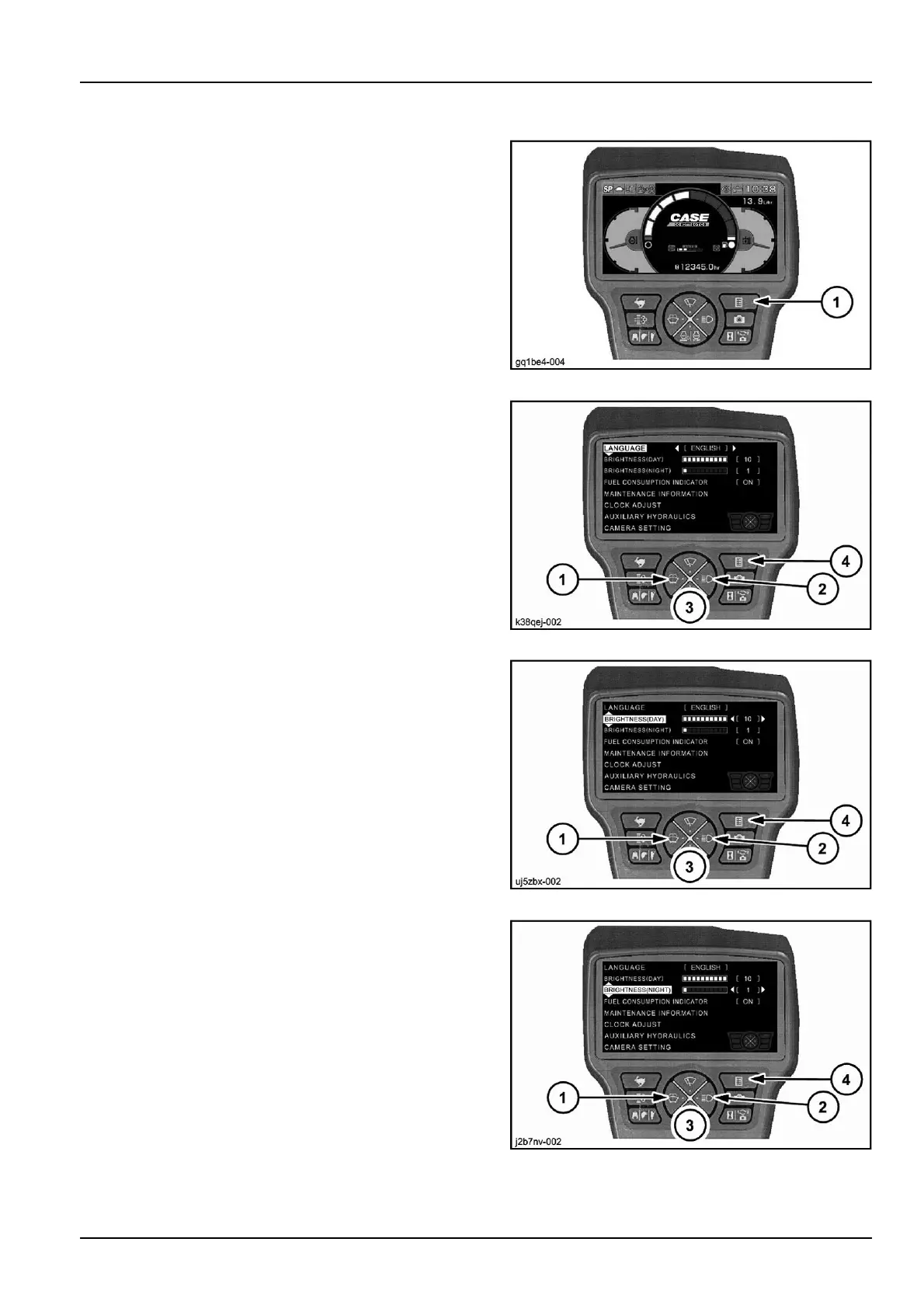
Pressthebutton(1)toaccesstheuserinformationmode
ofthedisplay.
Pressthebutton(3)asindicatedintothenextpicturesin
ordertoscrolldowntotheintendedsettingtab.
GQ1BE4-004Z12
LANGUAGEsetting
Thersttaboftheuserinformationmodeallowstosetthe
languageofthemessagesonthedisplay.
Pressthebutton(1)or(2)toselectthedesiredlanguage.
Ifothersettingsareneeded,pressthebutton(3)toscroll
downtothenexttab.
Otherwise,pressthebutton(4)toconrmtheselection
andtoresettheoperatingmodeofthedisplay.
K38QEJ-00213
BRIGHTNESS(DAY)setting
Thesecondtaboftheuserinformationmodeallowstoset
thebrightnessofthedisplayindaylight.
Pressthebutton(2)toincreasethebrightnessofthedis-
play,pressthebutton(1)todecreasethebrightnessof
thedisplay.
Ifothersettingsareneeded,pressthebutton(3)toscroll
downtothenexttab.
Otherwise,pressthebutton(4)toconrmtheselection
andtoresettheoperatingmodeofthedisplay.
UJ5ZBX-00214
BRIGHTNESS(NIGHT)setting
Thethirdtaboftheuserinformationmodeallowstoset
thebrightnessofthedisplayinlowambientlighting.
Pressthebutton(1)or(2)tosetthebrightnessofthe
displayasdescribedintheprevioustab.
Ifothersettingsareneeded,pressthebutton(3)toscroll
downtothenexttab.
Otherwise,pressthebutton(4)toconrmtheselection
andtoresettheoperatingmodeofthedisplay.
J2B7NV-00215
3-37



 To Next Page