OTHER RECORDING FUNCTIONS
141
1.
In a REC mode, press [MENU].
2.
Select the “REC” tab, select “Memory”, and
then press [왘].
3.
Use [왖] and [왔] to select the item you want to
change, and then press [왘].
4.
Use [왖] and [왔] to select the setting you
want, and then press [SET].
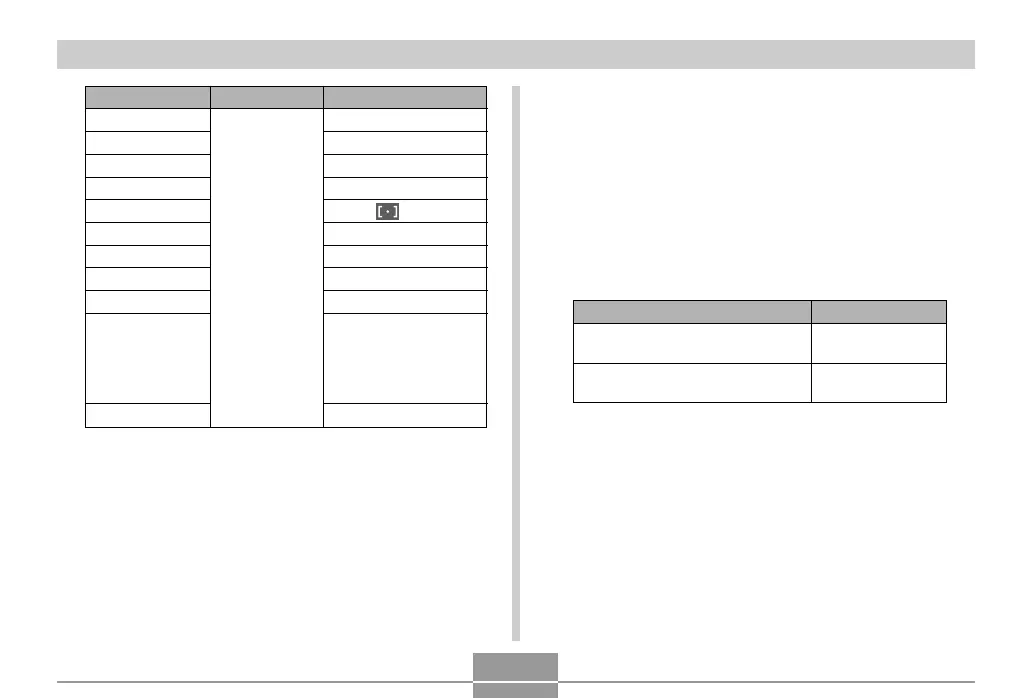
To do this:
Turn on mode memory so settings
are restored at power on
Turn off mode memory so settings
are initialized at power on
Select this setting:
On
Off
* Only the optical zoom position is remembered.
Function
Flash
Focus
White Balance
ISO
AF Area
Metering
Self-timer
Flash Intensity
Digital Zoom
MF Position
Zoom Position*
On
Setting when
camera is
turned off
Off
Auto
Auto
Auto
Auto
Spot
Multi
Off
0
On
Last Auto Focus
position that was in
effect before you
switched to manual
focus
Wide


 To Next Page
 Loading...