98
Listening to the EZ•FM as a BGM/
Stopping the EZ•FM
Suspends/stops the EZ
•
FM apps. Even after suspending the
EZ
•
FM apps, you can listen to the EZ
•
FM as a BGM.
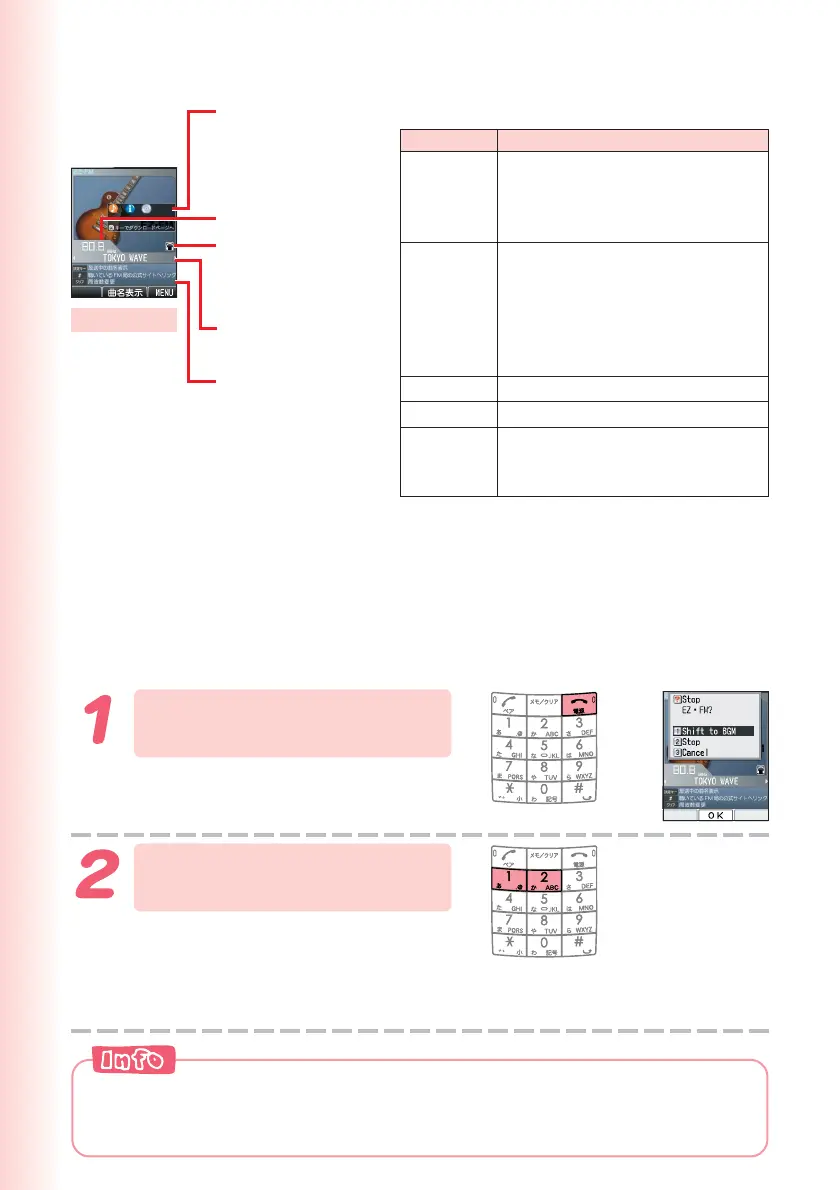
Press F on the EZ
•
FM
screen.
Press 1 (Shift to BGM)
or 2 (Stop).
:Although the EZ
•
FM apps
pauses, you can continue
listening to the EZ
•
FM.
Stop : Stops the EZ
•
FM.
■ Viewing and Operating the EZ•FM
Icons appear if
downloadable
information is
provided.
Displaying
changeover
speaker/earphone
Radio station/Song
title
Main Operations:
Key Operation
s
C → s
u / g
d / f
F
Switches radio stations.
*Press 1 to 9 to switch to a
radio station which is set to each
key.
Tunes in on the station by 0.1 MHz.
*Press s for more than one
second and tuning starts
automatically.
Press 1 to 9 to input the
radio frequency directly.
Increases the volume.
Decreases the volume.
Stops EZ
•
FM.
*Use j to select “Stop,” and then
press c (OK).
Banner
Radio frequency
Shift to
BGM
EZ
•
FM apps automatically stops after 2 hours at the time of purchasing.
You can change the setting of “ラジオ自動終了” (stopping radio
automatically) in “ラジオ機能設定”(radio function/setup).
EZ
•
FM screen


 To Next Page