9.4 Automated acquisition
Once the START button is pressed, the DRS will automatically perform the following steps:
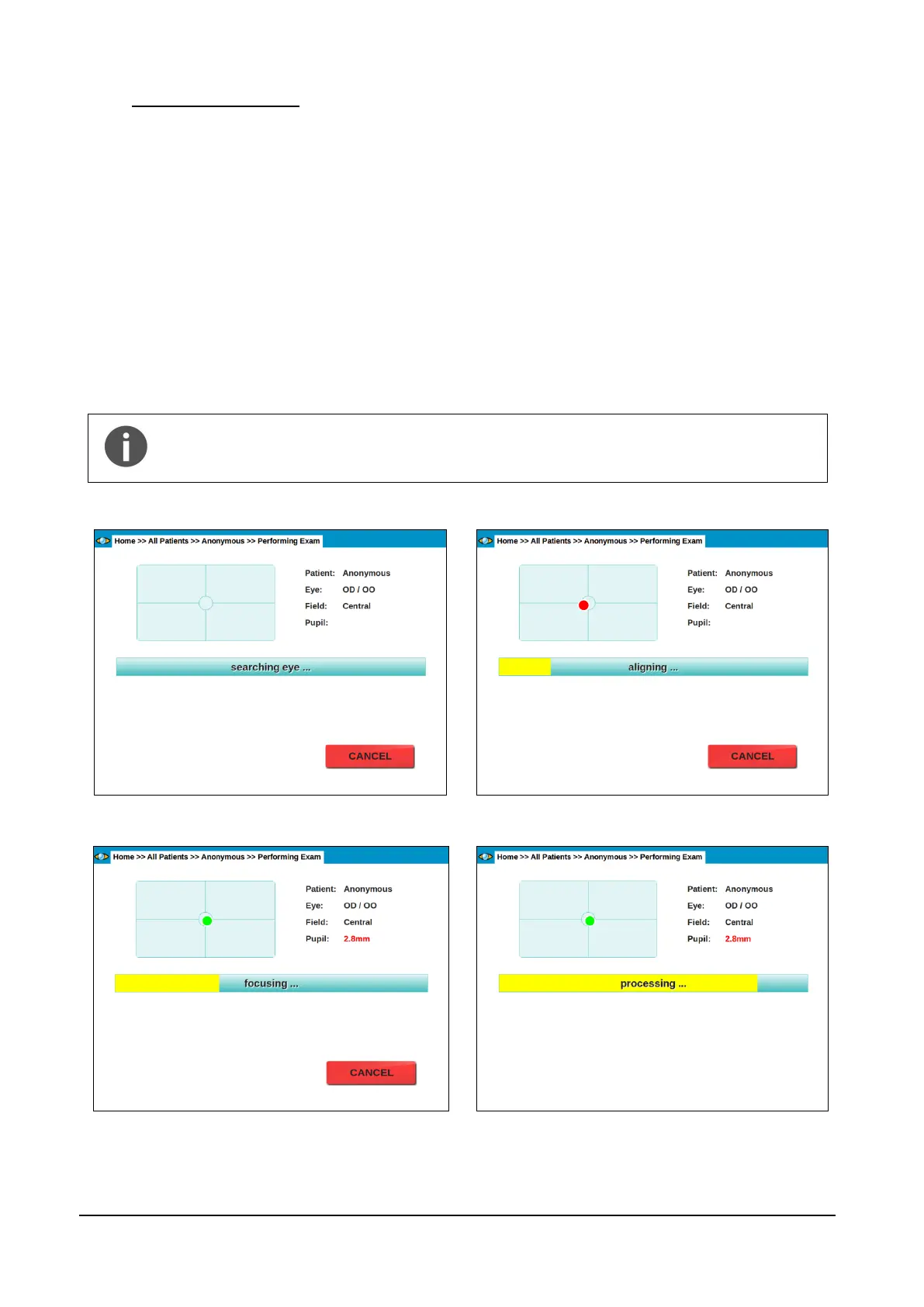
a. Move the optical head to locate the patient’s pupil (see Figure 10);
b. Move the optical head to center the patient’s pupil to the front lens (see Figure 11); the
system will also display the pupil current diameter and which eye is being acquired; the red
circle in Figure 11 represents the pupil and becomes green when proper centering is
achieved.
c. Perform auto-focus (see Figure 12);
d. Capture an image, by flashing the retina. This step involves also automatic tuning of the
flash level;
e. Store the image in the local hard drive (see Figure 13);
f. In case of acquisition of both eyes and/or multiple fields, the acquired images can be
displayed before proceeding to the next one, depending on the settings (see par. 14.2).
At any time during the above sequence it is possible to stop the acquisition process
by pressing the CANCEL button. In case the auto-alignment process fails, manual
alignment is possible: see par. 9.5 below for details.
Figure 10 - Eye search in progress
Figure 11 – Auto-alignment in progress
Figure 12 - Auto-focus in progress
Figure 13 - Image processing and saving in progress



 To Next Page