page 43www.CentSys.com
CONTROLLER FEATURES SECTION 25
MTRM gate
FIGURE 28
Mechanical lip on
Master motor (MTR M)
gate engages with
Slave motor (MTR S) gate
With PCM, Master motor (MTR M) gate continues
closing, pushing the Slave motor (MTR S) gate with it
Line of gates when closed
FIGURE 29
If Short Stop is corectly set, PCM
will cut o when gates reach
the closed position
Master motor (MTR M)
Slave motor (MTR S)
Line of gates when closed
If the ‘Short Stop’ distance is correctly set, the Master Gate will engage with the
SlaveGatesucientlybeforetheclosedpositionandviathePCM,pushthetwo
gates into the fully closed position, but not past it.
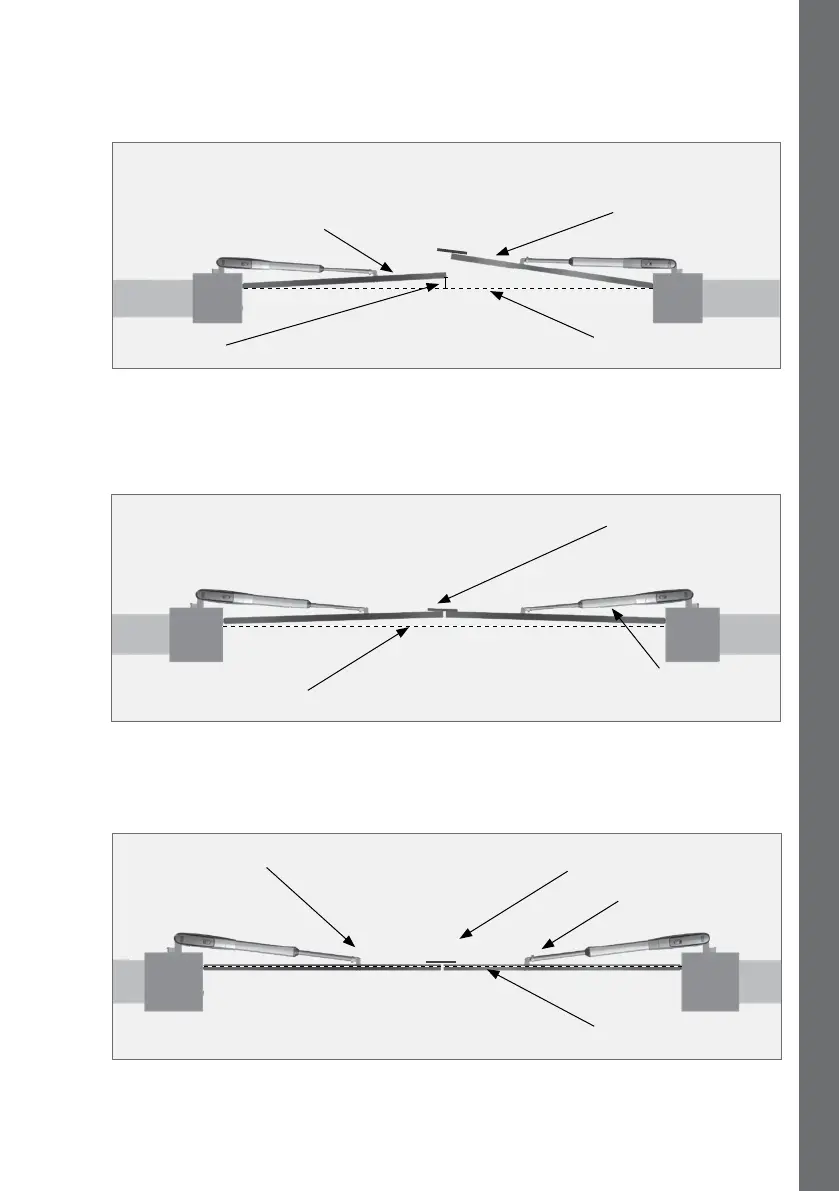
FIGURE 27
Master motor (MTR M)
gate continues to close
Line of gates when closed
Short Stop
Slave motor (MTR S) gate stops
slightly before closed position
To ensure that the gates do not close past their desired end point, the Slave Gate
against which the Master gate with the mechanical lip pushes, can be preset to
stop slightly short of its closed position. This is referred to as the ‘Short Stop’
distance.



 To Next Page