22
1
3
2
4
76
5
1
3
2
76
5
4
1
3
2
76
5
4
4
4
43
2
1
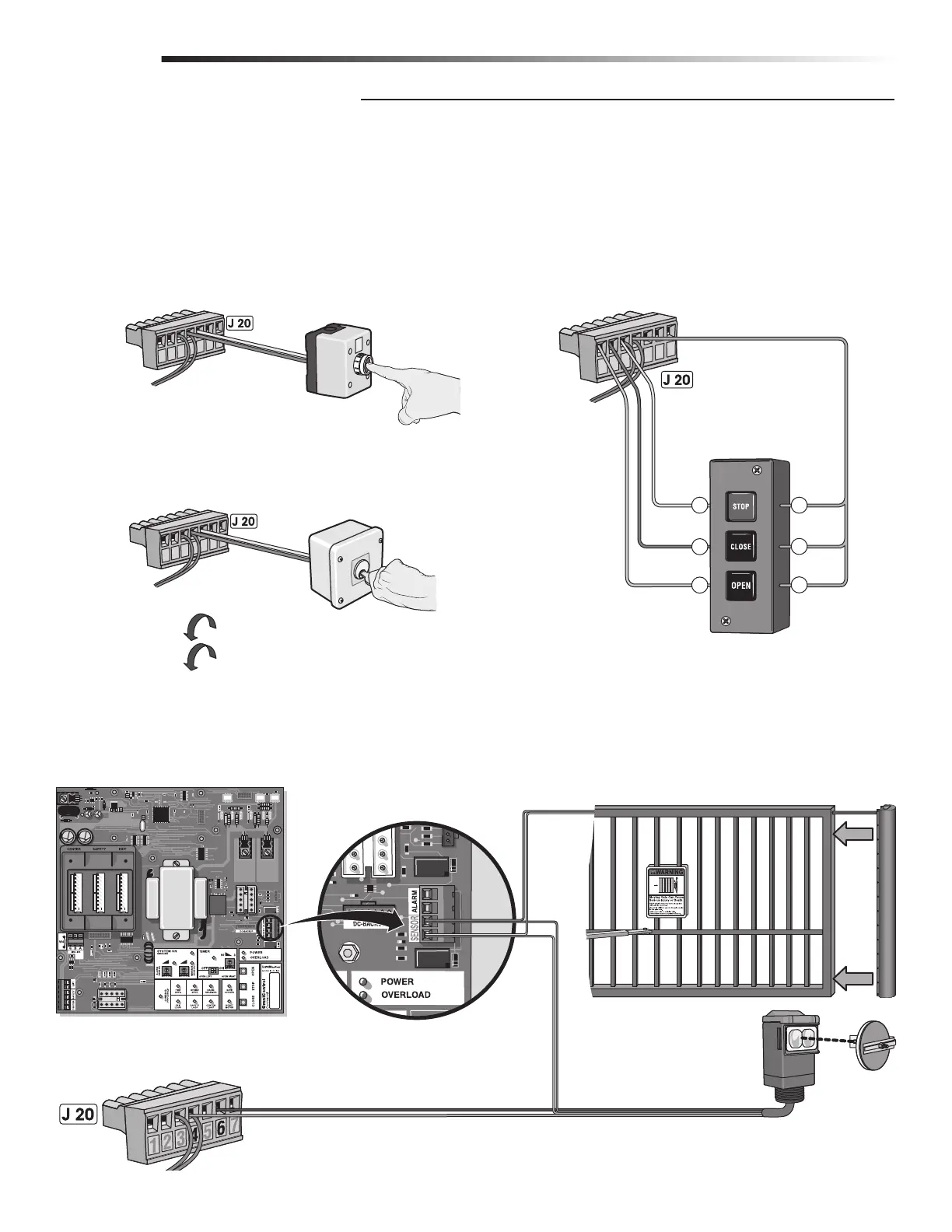
Manually Operated DC2000™ Devices
Manual external devices should be dry-contact which do not consume any current like push buttons or a key switch.
Key switch is for property owner’s emergency access ONLY. DO NOT USE FOR AN EMERGENCY FIRE/POLICE KEY ACCESS.
Contact your local Fire/Police municipalities for more information on correct Fire/Police emergency key access.
DC2000™ Entrapment Protection Devices
It is recommended using separate entrapment protection devices to maintain gate safety when the DC2000™ is needed for any reason.
The entrapment protection devices connected to the OmniControl™ board and surge suppressor WILL NOT protect the gate when there
is a AC power failure and the DC2000™ is used.
Com
N.O.
N.O.
N.O.
Com
Ground
+12 Vdc
Com
OmniControl™ Board
Sensor Connection
Manual One-Button
Push and HOLD button to Open.
Push button again and HOLD to Close.
3 Edge Sensor
12 Vdc Failsafe
Photoelectric Sensor
Manual 3-Button
Push and HOLD a button to operate.
Manual Key Switch
(See Accessories for part number.)
Failsafe Photoelectric Sensor: If a photoelectric sensor is not working, loses power or
photoelectric sensor is blocked, then the photoelectric sensor will stop all gate operation.
WIRING
DC2000™ DEVICE WIRING
Turn and HOLD key to Open.
Turn key again and HOLD to Close.







 To Next Page