30
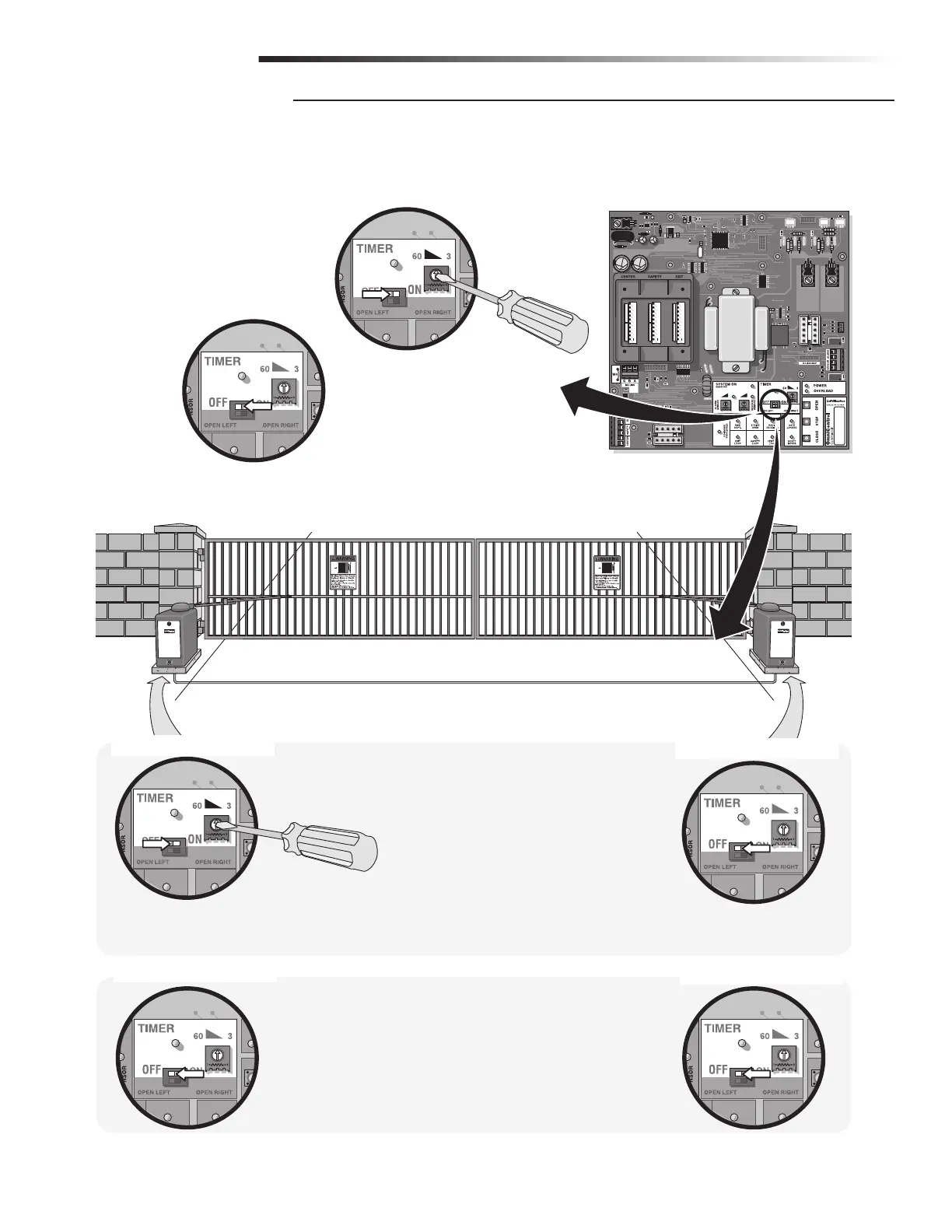
To use the automatic close for the gate system the
timer switch should be put in the “ON” position.
Set timer 3 to 60
seconds.
Primary Board
Secondary Board
Primary Board
Secondary Board
Single Operator
Primary/Secondary Operators
Operators need to be connected by M/S LINK. See Linking Primary/Secondary page 19.
With Timers ON
1. Turn Primary timer ON.
2. Turn Secondary timer OFF.
3. Use Timer on Primary Board Only.
(3 to 60 seconds)
NOTE: If a secondary photoelectric sensor
device is NOT used when the timer is ON, the
gate WILL hit a vehicle obstructing the gate
path before reversing during the close cycle.
With Timers OFF
1. Turn BOTH timers OFF.
NOTE: Push button once to open gate,
push button again to close gate.
Primary/Secondary control boards are interchangeable.
M/S LINK
To use the push close command,
the timer should be
switched to the
“OFF” position.
Push button
once to open
gate, push
button again to
close gate.
SETTING THE TIMER
ADJUSTMENTS







 To Next Page