3 1 3
CENTER SAFETY EXIT
CENTER SAFETY EXIT
FIRE
DEPT.
1 3
STRIKE
OPEN
RADIO
RECEIVER
TIMER
SYSTEM ON
EXIT
LOOP
ALARM
SENSOR
REVERSE
SENSOR
OPEN
STOP CLOSE
SAFETY
LOOP
CENTER
LOOP
GATE
LOCKED
60
POWER
OVERLOAD
OFF
W4
OPEN LEFT
DC-BACKUP
ALARM SENSOR
OPEN RIGHT
3
SENSORS
RESET
MOTOR
1 3
1 3
COMMAND
PROCESSED
ON
G B
MS LINK
A
MADE IN USA
CLASS I, II, III, IV
D
C
2
0
0
0
H
a
r
n
e
s
s
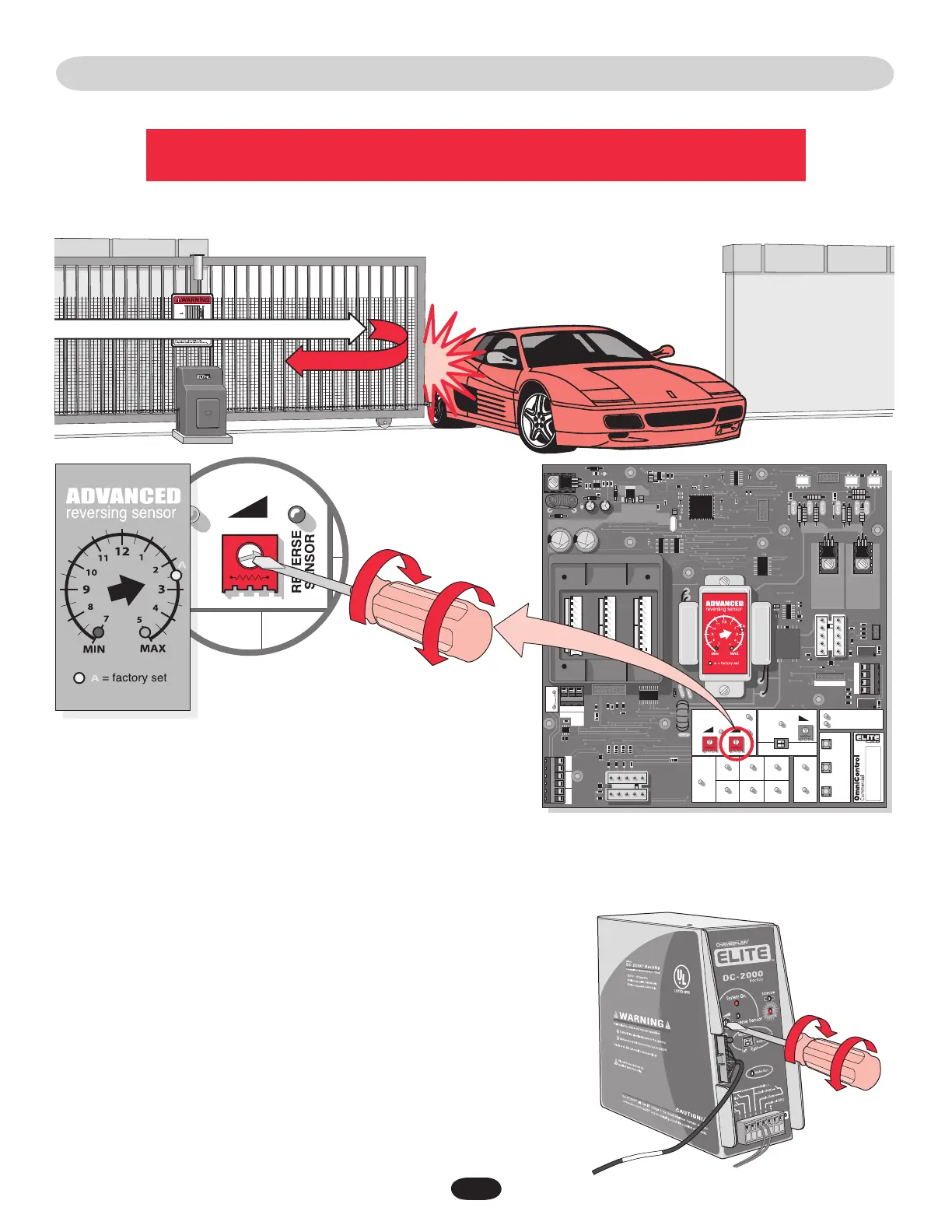
ADJUSTING REVERSING SENSOR(S)
The level of reverse sensitivity depends on the weight of the gate
and the condition of installation.
Sensor is set too sensitive = if the gate stops in midcycle or reverses by itself.
Sensor is not set sensitive enough = if the gate hits an object and does not stop or reverse.
Adjust the “Reverse Sensor” on the control board. Alarm Sensor does not need to be adjusted except where noted below.
30
Maximum
Sensitivity
Maximum
Sensitivity
Minimum
Sensitivity
Minimum
Sensitivity
DC2000™ Reverse Sensor
The DC2000™ has a separate reverse sensor that will need to be adjusted. The 120Vac
operator power needs to be turned off and the DC2000™ should have the “Charge OK”
LED ON to make the adjustment.






 To Next Page