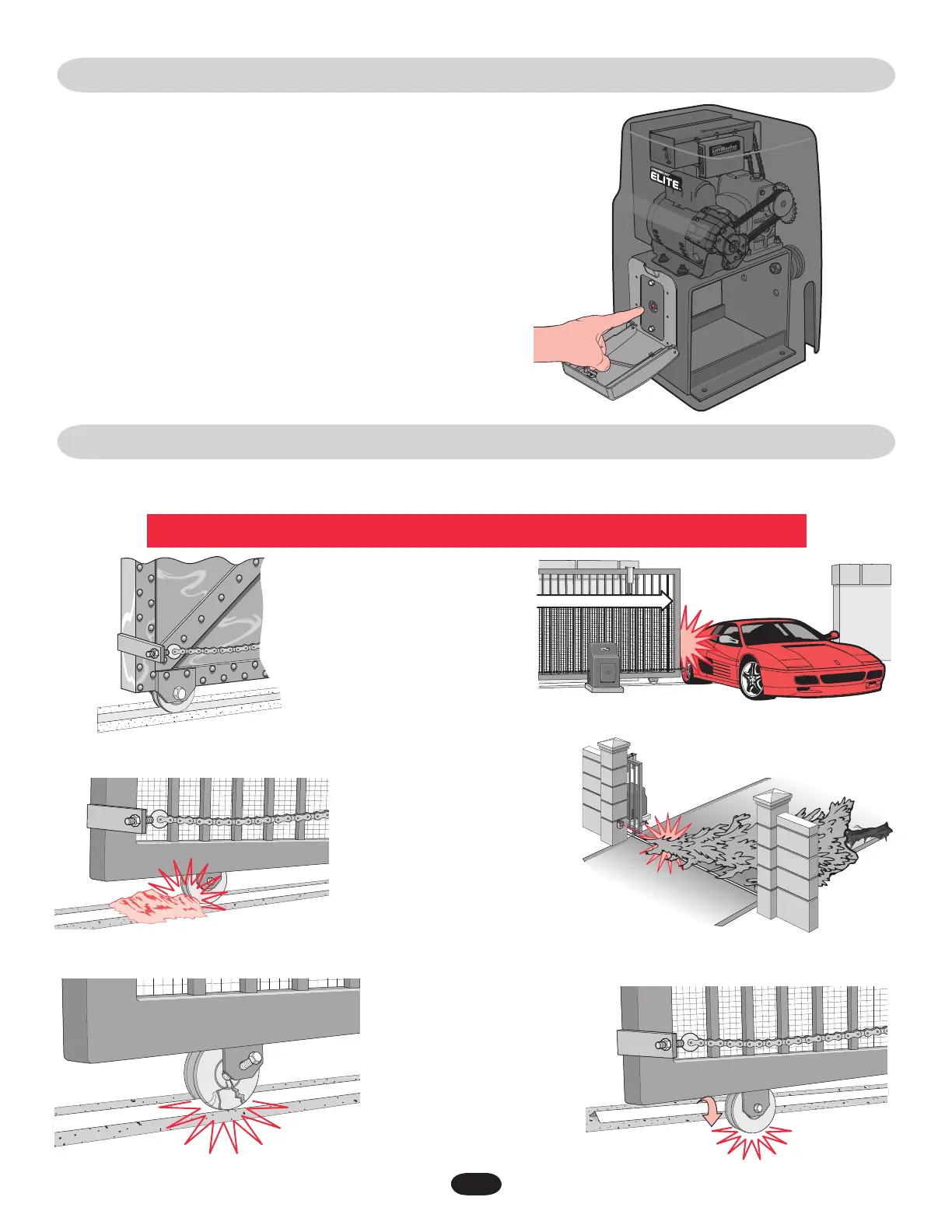
BUILT-IN RESET SWITCH
AUDIO ALARM
When the gate operator’s audio alarm has been tripped (see below), the reset
switch must be pushed for the operator to function again.
The reset switch will shut off an activated audio alarm and reset the operator
to function again.
If the audio alarm goes off, always check the gate area for:
• Obstructionsinthegatepath.
• Damagetothegateand/orgateoperator.
Press the built-in reset switch to shut off alarm and reset operator (see above).
Pressing the reset switch will stop a moving gate during
a normal open/close cycle, like a stop button. The
operator does NOT need to be reset after doing this.
The alarm could be tripped when one of the following happens twice consecutively,
then the alarm will sound for 5 minutes or until the reset switch is pressed!
3232
The gate is TOO heavy.
An externally wired entrapment protection device has been
triggered twice. (Photoelectric sensor blocked)
The gate has one or more broken axles or wheels.
The gate wheel is off the gate rail.
The gate is hitting a wall or vehicle.
Debris is on the gate's track such as mud, rocks, dirt, etc.






 To Next Page