Installation Edge/Edge Blanket
2-14
Clean the Corner Photosensors
Since they look up, dust can easily settle
on the corner photosensors during transit. To
ensure proper operation, clean them before
proceeding.
Required Tools
soft, lint-free cloth
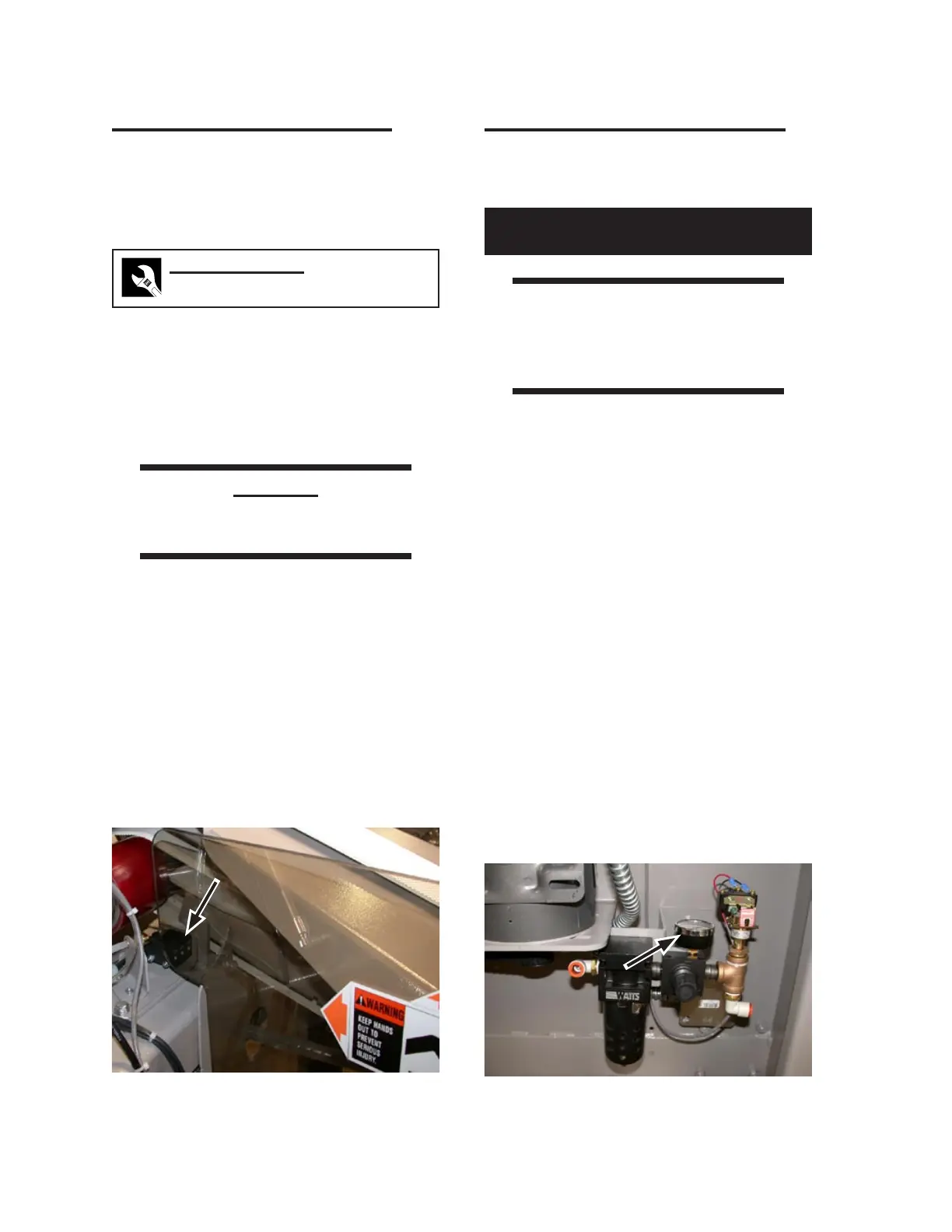
Locate the corner photosensors behind
the front Plexiglas guards: Three are on
the left side (Figure 2-24) and three are
on the right.
Clean with a soft, lint-free cloth.
CAUTION
Do not attempt to START the
machine at this time.
1.
2.
Figure 2-24: The corner photosensors are located
at the front center of the unit.
Compressed Air Supply Checkout
Check the primary air pressure regulators and
make sure each has the correct initial setting.
Perform only when the unit is OFF
with power disconnected.
WARNING
Wear protective eyewear
when working with
compressed air components.
Move the left side of the unit and open the
left endframe door.
Turn ON the compressed air supply to
the unit.
Wait a few seconds and then, in the left
endframe, check the incoming air pressure
gauge (Figure 2-25) and make sure it is set
to 80 psi (550 kPa).
Close and secure the left endframe door.
Turn power ON at the main disconnect
switch.
Press the green station Start button.
1.
2.
3.
4.
5.
6.
Figure 2-25: Main/high air pressure regulator in
left endframe.


 To Next Page