Installation Edge/Edge Blanket
2-16
Safety Device/Control Function
Checkout
The machine can now be energized, checked
for proper safety device and control function, and
checked for correct operation. This includes:
Safety Device Check
CHI Panel Function Check
NOTE: Wo r k w ith a not h er
person. The “buddy system” is
the safest system.
All test procedures should be handled by at
least two qualified people. Using the “buddy
system” decreases the risk of an accident.
WARNING
Do not place the machine
into service until all controls
are functioning properly.
Failure to follow this rule
may cause serious injury
to operators or
maintenance personnel.
•
•
Safety Device Check
Make sure power is turned ON at the main
disconnect switch and the compressed air
supply is ON.
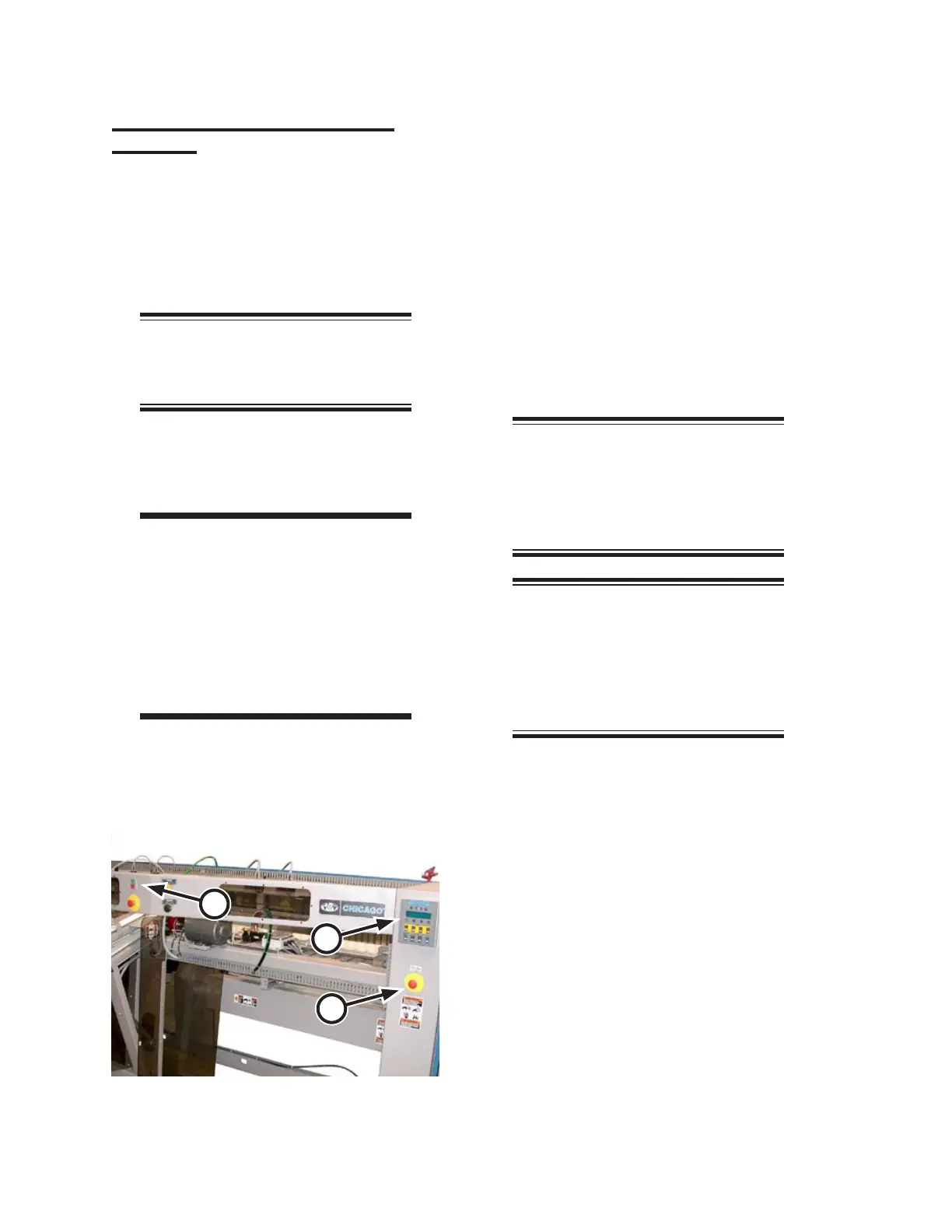
Go to the front and press the green Start
button (Figure 2-28, A). All rotating and
conveying elements of the feeder should
operate.
The CHI panel (B) will display the start-up
diagnostic messages. The main air valve
will open and supply compressed air to
the unit.
NOTE: During normal operation,
the START/STOP lamp glows
steadily. The lamp flashes when a
red operator STOP button or a red
safety STOP button is pressed.
NOTE: If the unit is part of a
line with the Interconnected Stop
Circuit option, turn power ON at
the main disconnect switch to
each of the other machines in the
line.
There are six red safety STOP buttons (Fig
-
ure 2-28, C) arrayed around the unit, four
in front, two in back:
With the unit running, test each button
in turn to make sure the machine comes
to a complete stop and compressed air
pressure is released.
The CHI Panel should display the loca
-
tion of the depressed STOP button.
These are twist-lock buttons so turn
each one clockwise to release it before
attempting to start the unit again.
Restart the unit after each red safety
STOP button test.
1.
2.
3.
4.
•
•
•
•
Figure 2-28: The green START button is located at
the front of the unit.
A
B
C


 To Next Page