Edge/Edge Blanket Operating Guidelines
3-5
Pieces marked by pressing the TEAR button
will be rejected onto an area separate from items
rejected with the STAIN button.
These buttons should be pushed after the stained
or torn flatwork is spread out but before it is laid
down onto the discharge ribbons. The programming
for discharge locations takes place at the folder.
CHI Panel (E):
Allows fully automatic operation of the unit
under a wide range of conditions. For a complete
description of the CHI Panel’s functions, refer to
the CHI PANEL OPERATION bulletin.
If the machine is ChiLinc enabled, there will
be two additional buttons just beneath the CHI
Panel. For information regarding the use of these,
refer to the
CHILINC manual, Using ChiLinc
on the Production Floor chapter, Using the CHI
Panel section.
Interconnected Stop Circuit (option)
indicator lights (F):
If the unit has the optional Interconnected Stop
Circuit system installed, lights indicate whether
an interlock on a unit in the line is open.
If all lights on all units are green (SYSTEM
READY), the line is operational.
If one unit light is green while the other unit(s)
light’s are red (SYSTEM E-STOP), the unit with
the green light has an open interlock. Check it’s CHI
Panel for location.
Pacing Light (option) (G):
Gives operators a visual reference to help
assure consistent linen processing.
The green light glows steady to indicate the
target feeding rate for the previous hour was
met. The red light flashes to indicate the target
rate was not met.
Use the CHI Panel to set the target pieces per
hour. For more information, refer to the CHI
PANEL OPERATION bulletin, Adjustments
section, CHI Adjustments procedure.
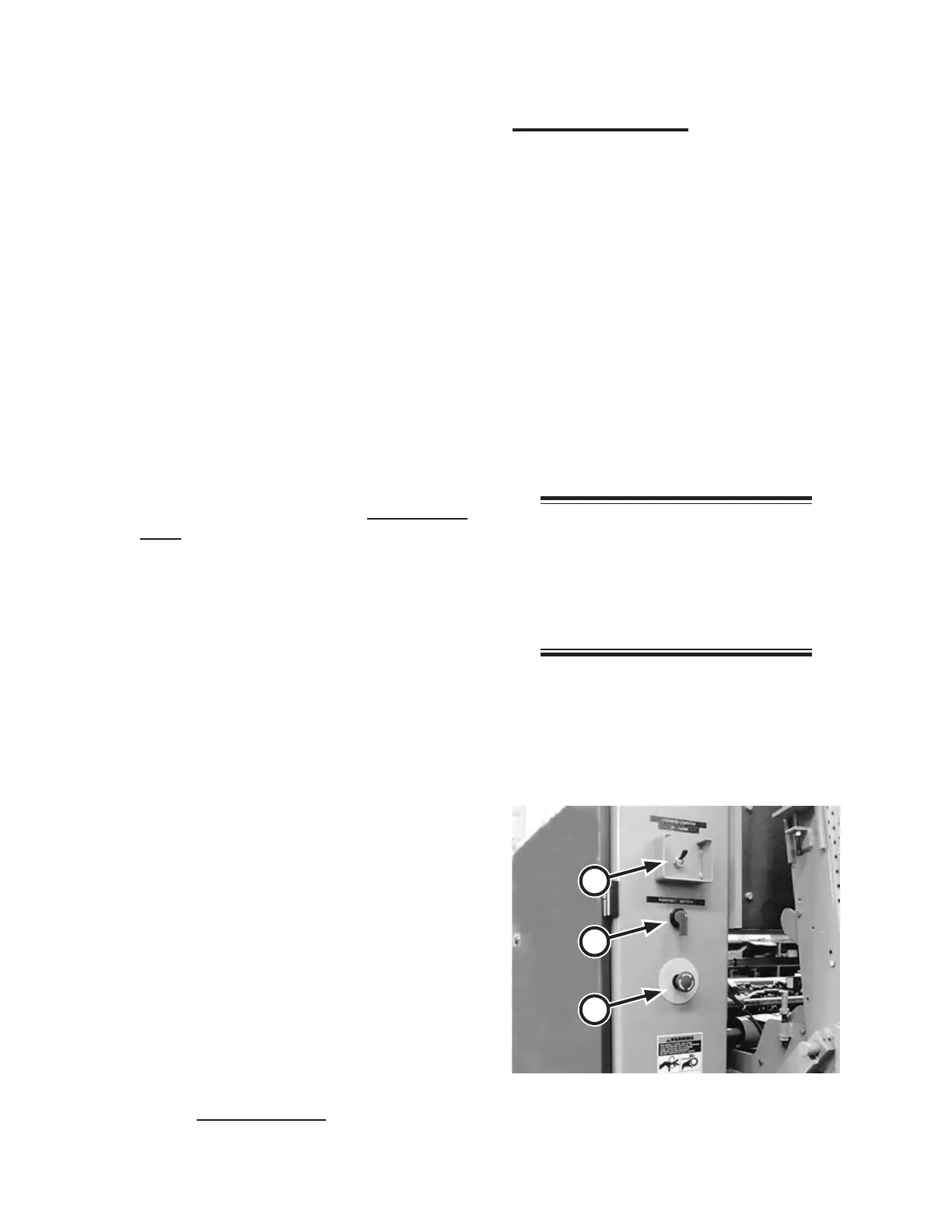
Right Rear Controls
Controls at the right rear of the unit include
(Figure 3-8):
DISCHARGE CONVEYOR UP/DOWN
switch (A)
EASI-GLIDE FORWARD-OFF-
REVERSE switch (B) (option)
Safety STOP button (C)
DISCHARGE CONVEYOR UP/DOWN
switch (A):
Moves the discharge conveyor up and down.
When the switch is in the UP position, the piece
discharge conveyor raises to allow for hand
feeding small pieces.
NOTE: Be sure to engage the
RED exit conveyor safety latch
when the conveyor is in the UP
position and to release the latch
before trying to move the conveyor
to the DOWN position.
When the switch is in the DOWN position,
the discharge conveyor lowers to allow for clip
feeding large pieces.
•
•
•
Figure 3-8: Test the red safety STOP buttons
located around the unit.
A
C
B


 To Next Page