3-66
Cisco Aironet 1552 Series for Hazardous Locations Installation Guide
Chapter 3 Installing the 1552 Series Access Points in Hazardous Locations
Installation Details for the 1552SA and 1552SD Access Point
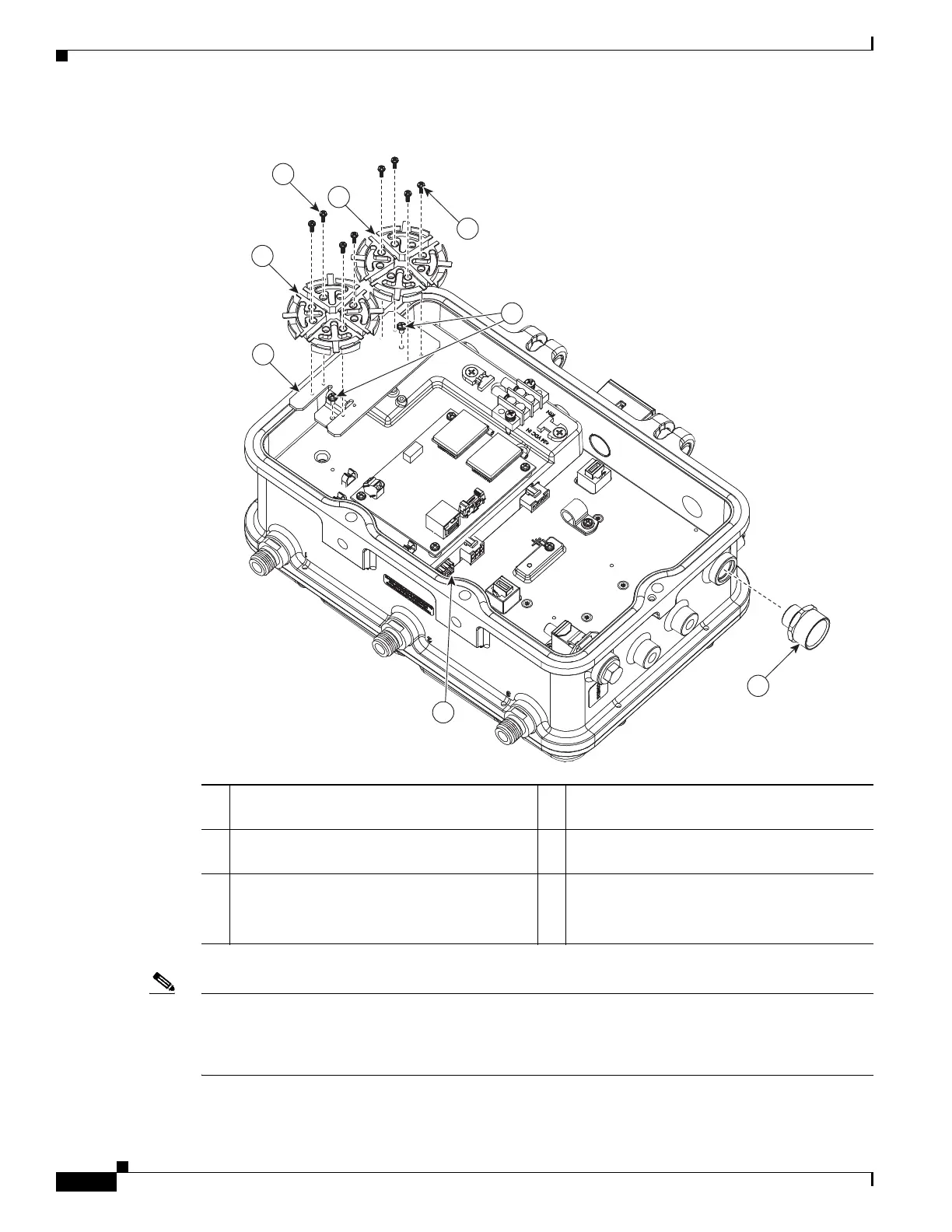
Figure 3-15 Fiber-Optic Cable Kit Components (1552SD shown)
Note Fiber and power can both be routed through the AC/DC port. If fiber and power are coming from the
same area externally, route both through the AC/DC port. If fiber and power are coming from different
areas externally, route them through one of the recommended junction boxes.
The rest of this procedure will show routing through an ETRT50 junction box.
1 Reel bracket 2 Two screws for attaching reel bracket to AP
(#4-40 x .25 in)
3 Two fiber reels 4 Eight screws, four to attach each reel to
bracket (#2-56 x .31 in)
5 1/2-NPT port adapter from the kit.
Do not use in hazardous location
deployments.
6 SFP module slot
3
3
1
6
4
4
5
2
333826












 To Next Page