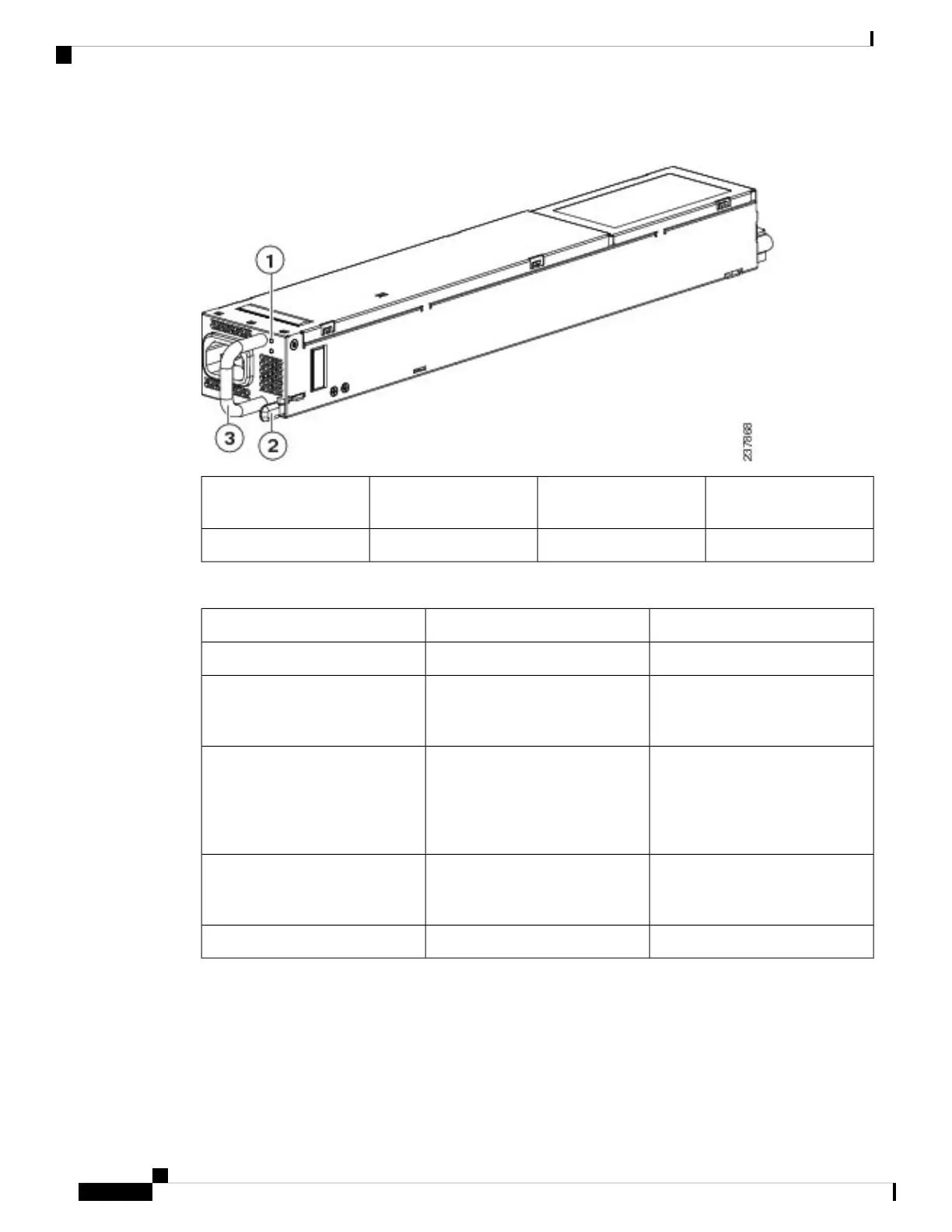
Figure 14: Power Supply for the Cisco UCS 6296 UP Switch
Release lever3Failure (top) and Power
(bottom) LEDs
1
Handle2
Table 3: Power Supply LED Descriptions
Fail LED StatusPower LED StatusPower Supply Condition
OffOffNo AC power to all power supplies.
OnOffPower supply failure, including
over voltage, over current, over
temperature, and fan failure.
1 Hz BlinkingOffPower supply warning events
where the power supply continues
to operate. These events include
high temperature, high power, and
slow fan.
Off1 Hz blinkingAC present, 3.3 voltage standby
(VSB) on, and the power supply
unit is off.
OffOnPower supply on and OK.
If one power supply is installed in the chassis, but the other power supply slot is empty, a blank filler panel
(N10-S1BLKP=) should be used to cover the empty slot.
Cisco UCS 6200 Series Fabric Interconnect Hardware Installation Guide
OL-24475-0310
Product Overview
Power Supplies


 To Next Page