Clare Controls IP Network Camera User Guide 13
Wi-Fi settings
You do not need to use cables when connecting to the wireless network.
Note: This chapter is only applicable for the cameras with a Wi-Fi module built-in, like
the Clare Controls 1.3 MP Budget Mini-Dome Camera with Wi-Fi.
Configuring Wi-Fi connection in manage and ad-hoc modes
A wireless network must be configured.
To configure a wireless connection in Manage Mode:
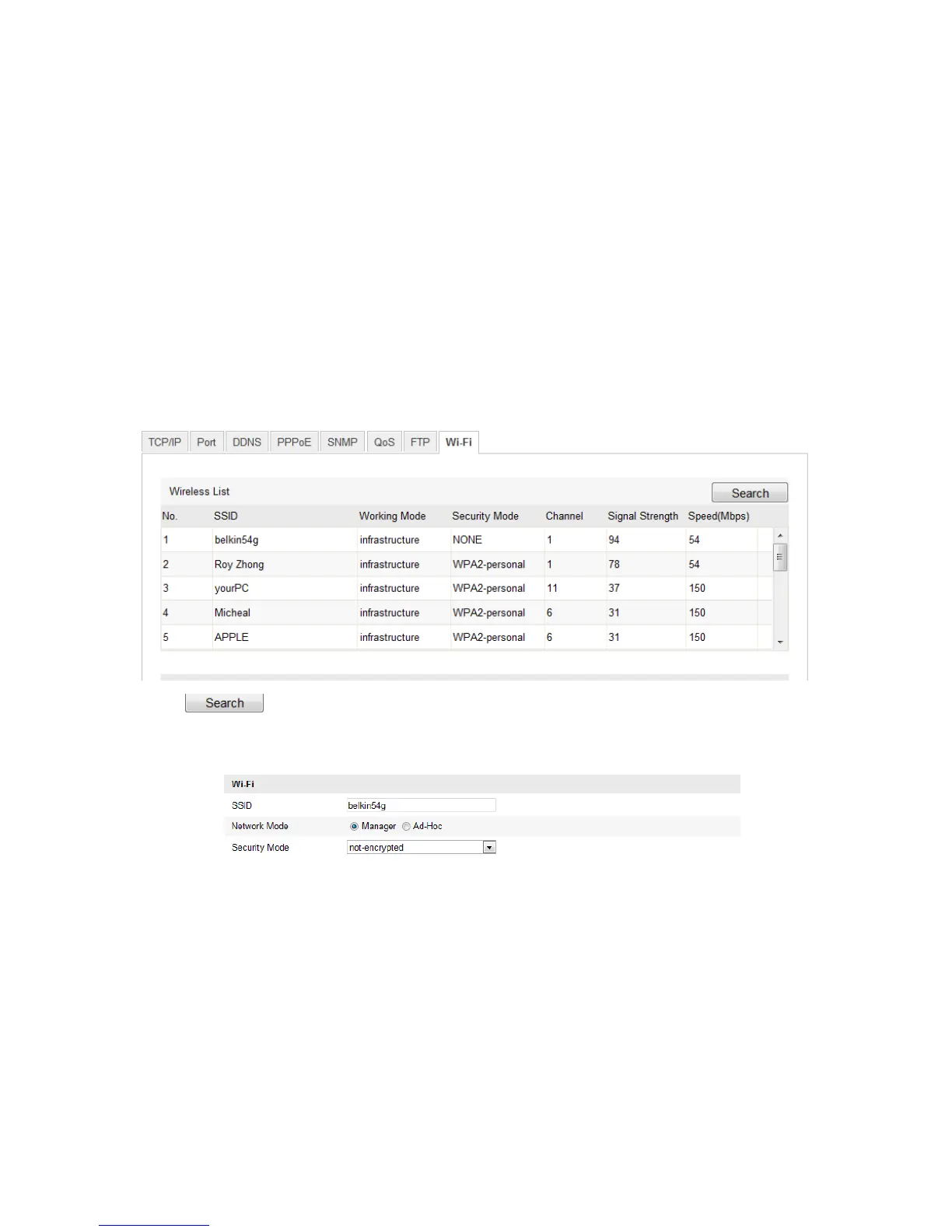
1. Enter the Wi-Fi configuration interface.
Configuration > Camera Configuration > Network > Wi-Fi
2. Click to search the online wireless connections.
3. Click to select a wireless connection on the list.
4. Select the checkbox to select the Network Mode as Manager. The Security Mode
and the network Encryption Type are automatically selected when you choose the
wireless network, do not change it manually.
Note: These parameters need to match those of the router.
5. Enter the password to connect the wireless network. The password should be that of
the wireless network connection you set on the router.



 To Next Page