Clare Controls IP Network Camera User Guide 51
Email sending triggered by alarm
The system can be configured to send an Email notification to all designated receivers if
an alarm event is detected – for example, motion detection event, video loss, video
tampering, etc.
Note: Before using the Email function, configure the DNS server settings. Go to
Configuration > Network > TCP/IP.
To send email triggered by an alarm:
1. In TCP/IP, set the IPv4 /IPv6 Address, IPv4 /IPv6 Subnet Mask, IPv4 /IPv6 Default
Gateway, and the Preferred DDNS Server.
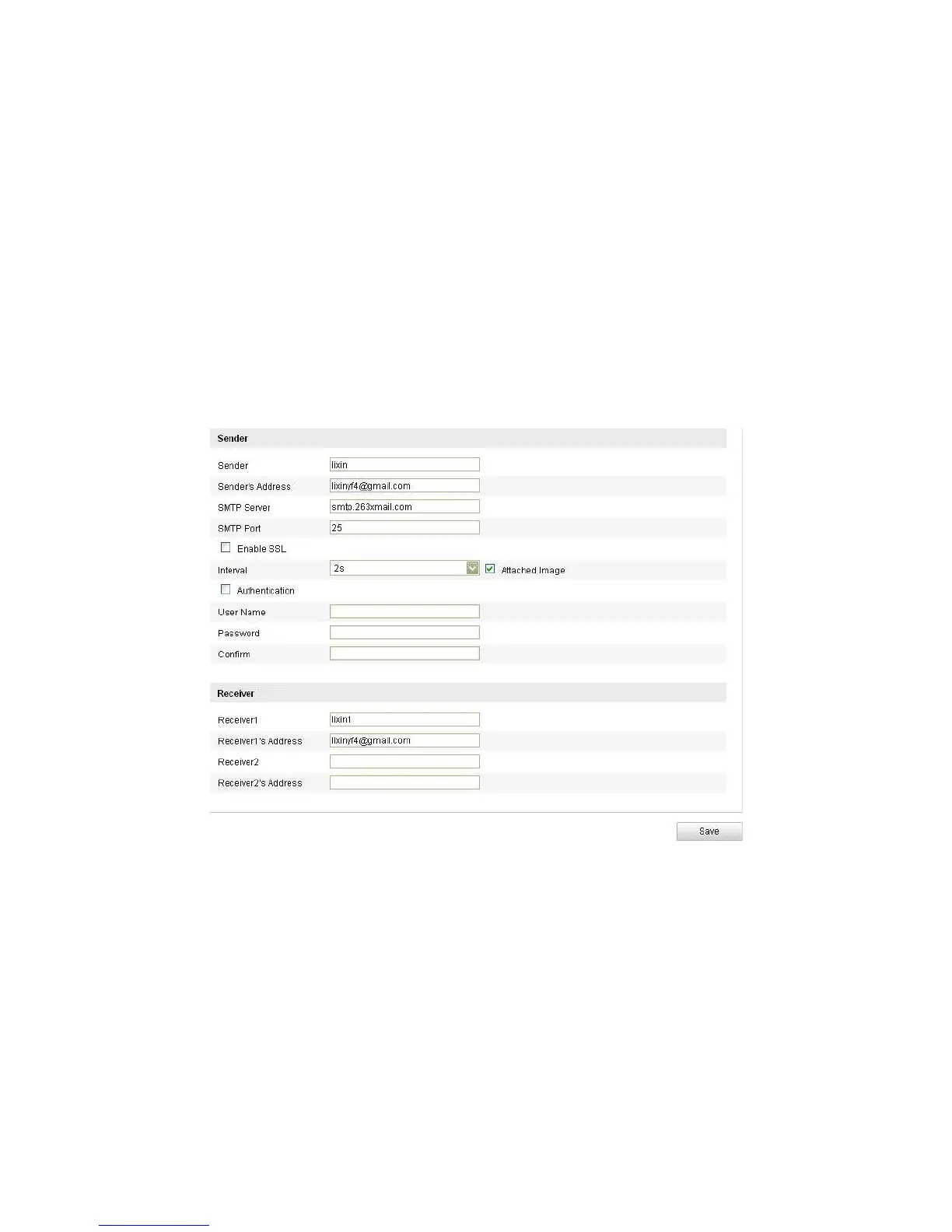
2. Enter the Email Settings interface.
Configuration > Camera Configuration > Network > Email
3. Configure the following settings.
Sender: The name of the email sender.
Sender’s address: The email address of the sender.
SMTP server: The SMTP Server IP address or host name (e.g.,
smtp.263xmail.com).
SMTP port: The default TCP/IP port for SMTP is 25 (not secured). And the SSL
SMTP port is 465.
Enable SSL: Select the checkbox to enable SSL, if the SMTP server requires it.



 To Next Page