Chapter 4: Configuration with web interface
98-148232-E Optional: To set up cellular network for data 97
before the Cellular connection is considered stable and ready for use again. The EXPLORER 540
will now prepare a switch back to the Cellular connection but will monitor the traffic volume in
order to avoid switching while traffic volume is high. The EXPLORER 540 will monitor the traffic
volume at regular intervals in order to switch back to the Cellular connection. If the traffic
volume remains high the EXPLORER 540 will eventually switch back to the Cellular connection
after 30 min.
If recovery of the Cellular data connection continues to fail, the EXPLORER 540 will continue to
use the BGAN connection as "Network in use" (while still trying to reestablish the cellular
connection) until the EXPLORER 540 is restarted or the BGAN connection fails.
If the BGAN connection fails while it is "Network in use" or if the backup BGAN connection is
down or fails when the EXPLORER 540 attempts to switch to the backup BGAN connection, the
EXPLORER 540 will reboot in order to attempt to recover both the Cellular and BGAN
connections.
If the BGAN connection fails while it is operating as standby connection, the EXPLORER 540
will try to re-establish the BGAN connection without rebooting the terminal.
EXPLORER 540 operation in Cellular modem preferred (PRISM) mode
When the cellular modem is installed, the terminal offers simultaneous cellular and BGAN IP-
network connectivity, where each link receives an IP-address from the corresponding Network
Operator.
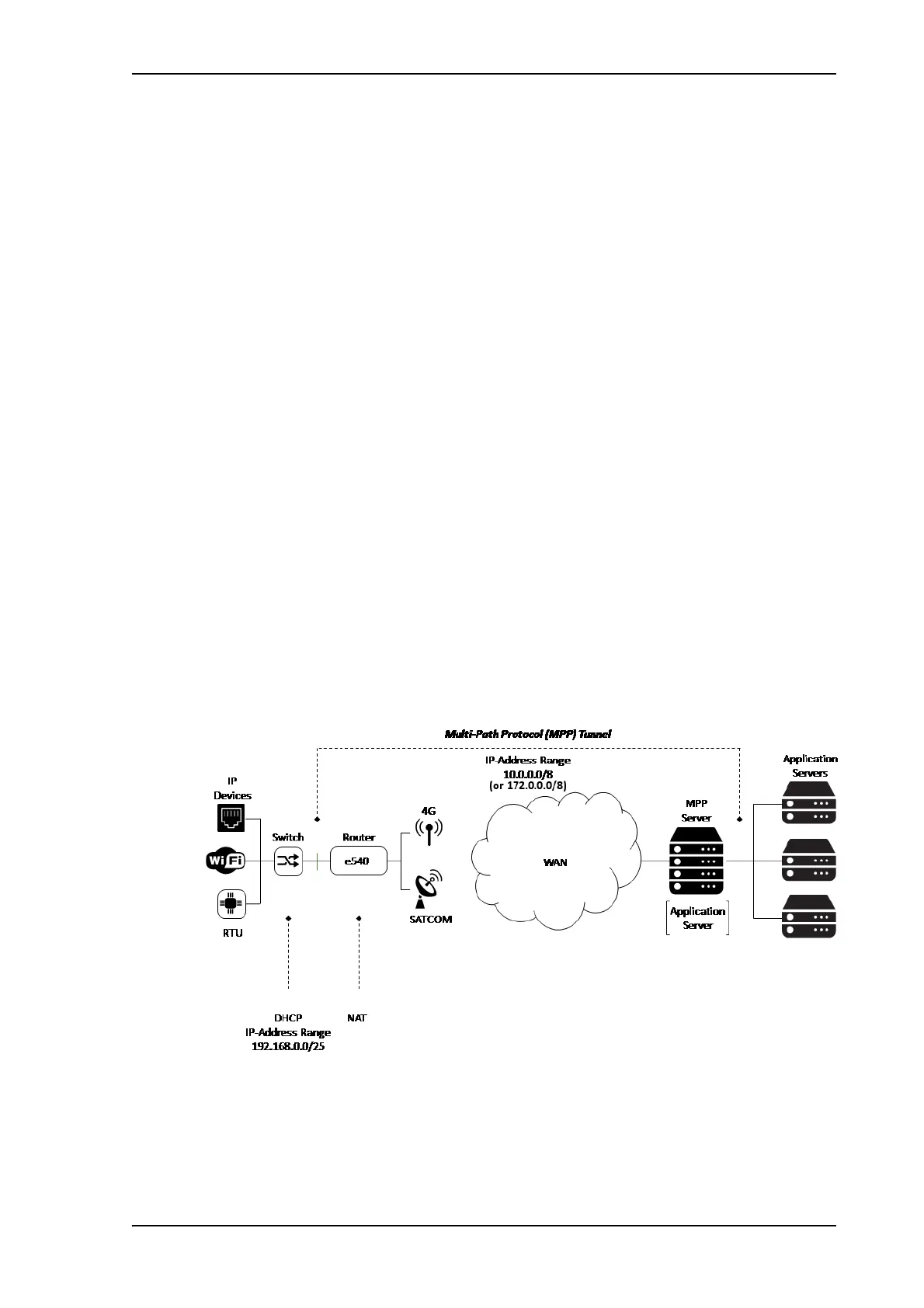
With the PRISM option, you can route all traffic to and from the EXPLORER 540 through a
multi-path tunnel between the terminal and a server, using cellular or BGAN connectivity.
Devices connected to the EXPLORER 540 will be immediately reachable from server
applications, regardless of the network technology (cellular or BGAN), using the same IP
address. Depending on server routing, devices attached to the EXPLORER 540 will likewise have
direct access to services on the server and beyond.
To set up PRISM you must install the PRISM server software from Cobham SATCOM, configure
the PRISM server and set up your EXPLORER 540 to communicate with this server.
For details how to set up the EXPLORER 540 for PRISM, see To set up the connection mode on
page 62 and To set up PRISM on page 65.



 To Next Page