Chapter 3: Operation
98-148232-E To access the terminal from a remote location 25
To access the terminal from a remote location
Remote access with SMS
You can perform a number of actions and some configuration on the EXPLORER 540 using
SMS commands.
Send an SMS to the mobile number of the terminal. The text in the SMS must start with the
SMS command and follow the syntax for the SMS commands. Note that the remote SMS
password (default: remote) must be included with every command.
For an explanation of syntax and parameters, see SMS remote commands on page 127.
Note that the remote SMS function is password protected.
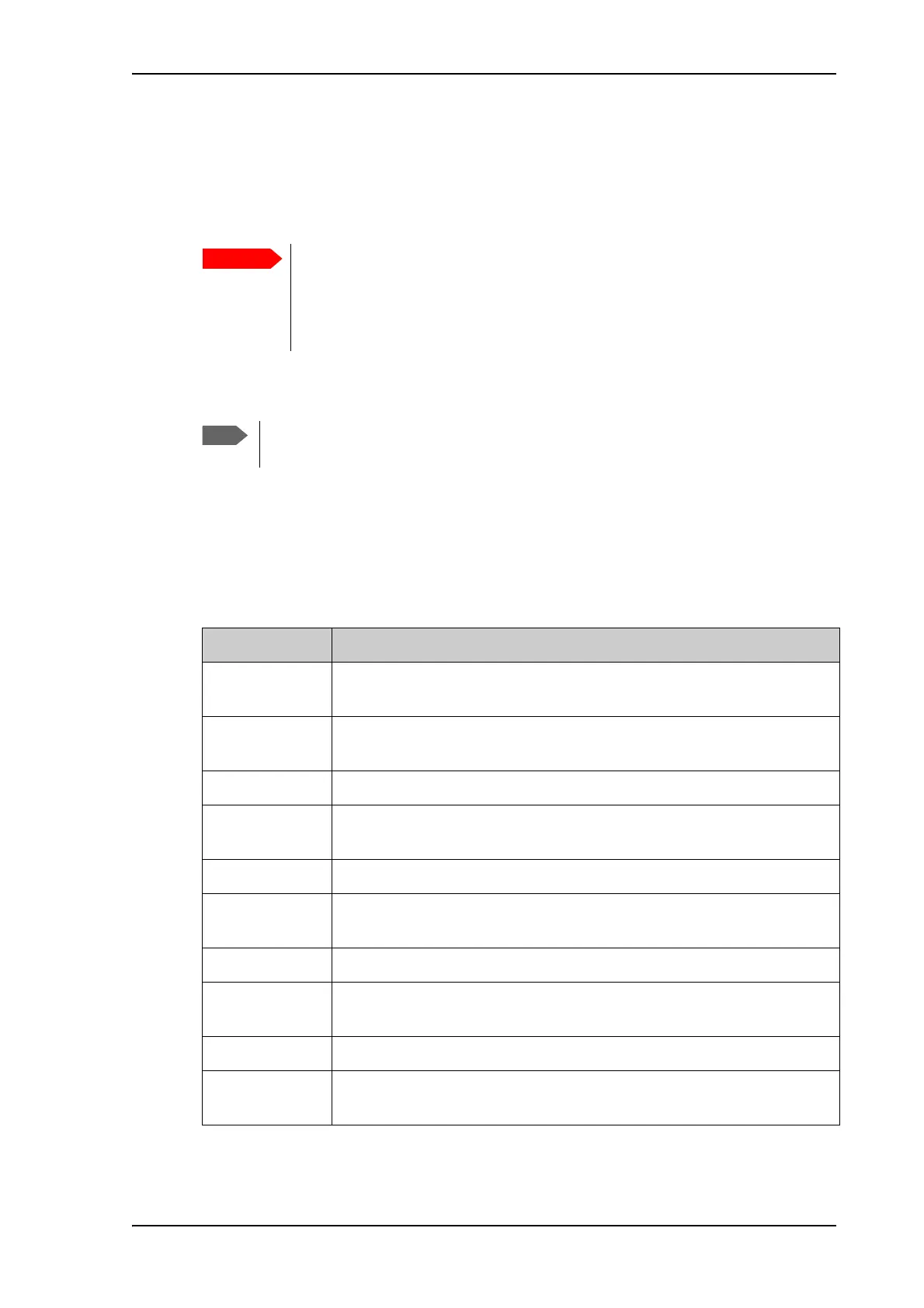
The following SMS commands are supported.
By default, any phone number can access the EXPLORER 540 with an SMS, if
they have the phone number of the terminal and the remote SMS password.
Before installing the EXPLORER 540 you should set up the security measures for
the terminal. See Security setup on page 34 and To set up remote access with
SMS on page 86.
If you are using a cellular connection as your primary network connection, the SMS
commands will be sent over the BGAN backup connection.
SMS command Function
ACTIVATE
a
a. These commands cannot be used in Cellular modem preferred mode nor Cellular modem preferred
(PRISM) mode.
Activates BGAN data connections for the device(s) connected to the
EXPLORER 540.
DEACTIVATE
a
Deactivates some or all the BGAN data connections for devices
connected to the EXPLORER 540.
CLEAR Deletes SMS messages in the EXPLORER 540.
GETINFO Gets current information from the EXPLORER 540 such as call time, data
usage, GPS position and global IP address.
RESTART Restarts the EXPLORER 540.
WATCHDOG Gets or allows you to set the current Connection watchdog parameters
(Link monitoring).
ADVWATCHDOG Gets or allows you to set the current Terminal watchdog parameters.
ATCO Allows you to send M2M related AT commands to the EXPLORER 540
which returns the response in an SMS.
ADPWRST Resets the EXPLORER 540 admin password to admin.
WANMODE Gets or allows you to set the WAN connection mode (BGAN only, Cellular
modem preferred or Cellular modem preferred (PRISM))



 To Next Page