Interfaces of the VMU
98-133966-G1 Chapter 4: Interfaces 4-9
4444
Interfaces
4.2.2 Connecting an Evolution® Satellite
Router
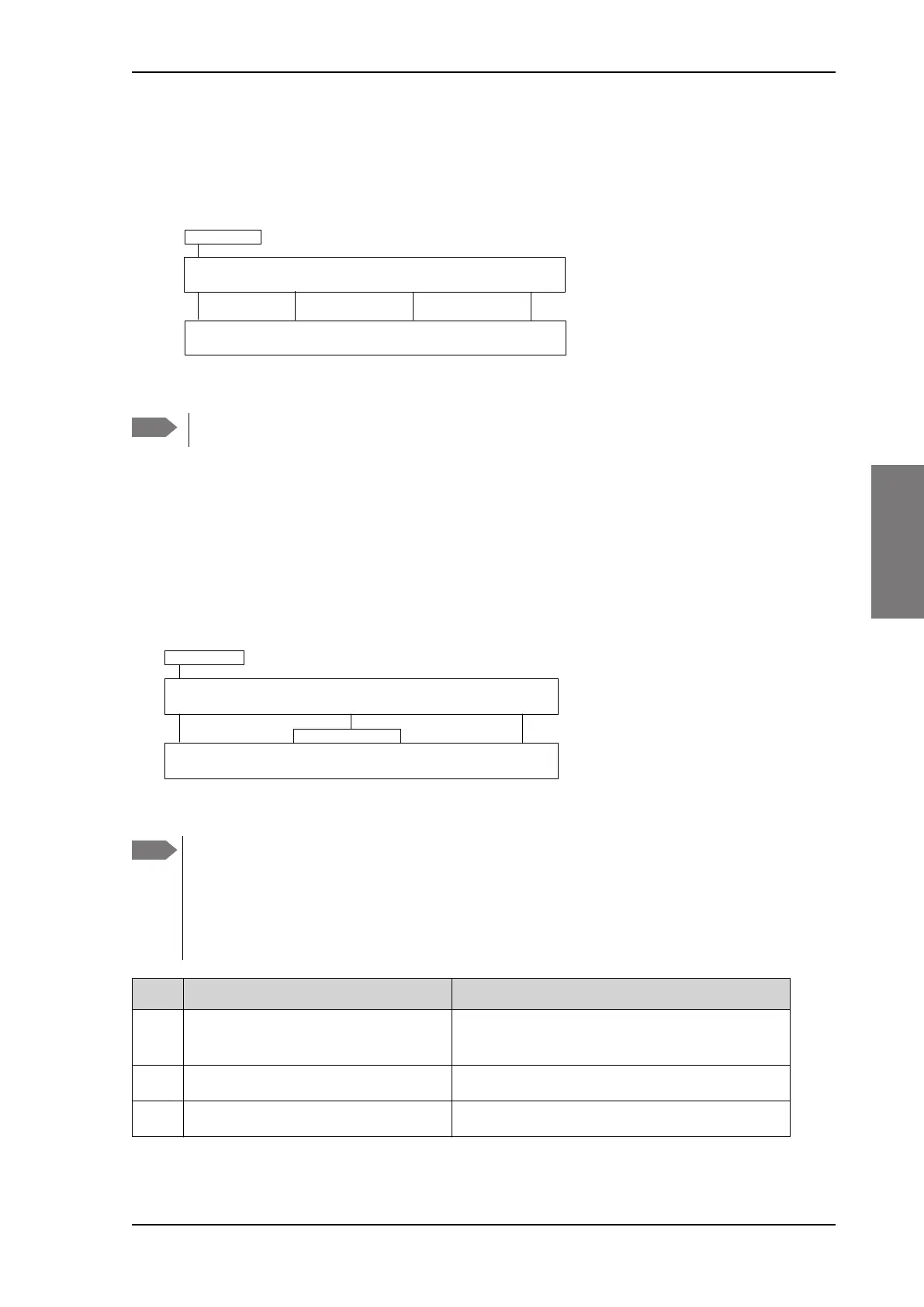
Connect the VSAT modem to the ACU as shown in the figure below:
For cables see Table 4-8: Cables to connect an iNFINITI® Series
Satellite Router on page 4-8. For VMU cable specifications see VMU
cables on page B-1.
4.2.3 Connecting a COMTECH 570 L or 625
Satellite Modem
Connect the VSAT modem to the ACU as shown in the figure below:
For VMU cable specifications see VMU cables on page B-1.
Figure 4-7: Connecting an Evolution Satellite Router
Note
Cable 3 is only used when using OpenAMIP protocol.
Figure 4-8: Connecting a COMTECH 570 L or 625 Satellite Modem
5[,Q 7[2XW&RQVROH
/$1$
(YROXWLRQ;6DWHOOLWH5RXWHU
5[2XW
$&8
7[,Q
$QWHQQD
56
$QWHQQD
/$1
5[
0+]
7[
0+]
5HPRWHFRQWURO
$ODUPV
&207(&+/%DQG6DWHOOLWH0RGHP
5[2XW
$&8
7[,Q
$QWHQQD
56
$QWHQQD
Note
If the satellite profile is configured to use narrow band tracking
(recommended) a standard RS-232 cable can be used to connect the
ACU RS-232 port to the Remote control port of the VSAT modem. If the
satellite profile is configured to use modem RSSI tracking a proprietary
RS-232/Alarm cable must be used to connect the ACU RS-232 port to
the Remote control and Alarm port of the VSAT modem.
Cable Description Cable specifications
1 RX Out to Rx 950-1950 MHz 75 Ohm coax cables F-F (1m) and adapter F to N
50 Ohm, included
2 RS-232 to Remote control and Alarms 37-134337-A Cable COMTECH Serial and RSSI
3 Tx In to Tx 950-1950 MHz 75 Ohm coax cables F-F (1 m), included
Table 4-9: Cables to connect a COMTECH 570 L-Band Satellite Modem
SAILOR900TM.book Page 9 Monday, September 16, 2013 11:01 AM



 To Next Page