Calibration of the SAILOR 900 VSAT
98-133966-G1 Chapter 6: Configuration 6-11
6666
Configuration
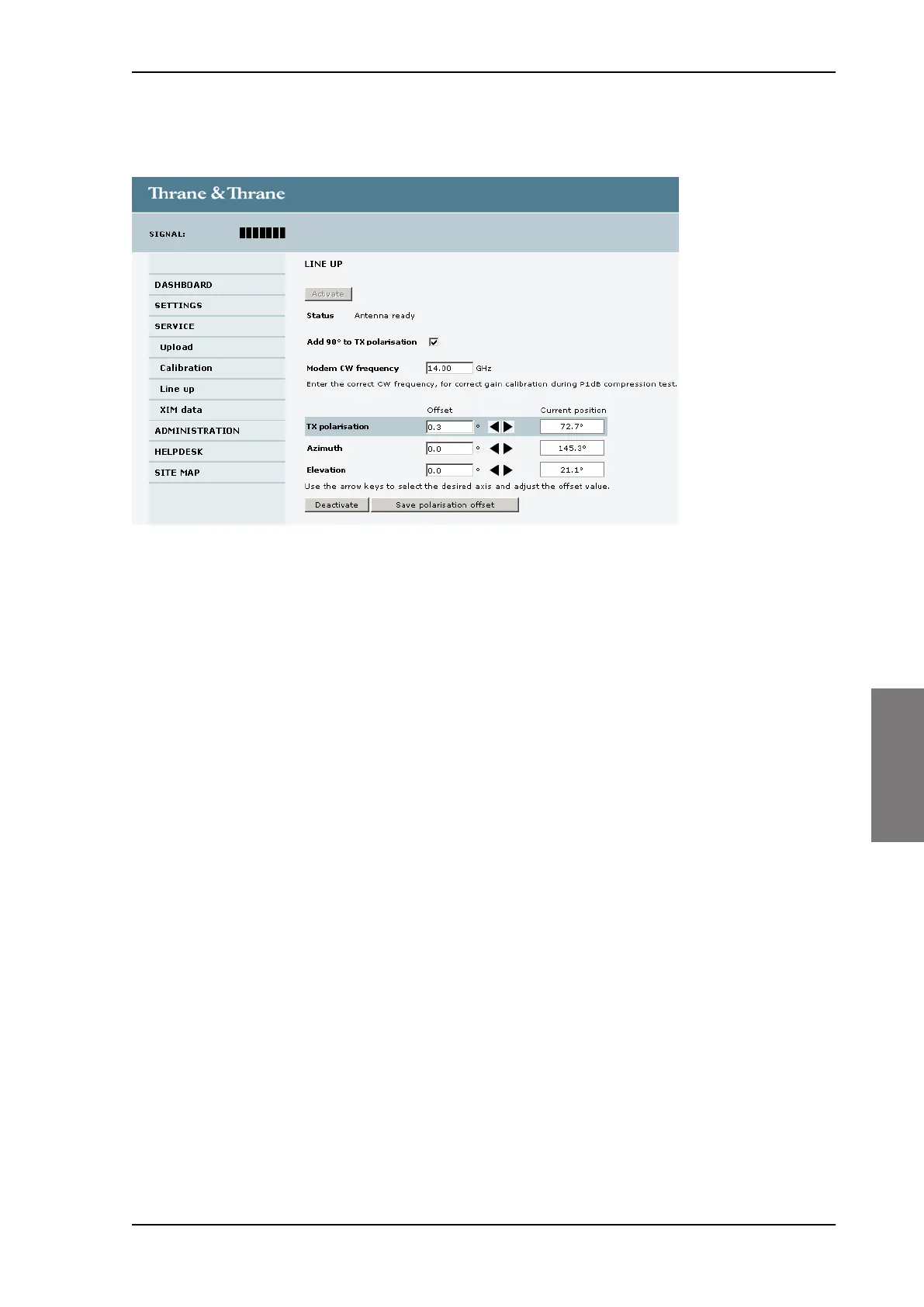
4. Click the button Activate and wait until the status field shows
Antenna ready. Follow the instructions from your service provider.
5. Enter the Modem CW frequency (Continuous Wave) in GHz.
This is provided by the satellite operator, typically when talking to the
satellite operator on the phone before starting the line up.
6. Adjust the TX polarisation as instructed by the service provider. If
needed, add 90 degrees to the TX polarisation by selecting the field.
7. Set the values as advised by the service provider:
• TX polarisation
• Azimuth
• Elevation
8. To save the TX polarisation offset value, click the button Save
polarisation offset.
9. Follow the instructions from the service provider to make a P1dB
compression test (VSAT modem).
10.Click the button Deactivate to finish the line up procedure.
When finished, the saved value for TX polarisation is visible the next
time the line up procedure is selected.
Figure 6-8: Web interface: SERVICE, Line up: Antenna ready
SAILOR900TM.book Page 11 Monday, September 16, 2013 11:01 AM




 To Next Page