1. Enable the protocols using the Industrial Protocols pane of the DataMan Setup Tool (under Communication
Settings).
2. Scan the appropriate Reader Configuration codes (see Reader Configuration Codes available through the
Windows Start menu or the DataMan Setup Tool Help menu).
3. Send the appropriate DMCC (see Command Reference available through the Windows Start menu or the
DataMan Setup Tool Help menu).
For more information on using the industrial protocols, read the DataMan Communications and Programming Guide
available through the Windows Start menu or the DataMan Setup Tool Help menu.
Setting the Focus Position
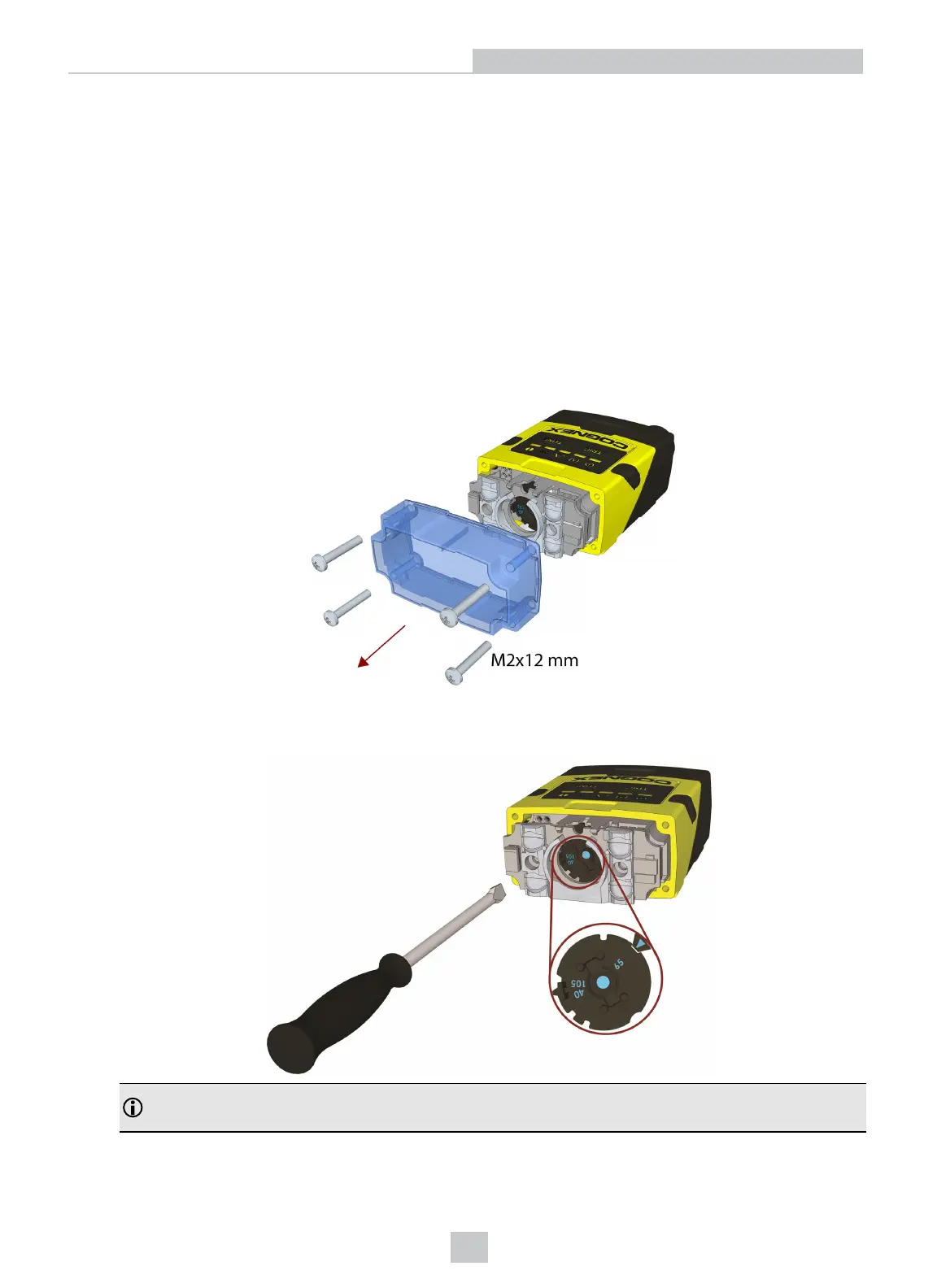
DataMan 260 can operate in one of three distance ranges. Follow the steps below to set the focus position.
1. Remove the screws and the front cover.
2. Using a flathead screwdriver, set the focus position from the front. Always turn clockwise to focus to a larger
distance and counterclockwise to focus to a shorter distance.
Note: If an optical filter has been mounted, first disconnect the DataMan 260 reader from power and remove
the illumination module with the filter before adjusting the focus.
48
Using Your DataMan 260
Artisan Technology Group - Quality Instrumentation ... Guaranteed | (888) 88-SOURCE | www.artisantg.com








 To Next Page