Changing Orientation
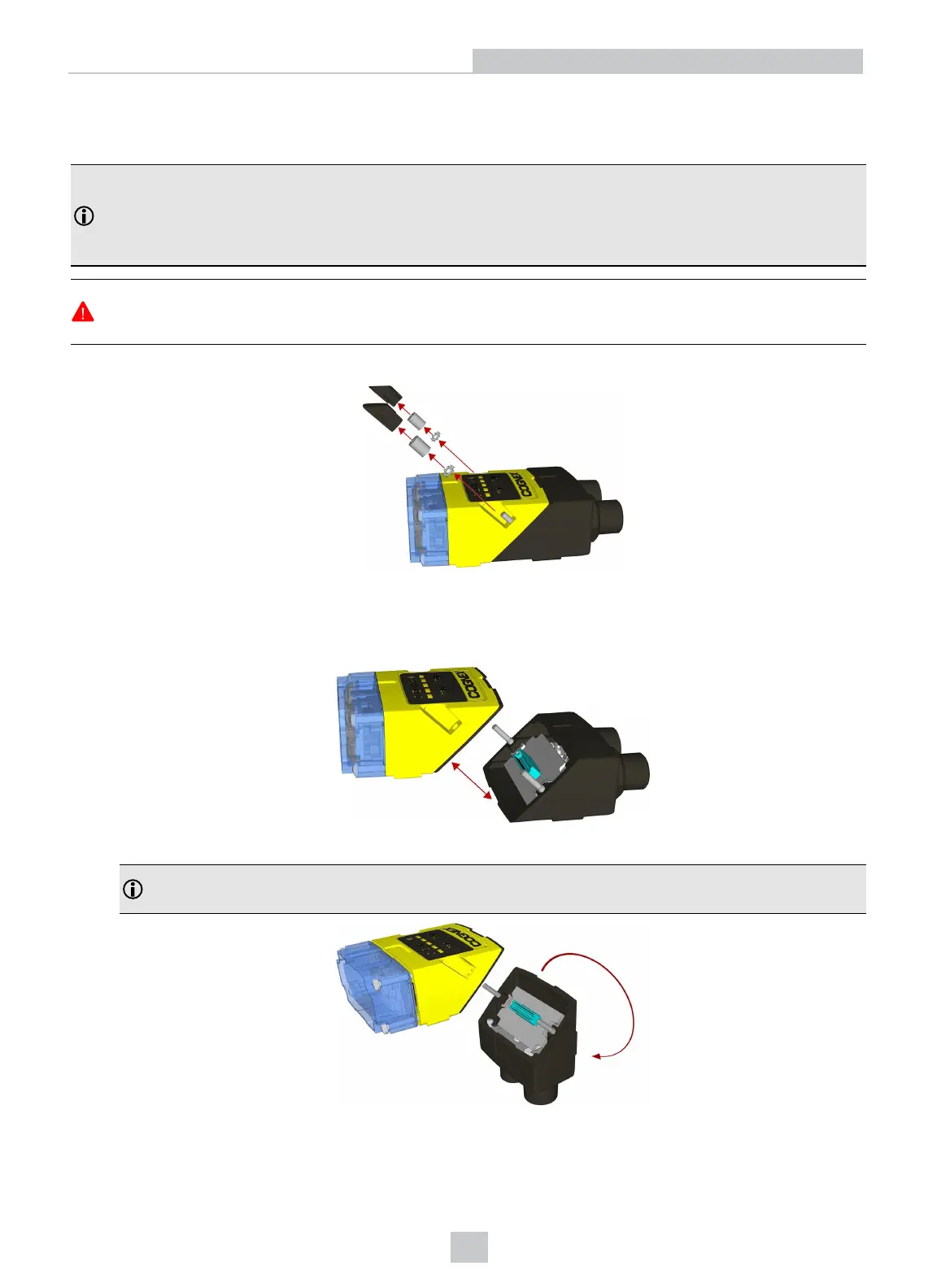
Perform the following steps to change between in-line and right-angle configuration.
Note:
l Switching between in-line and right-angle configuration is recommended only up to 10 times in the lifetime
of the DataMan 260.
l Disconnect the DataMan 260 from power before changing the orientation.
WARNING: Make sure that no electrostatic charges are applied to the PCB. (e.g. wear ESD shoes.) If the main
module is separated from the I/O connector module, take care to assemble them correctly. Otherwise, the IP rating
can be compromised.
1. Carefully remove the screw covers, threaded nuts and washers.
M2 Torx 10 CAPNUT
DIN 6798A M2 LOCKWASHER
2. Detach the main module and the I/O connector module by firmly pulling them apart.
3. Change the orientation.
Note: Make sure that the gasket is properly seated on the main module. Ensure that the flat gasket side is
facing away from the module.
14
Getting Started
Artisan Technology Group - Quality Instrumentation ... Guaranteed | (888) 88-SOURCE | www.artisantg.com









 To Next Page