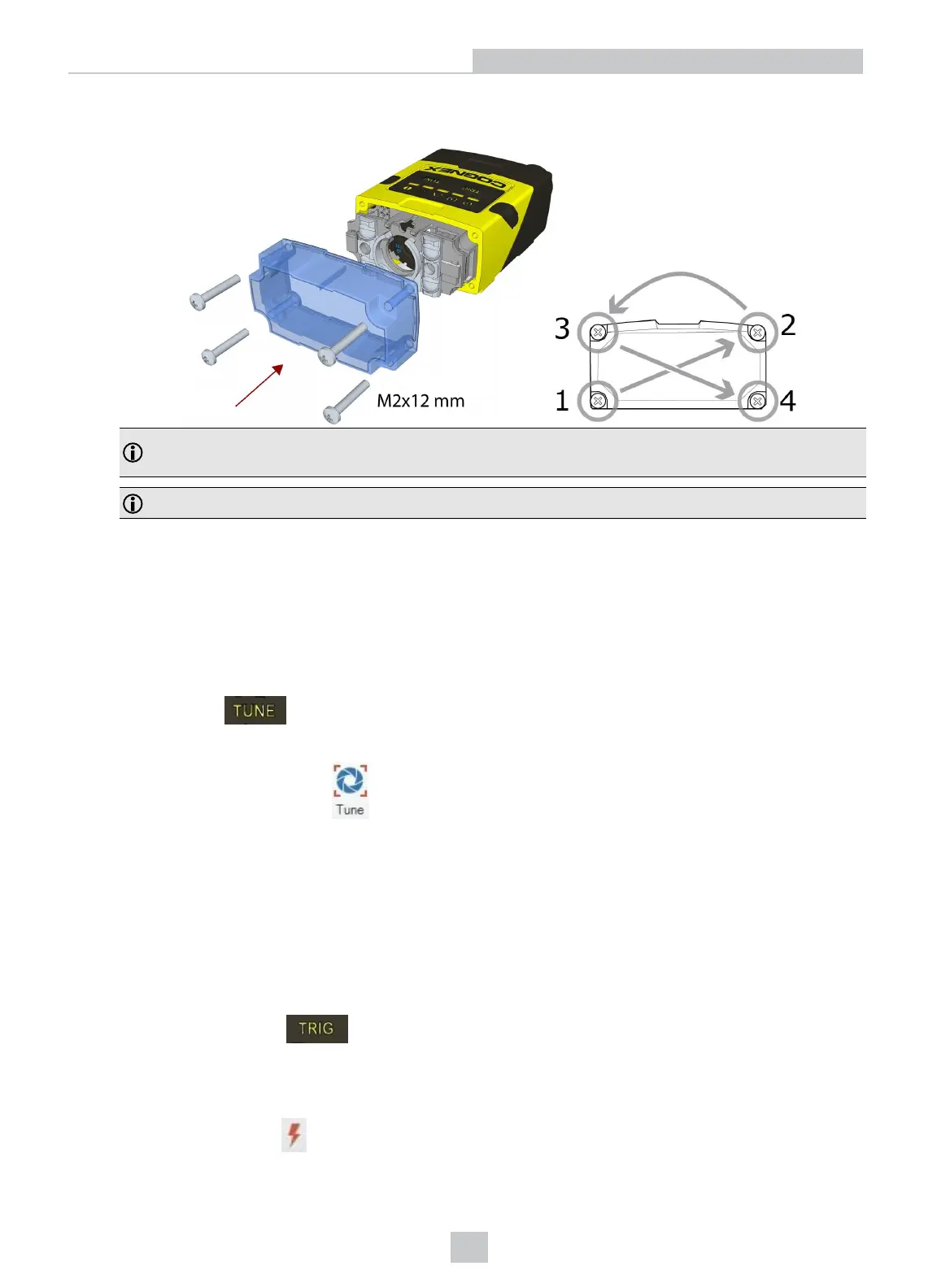
3. Remount the front cover. Observing the tightening sequence below, tighten all four screws to 9 Ncm using a
torque wrench.
Note: If you use an optical filter and the illumination was removed, remount the illumination module first and
then remount the front cover.
Note: The rib in the front cover must be oriented to the top side.
Tuning
By tuning, your DataMan 260 reader automatically selects the best settings for the given reading situation, based on
parameters of illumination, camera and decoder properties, and focal distance. Tuning autodiscriminates all enabled
symbologies (both 1-D and 2-D). If multiple symbols are found in the field of view, tuning locks on the first one found. Use
this feature to create an optimum setting to read your codes.
You can use any of the following methods to tune your reader:
Press the Tune button ( ) at least for 3 seconds on your reader. The first press starts the tuning and the second
press cancels the tuning, if it is still ongoing.
Turn on tuning in DataMan Setup Tool ( ).
Start tuning by sending a DMCC, for more information, see the Command Reference, available through the Windows
Start menu or the DataManSetup ToolHelp menu.
Use Input line 1 for tuning. Go to the System Settings pane in the DataManSetup Tool and check Tune. You can also
use the In1 button on the toolbar.
External Triggering and Trigger Modes
If you are using external triggering, you can use any of the following methods to trigger your DataMan 260 reader:
1.
Press the Trigger button ( ) on the reader.
2. Send a pulse on the I/O cable: Trigger +(blue), Trigger - (black).
3. Send a serial trigger command over the RS-232 or the Ethernet connection.
4.
Click the Trigger button ( ) or press <Ctrl>-T in DataMan Setup Tool.
49
Using Your DataMan 260
Artisan Technology Group - Quality Instrumentation ... Guaranteed | (888) 88-SOURCE | www.artisantg.com








 To Next Page