DataMan 150 and 260 Series Service Procedures
Setting the Focus Position of a DataMan 150 or DataMan 260 Reader
DataMan 150 and 260 can operate in one of three distance ranges. Follow the steps below to set the focus position.
Note: The following steps describe service procedures for both the DataMan 150 and the 260 readers, but the
images show only the DataMan 260.
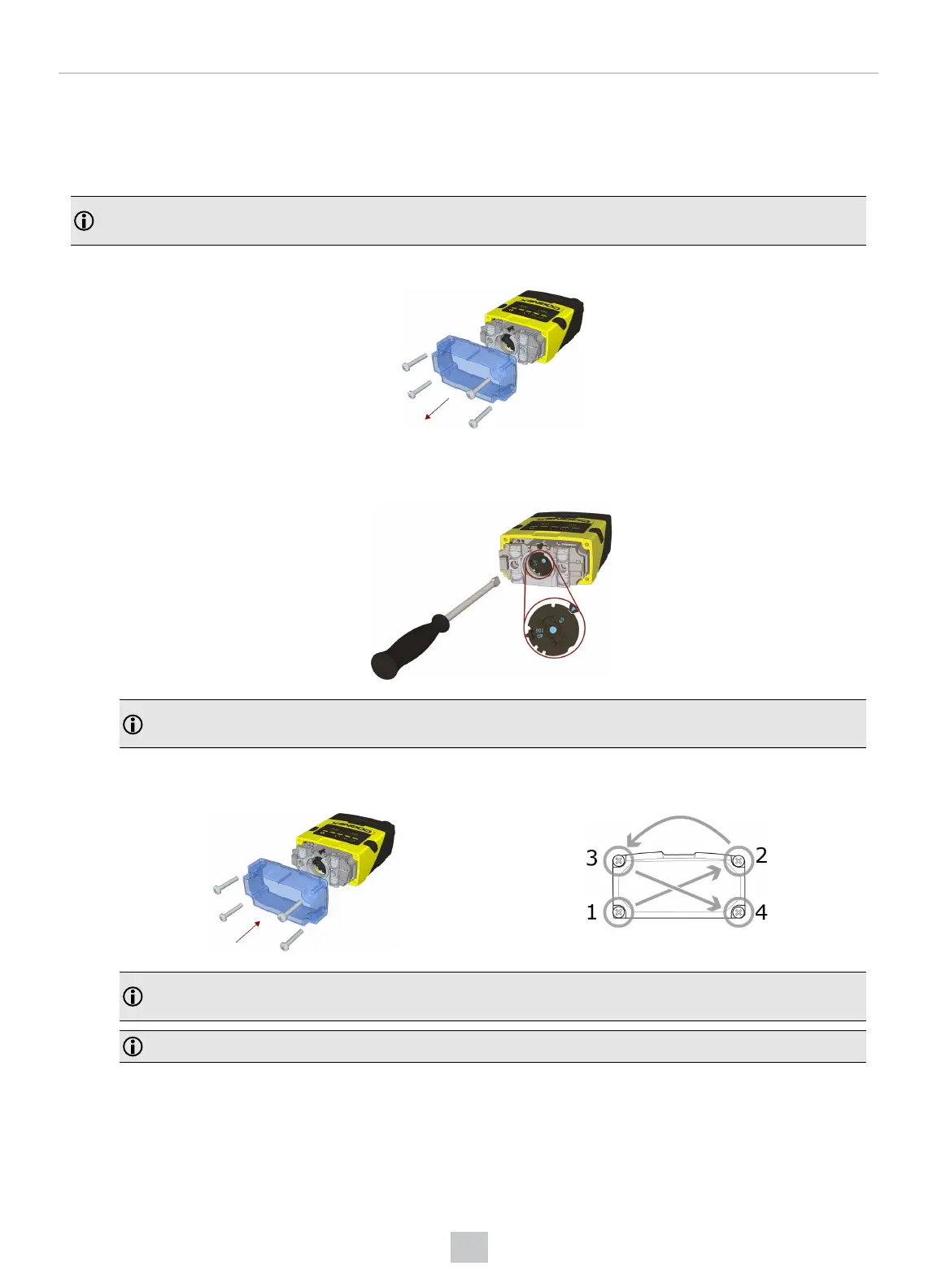
1. Remove the screws and the front cover.
2. Using a flathead screwdriver, set the focus position from the front. Always turn clockwise to focus to a larger
distance and counterclockwise to focus to a shorter distance.
Note: If an optical filter has been mounted, first disconnect the DataMan 150 or 260 reader from power and
remove the illumination module with the filter before adjusting the focus.
3. Remount the front cover. Observing the tightening sequence below, tighten all four screws to 9 Ncm using a
torque wrench.
Note: If you use an optical filter and the illumination was removed, remount the illumination module first and
then remount the front cover.
Note: The rib in the front cover must be oriented to the top side.
30
Mechanical Information











 To Next Page