Changing from a 6.2 mm Lens to a 16 mm Lens on a DataMan 150 or DataMan 260
Reader
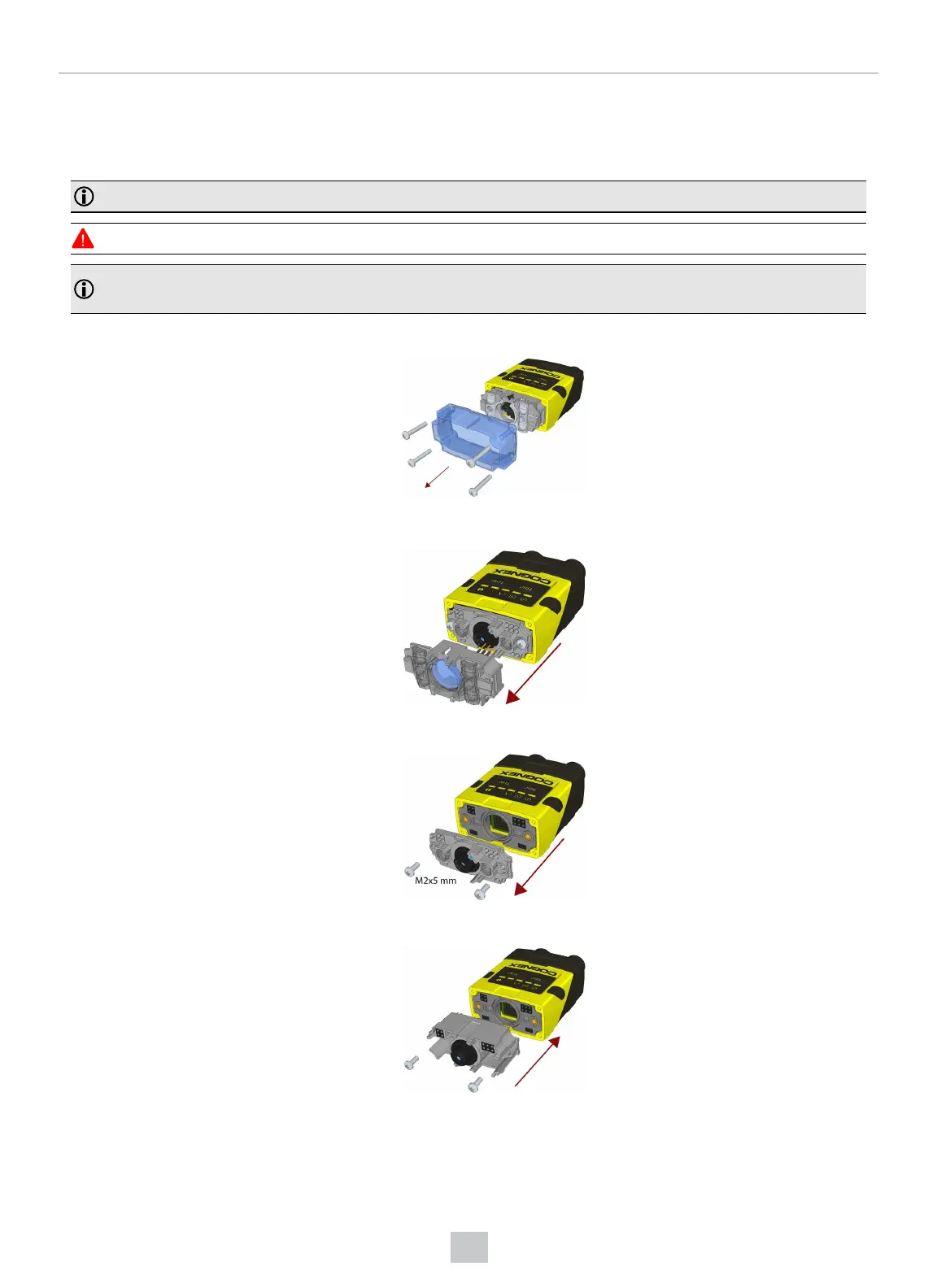
Perform the following steps to change a 6.2 mm lens to a 16 mm lens on your DataMan 150 or 260 reader.
Note: Disconnect the DataMan 150 or 260 reader from power before changing lenses.
WARNING: This modification must be made in a dust-free and ESD safe area.
Note: The following steps describe service procedures for both the DataMan 150 and the 260 readers, but the
images show only the DataMan 260.
1. Remove the front cover: unscrew the four screws and take off the LEDcover.
2. Remove the illumination module.
3. Unscrew the two Phillips head screws and remove the 6.2 mm lens mount.
4. Attach the 16 mm lens mount.
5. Fasten the two Phillips head screws to 0.06 Nm using a torque wrench.
31
Mechanical Information











 To Next Page