CBR2 CGA4332COM- User Guide
22 of 51
4.1
Components
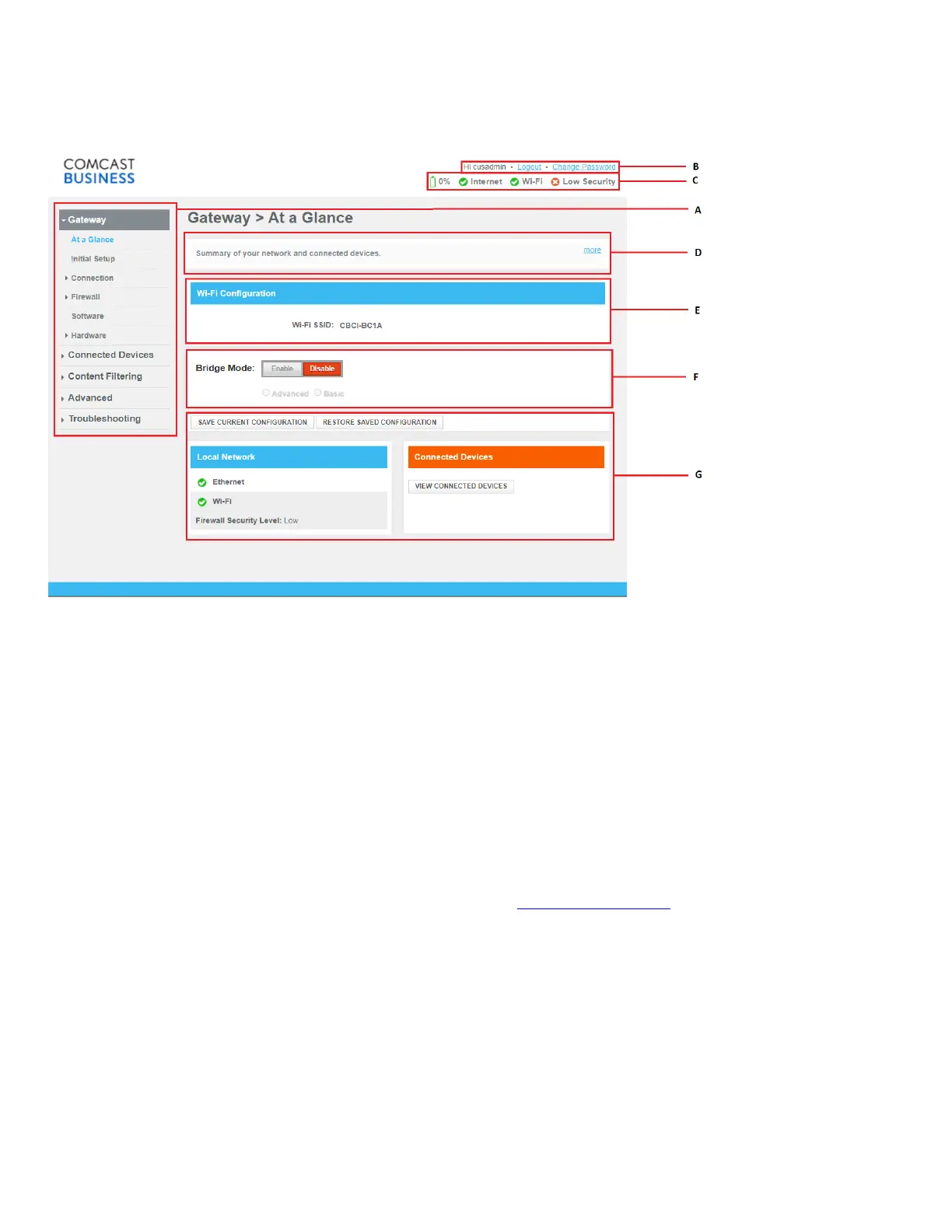
The following diagram identifies the sections of the Admin Tool:
A: Menu
The menu consists of the following items:
• Gateway:
Provides basic information about the Gateway and allows you to configure basic settings.
• Connected Devices:
Allows you to manage the access settings of the devices in your network.
• Content Filtering:
Allows you to manage the access rights for Internet access.
• Advanced:
Allows you to configure more advanced Internet services.
• Troubleshooting:
Allows you to perform some basic troubleshooting on the Gateway and network connections.
Each of these items contain several sub-menu items. More detailed information about the menu pages can be found
in the tips section of each page. For more information, see “Tips section (item D)”
.
B: Login section
The login section contains the following options:
• User Name
• Option to logout or change password
C: Status section
The status section provides a quick overview of the following:
• The battery charge status



 To Next Page