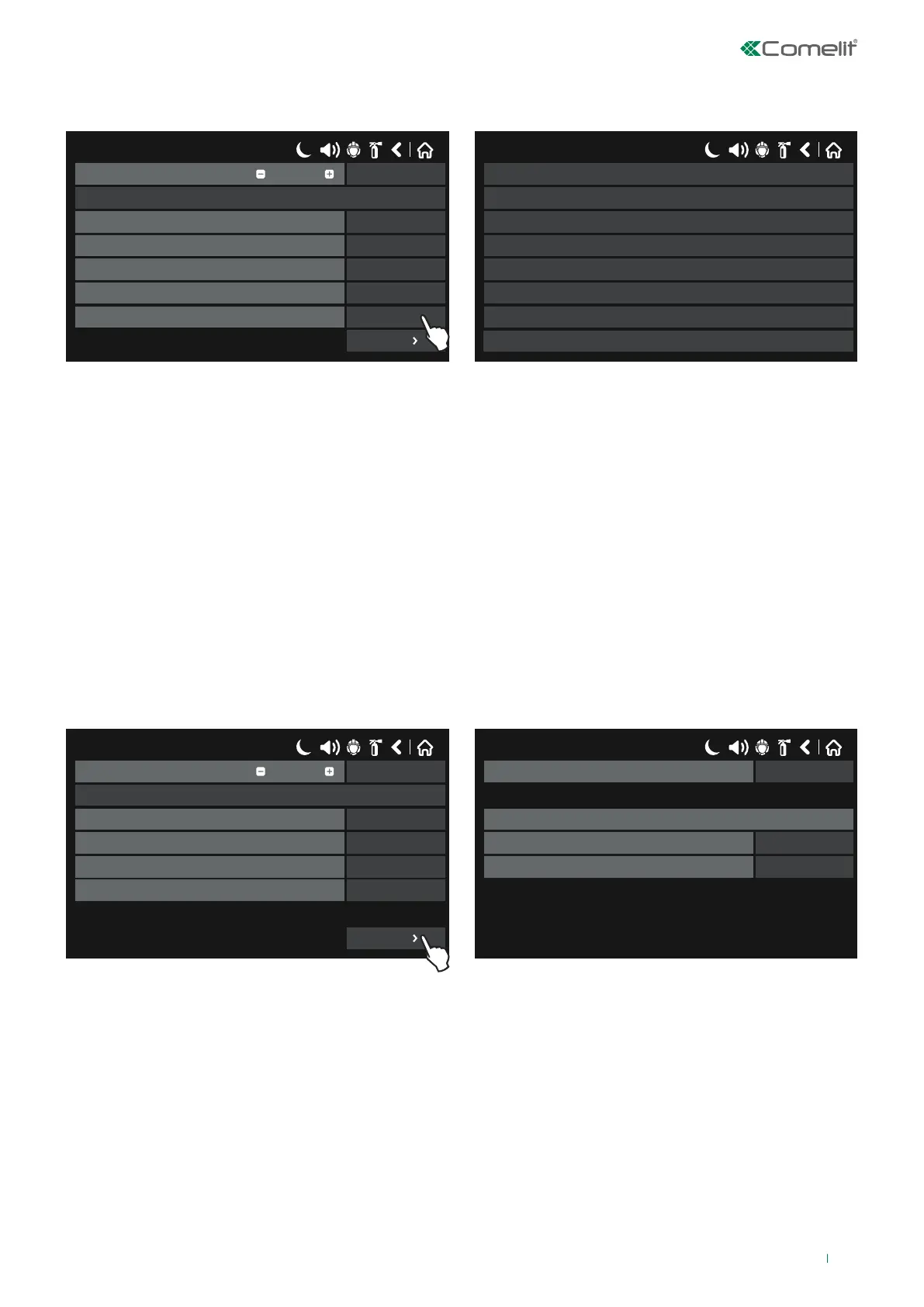
• GENERAL: select this option when the input will be enabled by a “General” event in the System.
Press the button next to the “Functions” field and select the type of event to be linked with the input.
17/06/2020 14:06
SAVEInput Number
Name
UnlatchedBehaviour
NORMALPolarity
0Input Delay
GeneralType
COMMON FIREFunction
1
More
17/06/2020 14:06
COMMON FIRE
COMMON FAULT
SYSTEM FAULT
COMMON PREALARM
DISABLED
TEST
COMMON EVACUATE
VOICE CYCLE
◊ COMMON FIRE - Activated when a “Fire Alarm” event occurs in the system.
◊ COMMON PREALARM - Activated when a “PreAlarm” event occurs in the system.
◊ COMMON FAULT - Activated when a “Common fault” event occurs in the system.
◊ SYSTEM FAULT - Activated when a “System Fault” event occurs.
◊ DISABLED - Activated when disablements (loop device, zones, outputs, buzzers, etc...) occur in the system.
◊ TEST – Activated when a “Test” procedure is in progress in the system.
◊ COMMON EVACUATE – Activated when an “Evacuate” event occurs in the system.
◊ VOICE CYCLE - Activated when the alternating “voice cycle” starts (the ON and OFF time parameters are located in the
“more” submenu as part of the “Sounders Mode” menu).
Press “MORE” to enter the input group number to be linked with the input (if necessary).
To save any new parameters, press “Save” on the main input screen.
• NETWORK: select this option when the input is generated by an event / loop device originating from another panel
connected to its network (RS485 / LAN).
17/06/2020 14:06
SAVEInput Number
Name
UnlatchedBehaviour
NORMALPolarity
0Input Delay
NetworkType
1
More
17/06/2020 14:06
1Group
Network input parameters
1Output number
1Panel / repeater number
Press “MORE” to set:
◊ Output Number: enter the output number, between 1 and 250.
◊ Panel Number: enter the number of the panel from which the output originates, between 1 and 64.
◊ Group: if necessary, enter the number of the input group to which the input should belong, between 1 and 250.
To save any new parameters, press “Save” on the main input screen.
57



 To Next Page