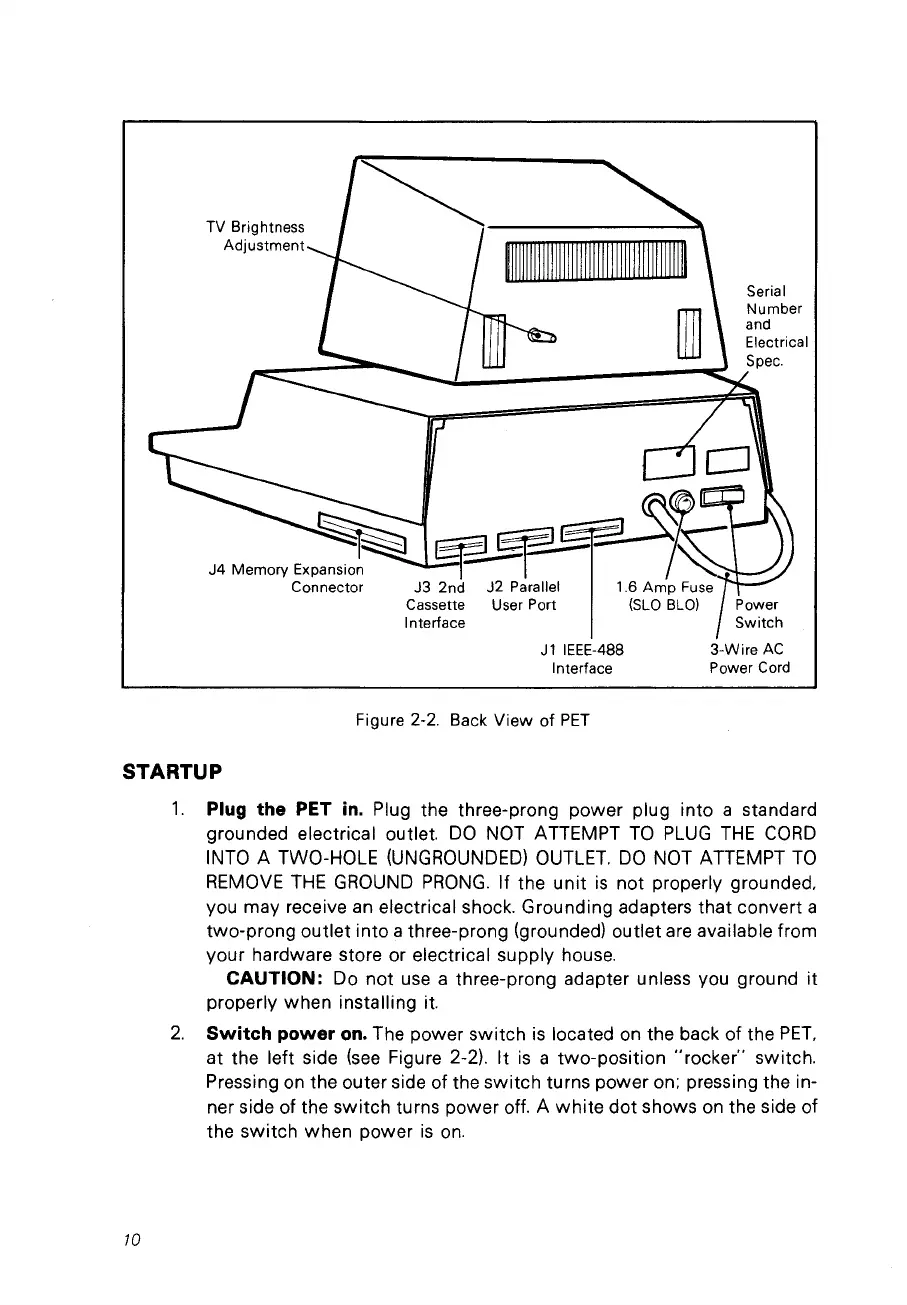
J4
Memory Expansion
Connector
3-Wire
AC
Power Cord
Figure 2-2. Back View of
PET
STARTUP
1.
Plug the PET
in.
Plug the three-prong power plug into a standard
grounded electrical outlet.
DO
NOT
ATTEMPT
Ta
PlUG
THE
CaRO
INTO A TWO-HOlE
(UNGROUNOED)
OUTlET.
DO
NOT ATTEMPT
Ta
REMOVE
THE
GROUNO
PRONG.
If the
unit
is
not properly grounded,
vou may receive
an
electrical shock. Grounding adapters that convert a
two-prong outlet into a three-prong (grounded) outlet
are
available from
your hardware store or electrical supply hou
se.
CAUTION:
Do not
use
a three-prong adapter unless vou ground
it
properly when installing it.
2.
Switch power
on.
The power switch
is
located on the back of the
PET,
at the left side
(see
Figure 2-2). It
is
a two-position "rocker" switch.
Pressing
on
the outer side of the switch turns power on: pressing the in-
ner side of the switch turns power off. A
white
dot shows
on
the side of
the switch when power
is
on.
10



 To Next Page