EasyManua.ls Logo

Commodore CBM - Variables; Special String Symbols

Commodore CBM
447 pages
Print Icon
To Next Page IconTo Next Page
To Previous Page IconTo Previous Page
Loading...
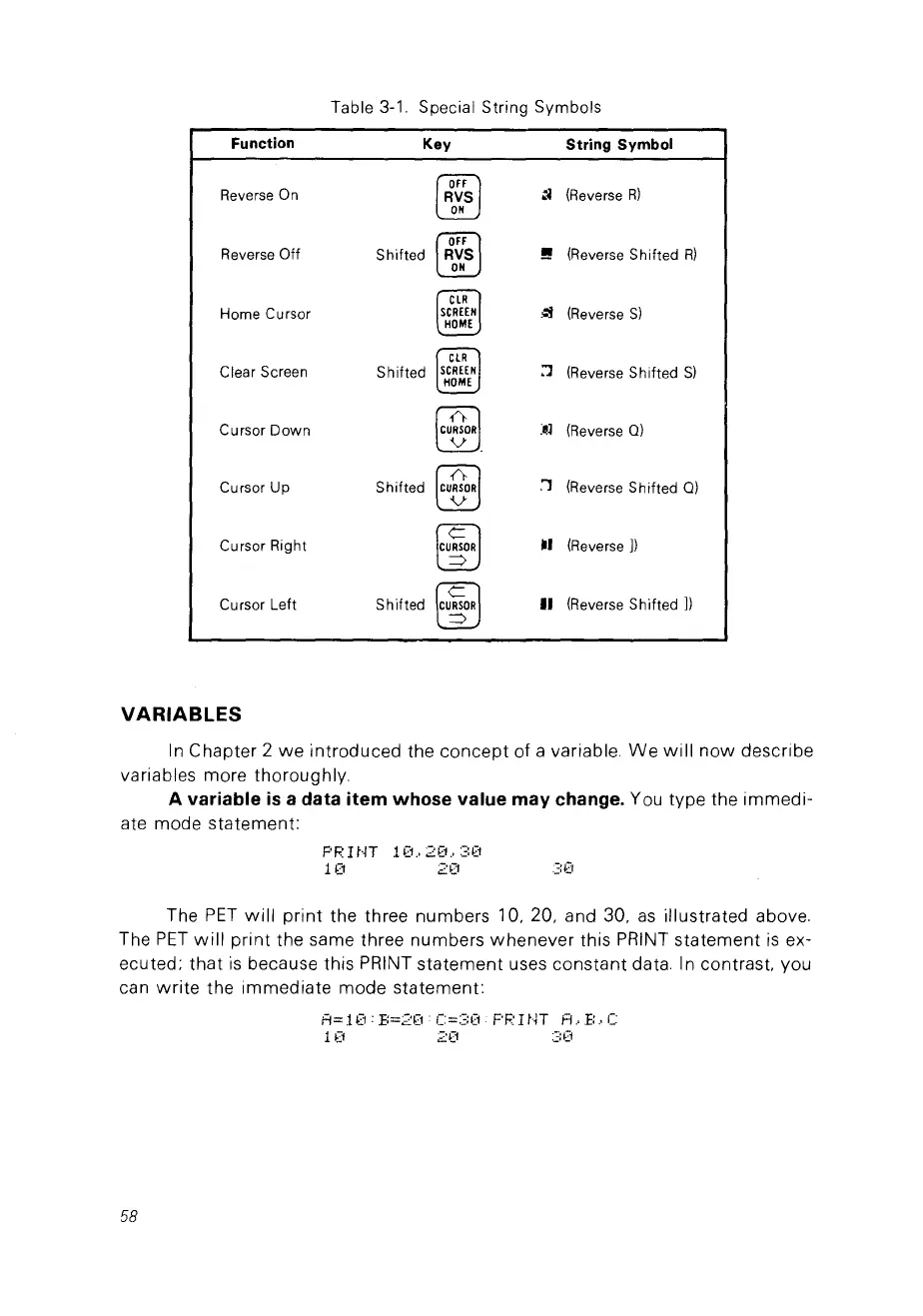
Table
3-1.
Special String Symbols
Function
Key
String Symbol
~
(Reverse
R)
Reverse
On
RVS
~
ON
~
Reverse
Off
Shifted
RVS
!!
(Reverse
Sh
ifted
R)
ON
CLR
Home
Cursor
SCREEN
.~
(Reverse
S)
HOME
CLR
Clear
Screen
Shifted
SCREEN
:'J
(Reverse
Shifted
S)
HOME
Cursor
Down
(CUBOR}
:~l
(Reverse
Q)
Cursor
Up
Shifted
(CU&R]
:1
(Reverse
Sh
ifted
Q)
Cursor
Right
[CU~R]
.1
(Reverse
])
Cursor
Left
Shifted
lC~R]
Il
(Reverse
Sh
ifted
])
VARIABLES
ln
Chapter
2
we
introduced
the
concept
of
a variable.
We
will
now
describe
variables
more
thoroughly.
A variable
is
a data item whose value may change. You
type
the
immedi-
ate
mode
statement:
F'RHJT
10.,20.,30
10
20
30
The
PET
will
print
the three
numbers
10, 20, and 30.
as
illustrated
above.
The
PET
will
print
the same three
numbers
whenever
this
PRINT
statement
is
ex-
ecuted:
that
is
because
this
PRINT
statement
uses
constant
data ln contras!. you
can
write
the
immediate
mode
statement:
A=10:B=20
C=30
PRINT
A.B.e
10
20
30
58

Table of Contents

Other manuals for Commodore CBM

Related product manuals